Considering a security camera for your home can feel like a daunting task, with countless options promising peace of mind. For those looking to gain comprehensive coverage of their indoor spaces without breaking the bank, the Nooie Security Camera 360 series has emerged as a popular contender. This review delves into the Nooie 360 Cam’s features, performance, and where it truly shines, helping you decide if it’s the right choice for your home. While the term “360 Degree View” often conjures images of expansive outdoor surveillance, it’s important to note from the outset that the Nooie 360 Cam (including the 360 Cam 2) is primarily engineered for indoor use, excelling as a versatile indoor monitor.
Security Cameras: An Essential Overview
A security camera is a vital component of any modern home security system, designed to monitor specific areas and record events, thereby enhancing personal safety and property protection. These devices have evolved dramatically from rudimentary, stationary systems to sophisticated, networked cameras offering advanced features. Early models primarily offered local, low-resolution recording, but today’s cameras leverage internet connectivity, high-definition video, and intelligent detection to provide real-time monitoring and alerts, offering unparalleled vigilance for your home.
The Nooie 360 Cam Series: An Indoor Surveillance Powerhouse
The Nooie 360 Cam series, including models like the original Nooie Cam 360 and the enhanced Nooie 360 Cam 2, represents a class of indoor security cameras built for dynamic monitoring. Unlike fixed cameras that offer a static field of view, these devices boast pan and tilt capabilities, allowing them to remotely cover a vast area of a room. They are designed for easy integration into a smart home setup, focusing on user-friendliness and essential monitoring functionalities that make them ideal for watching over pets, children, or general indoor security.
Understanding Security Camera Types
To fully appreciate the Nooie 360 Cam series, it’s helpful to understand the landscape of security cameras. Nooie’s offerings primarily fall into the IP (Internet Protocol) and Wi-Fi camera categories, utilizing your home network to transmit video data.
- IP Cameras: These digital cameras send and receive footage over an IP network, enabling remote access and advanced features. The Nooie 360 Cam falls squarely into this category.
- Wi-Fi Cameras: A subset of IP cameras, Wi-Fi cameras connect wirelessly to your home network, offering flexible placement without the need for Ethernet cables. Both Nooie 360 models utilize Wi-Fi for connectivity.
- Pan-Tilt-Zoom (PTZ) Cameras: The “360-degree view” in the Nooie context refers to its PTZ capabilities, allowing you to remotely control the camera’s orientation. This is different from a fisheye lens offering a truly panoramic view, but it provides excellent directional coverage.
|
Our Picks for the Best Security Camera in 2026
As an Amazon Associate I earn from qualifying purchases.
|
||
| Num | Product | Action |
|---|---|---|
| 1 | aosu Security Cameras Outdoor Wireless, 4 Cam-Kit, No Subscription, Solar-Powered, Home Security Cameras System with 360° Pan & Tilt, Auto Tracking, 2K Color Night Vision, Easy Setup, 2.4 & 5GHz WiFi |

|
| 2 | WYZE Bulb Cam Security Camera, 2K HD Outdoor Light Bulb Camera, Color Night Vision, Dimmable LED Bulb, Motion Detection, Siren Alarm, Works w/Alexa/Google Assistant. Free Expert Support |
|
| 3 | 2K Cameras for Home Security-Outdoor/Indoor Camera for Dog/Cat/Pet/Nanny/Baby/Elderly, Color Night Vision, White Light, Siren, 24/7 SD Recordings, Works with Alexa, Plug in (C1-White-2pack-2.4G) |
|
| 4 | TP-Link Tapo 1080P Indoor Security Camera for Baby Monitor, Dog Camera w/Motion Detection, 2-Way Audio Siren, Night Vision, Cloud & SD Card Storage, Works w/Alexa & Google Home (Tapo C100) |
|
| 5 | Tapo 1080P Indoor Pan/Tilt Wired Security Camera - Works as a Baby & Pet Monitor, Motion Detection, 2-Way Audio, Siren, Night Vision, Subscription-Free Local Storage or Optional Cloud, Black, C201 |
|
| 6 | Google Nest Cam Outdoor (Wired, 2nd Gen) - 2 Pack - Security Camera with 2K Video and Gemini, Night Vision, 2-Way Audio - Works with Google Home - 2025 Model - Snow |
|
| 7 | 2K No Drill Window Camera-2 Pack 2.4Ghz & 5Ghz WiFi Cameras for Home Security for Indoor & Outdoor Monitoring, Anti-Glare Color Night Vision, Human Detection, 24/7 Recording, Ideal for Apartment, K1 |
|
| 8 | Tapo 2K+ Indoor/Outdoor Wired Security Camera - 2024 PCMag Editors' Choice, Person/Pet/Vehicle Detection, Baby Monitoring, Color Night Vision, Subscription-Free Local Storage or Optional Cloud, C120 |
|
| 9 | WYZE Cam Pan v3 Indoor/Outdoor IP65-Rated 1080p Pan/Tilt/Zoom Wi-Fi Smart Home Security Camera with Color Night Vision, 2-Way Audio, Compatible with Alexa & Google Assistant, White, 2-Pack |
|
| 10 | Google Nest Cam with Floodlight - Outdoor Camera - Floodlight Security Camera, White, 1 Count (Pack of 1) |
|
For outdoor surveillance, specialized weatherproof cameras are required, often with rugged casings and different mounting solutions, which the Nooie 360 Cam series is not designed to withstand. Dedicated outdoor cameras, like the Nooie Cam Pro, focus on durability and often have fixed views or limited pan/tilt, prioritizing resilience over extensive maneuverability.
Nooie 360 Cam Series: Key Features and Capabilities
The Nooie 360 Cam series packs a suite of features designed to provide comprehensive indoor monitoring. These features ensure you have a clear view and responsive alerts for anything happening within your home.
- Resolution: The original Nooie Cam 360 offers 1080p Full HD video, providing clear visuals for everyday monitoring. The newer Nooie 360 Cam 2 steps up to 2K QHD resolution, delivering even sharper images with more discernible details. This higher resolution is a significant advantage for identifying faces or small objects.
- 360° Pan and Tilt with Motion Tracking: This is the hallmark feature of the series. The cameras offer a 355° horizontal pan and a 94° vertical tilt, allowing you to remotely sweep the entire room using the Nooie app. Furthermore, intelligent motion tracking automatically follows detected movement, ensuring that any activity stays within the camera’s view without manual intervention.
- Night Vision: Equipped with infrared LEDs, both models provide clear black-and-white night vision, typically extending up to 30-32 feet (10 meters). This ensures continuous surveillance even in pitch-black conditions, allowing you to check on your home or sleeping children without disturbing them.
- Two-Way Audio: A built-in microphone and speaker enable two-way communication. You can listen to sounds in the room and speak through the camera, making it perfect for comforting a pet, communicating with family members, or deterring unwanted visitors.
- Motion and Sound Detection: The cameras are highly sensitive to both motion and sound. When an event is detected, you receive instant alerts on your smartphone. The Nooie 360 Cam 2 further enhances this with AI-powered human detection, aiming to reduce false alarms triggered by pets or minor environmental changes.
- Storage Options: You have flexible options for storing footage. Cameras support local storage via a MicroSD card (up to 128GB), allowing continuous recording without a subscription. For remote access to recorded clips and extended storage, Nooie offers an optional cloud storage service.
- Smart Home Integration: The Nooie 360 Cam series integrates seamlessly with popular smart home ecosystems like Amazon Alexa and Google Assistant. This allows for voice control, such as requesting to view the live feed on a compatible smart display.
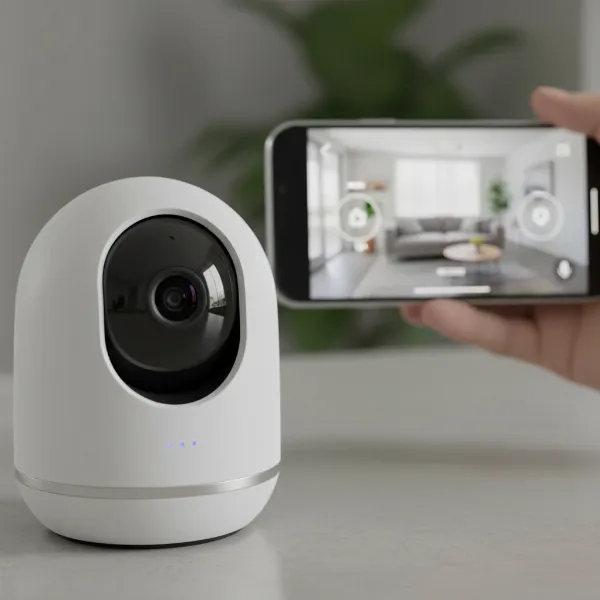 A close-up of the Nooie 360 Cam 2 showcasing its lens, pan-tilt base, and discreet design, with a smartphone displaying the live feed in the background.
Comparing Nooie 360 Cam Models
Understanding the differences between the generations can help in making an informed decision about the Nooie 360 series.
| Feature | Nooie Cam 360 (Original) | Nooie 360 Cam 2 |
|---|---|---|
| Resolution | 1080p Full HD | 2K QHD |
| Wi-Fi Support | 2.4 GHz only | 2.4 GHz & 5 GHz |
| Pan/Tilt Range | 355° H, 94° V | 355° H, 94° V |
| Motion Tracking | Yes | Yes |
| AI Human Detection | No | Yes |
| Intended Use | Indoor | Indoor |
| Price Point | More Budget-Friendly | Slightly Higher Value |
Nooie 360 Cam Series: Performance Review
From personal experience and extensive user feedback, the Nooie 360 Cam series generally offers reliable performance for its intended indoor use.
Video Quality
The 1080p resolution of the original Cam 360 provides clear and functional video during the day, suitable for most monitoring needs. The upgrade to 2K QHD in the 360 Cam 2 significantly enhances image clarity, allowing for better detail recognition. Night vision is consistently reported as solid, effectively peering up to 30 feet into darkness, though it operates in black and white. Colors appear crisp in daylight, with minimal distortion.
Motion Tracking and Alerts
The pan and tilt mechanism is notably responsive, allowing for smooth remote control via the Nooie app. The automatic motion tracking works effectively, ensuring subjects remain in frame. Alerts for motion and sound are typically instant, providing timely notifications of activity. However, some users have noted that sensitive settings can sometimes trigger false alarms from swaying curtains or minor movements, though sensitivity levels are adjustable.
App Experience
The Nooie app is generally described as user-friendly and intuitive, allowing easy setup, live streaming, remote pan/tilt control, and access to recorded footage. While video playback from MicroSD cards can sometimes be clunky or poorly organized, the overall app functionality is considered smooth for daily use. Integrations with Alexa and Google Assistant are straightforward, though direct pan/tilt control via smart displays like Echo Show may be limited.
Reliability
For its price point, the Nooie 360 Cam series offers strong reliability as an indoor monitor. It’s often praised for its ease of setup and consistent operation. However, a common point of feedback for the outdoor camera models from Nooie (not the 360 series) relates to potentially erratic motion recording performance, sometimes missing the beginning of an event. This highlights the importance of choosing the right camera for the right environment.
Buying Guide: Is the Nooie 360 Cam Right for Your Home?
Choosing the ideal security camera involves matching its capabilities to your specific needs. The Nooie 360 Cam series is an excellent choice for certain scenarios, but it’s important to understand its limitations.
1. Identify Your Needs
- Purpose: Are you primarily looking for an indoor security camera to monitor pets, toddlers, or general household activity? The 360 Cam series excels here.
- Area: Do you need wide coverage of a single room? Its pan and tilt features make it ideal for rooms where a fixed camera might miss blind spots.
- Budget: Nooie cameras are known for being budget-friendly, offering a lot of features for their price.
2. Consider the Environment: Indoor vs. Outdoor
It’s crucial to reiterate: the Nooie 360 Cam and 360 Cam 2 are designed for indoor use only. They lack the weatherproofing (IP rating) and robust construction required for outdoor environments. If your primary need is outdoor surveillance, you should explore Nooie’s dedicated outdoor camera models, such as the Nooie Cam Pro Wireless Spotlight. These outdoor models are built to withstand elements but typically offer fixed views or more limited pan/tilt compared to the indoor 360 series.
3. Setup and Installation
The Nooie 360 Cam series is known for its easy setup process. Simply power on the camera, connect it to your 2.4 GHz (or 5 GHz for Cam 2) Wi-Fi network via the Nooie app, and you’re ready to go. They can be placed on a flat surface or mounted to a wall or ceiling using included hardware, offering versatile placement options within your home.
4. Ongoing Maintenance
Maintaining your Nooie camera is straightforward. Regular cleaning of the lens ensures clear footage, and keeping the app and camera firmware updated will provide access to the latest features and security enhancements.
Popular Nooie Camera Models
- Nooie Cam 360: The original indoor pan-and-tilt camera, offering 1080p resolution and core smart features at an accessible price point.
- Nooie 360 Cam 2: An upgraded indoor model featuring 2K QHD resolution, enhanced AI human detection, and dual-band Wi-Fi support for improved performance.
- Nooie Cam Pro Wireless Spotlight: A dedicated outdoor security camera, offering 2K video, color night vision, and often battery power with optional solar charging. This model is built for outdoor resilience but does not feature the 360-degree pan/tilt of its indoor counterparts.
Tips for Effective Nooie 360 Cam Use
To maximize the effectiveness of your Nooie 360 Cam series camera, consider these best practices:
- Strategic Placement: Position the camera in a central location within the room to take full advantage of its pan and tilt capabilities. For monitoring a doorway, place it to capture a wide entry point.
- Customize Alerts: Adjust motion and sound detection sensitivity within the app to minimize unnecessary notifications while ensuring critical events are captured. Utilize detection zones on the Cam 2 to focus on specific areas.
- Strong Passwords: Always use a unique and strong password for your camera and Wi-Fi network to protect against unauthorized access.
- Privacy Considerations: Be mindful of privacy laws and ethical considerations, especially if the camera could capture public spaces or neighbors’ properties (though less likely with an indoor camera). Inform household members about the camera’s presence.
Common Issues and Troubleshooting
Even with user-friendly devices, occasional issues can arise. Here are some common problems with the Nooie 360 Cam series and potential solutions:
- Camera Not Connecting to Wi-Fi: Ensure your camera is within range of your 2.4 GHz Wi-Fi network (or 5 GHz for Cam 2). Double-check your Wi-Fi password and ensure no special characters are causing issues. A simple restart of both the camera and your router can often resolve connectivity glitches.
- Blurry or Noisy Image: First, clean the camera lens carefully with a soft cloth. If the image remains poor, check your internet connection speed; a weak signal can degrade video quality. Ensure the night vision mode is activating correctly in low light.
- False Motion Alarms: Adjust the motion detection sensitivity settings in the Nooie app. For the 360 Cam 2, utilize the AI human detection feature to filter out non-human movements, and define specific detection zones to exclude areas prone to false triggers.
- Playback Issues with MicroSD: Ensure the MicroSD card is properly inserted and formatted correctly within the Nooie app. If clips are disorganized, consider a cloud subscription for a more streamlined playback experience.
“A security camera like the Nooie 360 series offers invaluable peace of mind for indoor monitoring. Its flexible pan and tilt, combined with smart detection, make it a powerful tool for any home.” – [Your Name/Role, e.g., Admin, securitycameraon.com], Security Camera Specialist
Conclusion
The Nooie Security Camera 360 series stands out as an exceptionally capable and affordable solution for indoor surveillance. With features like responsive 360-degree pan and tilt, crisp 2K (on the Cam 2) or 1080p video, clear night vision, and two-way audio, it provides comprehensive coverage and intelligent alerts. While it’s essential to understand that these models are not designed for outdoor use, their performance within the home, coupled with seamless smart home integration, makes them a compelling choice. If you’re seeking to keep a vigilant eye on your indoor spaces, pets, or children, the Nooie 360 Cam series offers a robust and user-friendly experience that truly reimagines smart home surveillance.
Are you ready to experience the comprehensive indoor monitoring that a Nooie 360 Cam can offer?
Frequently Asked Questions
What does “360 Degree View” mean for the Nooie Security Camera?
For the Nooie 360 Cam series, “360 Degree View” refers to its mechanical pan (355° horizontal) and tilt (94° vertical) capabilities. This allows you to remotely control the camera’s lens to cover nearly every corner of an indoor room, rather than a single fixed perspective.
Is the Nooie 360 Cam waterproof for outdoor use?
No, the Nooie 360 Cam and Nooie 360 Cam 2 are specifically designed for indoor use and are not waterproof or weatherproof. For outdoor surveillance, Nooie offers dedicated outdoor camera models that are built to withstand various weather conditions.
Does the Nooie 360 Cam require a subscription for recording?
The Nooie 360 Cam series supports local storage via a MicroSD card (up to 128GB) without a subscription. This allows continuous recording. However, for cloud storage, remote access to recorded clips, and additional features, an optional subscription service is available.
Can I control the Nooie 360 Cam with my voice?
Yes, the Nooie 360 Cam series is compatible with popular smart assistants like Amazon Alexa and Google Assistant. You can use voice commands to view the live feed on compatible smart displays, although direct voice control for pan and tilt functions may be limited.
What is the difference between Nooie Cam 360 and Nooie 360 Cam 2?
The Nooie 360 Cam 2 is an upgraded version of the original Nooie Cam 360. Key improvements include higher 2K QHD resolution (compared to 1080p), dual-band Wi-Fi support (2.4 GHz and 5 GHz), and enhanced AI human detection for more accurate alerts.