Securing your property has never been more crucial, and choosing the right security camera system is the first step towards peace of mind. The HeimVision HM241 NVR Wireless Security System emerges as a popular choice for many, promising robust surveillance without breaking the bank. This comprehensive review dives deep into its features, performance, and user experience, helping you decide if this 1080p system is the ideal fit for your home or small business.
What is the HeimVision HM241 NVR Security System?
The HeimVision HM241 is an all-in-one wireless NVR (Network Video Recorder) security camera kit designed to offer straightforward and effective surveillance. It typically includes an 8-channel NVR and four 1080p IP cameras, ready to be deployed right out of the box. This system positions itself as an accessible solution for those seeking reliable monitoring of their indoor and outdoor spaces, providing both a sense of security and tangible evidence when needed. The HM241 plays a vital role in safeguarding assets and personal safety by offering continuous recording and remote viewing capabilities.
Unboxing and Design Features
Upon unboxing the HeimVision HM241, you’ll find the compact 8-channel NVR unit, four wireless IP cameras (model CA01), power adapters for both the NVR and cameras, an Ethernet cable, a USB mouse, and a quick start guide. The attention to detail, even in the manual, is notable, with clear instructions and helpful illustrations.
The NVR itself is designed for simplicity, featuring indicator lamps on the front and essential ports at the rear: HDMI, VGA, USB for the mouse, an RJ-45 Ethernet port, and a 12V/2A power jack. Internally, the NVR houses a single 3.5″ HDD bay for storage, powered by a Hi3536DV100 H.265/H.264 system-on-a-chip, ensuring efficient video processing.
The included IP cameras boast a durable metal body, carrying an IP66 weather-rated certification, making them suitable for both indoor and outdoor use. Each camera features a fixed 3.6mm lens, providing a wide 110° viewing angle, and is equipped with powerful 850nm EXIR LEDs for superior night vision. A practical 3-axis mount allows for versatile positioning, while the inclusion of an Ethernet port offers the flexibility to use the cameras as wired units, despite their primary wireless functionality.
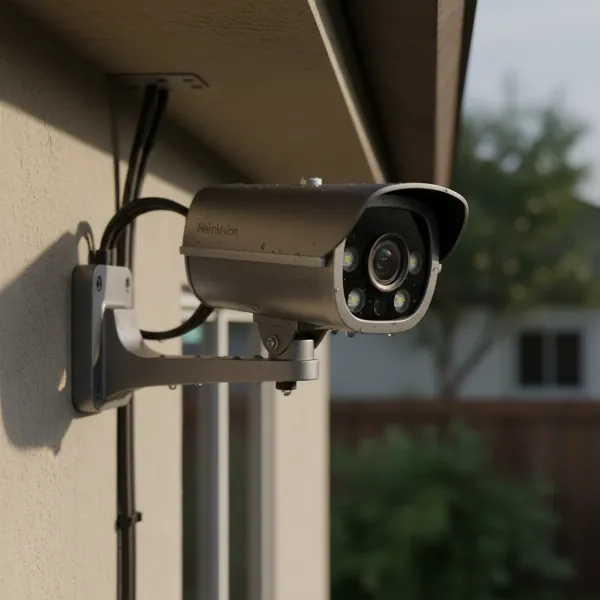 HeimVision HM241 IP camera showing durable metal body, fixed lens, and 3-axis mount.
Seamless Installation and Setup
One of the standout advantages of the HeimVision HM241 system is its user-friendly installation. The wireless cameras come pre-paired with the NVR directly from the factory, drastically simplifying the initial setup process. This means you can get your surveillance system up and running in a matter of minutes, largely a plug-and-play experience.
However, a crucial step for recording is the installation of a hard drive, as it is not included in the standard kit. Users will need to purchase and install a 3.5-inch HDD into the NVR bay to enable continuous recording and playback. Once the hard drive is in place, connecting the NVR to a monitor via HDMI or VGA and attaching the included USB mouse allows you to access the system’s intuitive graphical user interface (GUI) for further configuration, such as formatting the HDD and fine-tuning settings.
For optimal wireless performance, selecting strategic camera installation locations is key. While the system boasts strong wireless range and penetration through various wall types, ensuring a stable connection to the NVR is vital before permanent mounting. The cameras can even form a basic mesh network, where one camera can act as a repeater to extend the range for another, though this feature requires manual configuration. Connecting the NVR to your home network via the Ethernet port enables remote viewing and access to smart features through the mobile app.
Diving Deep into Performance
Understanding the HeimVision HM241’s performance across key areas like video quality, wireless strength, and motion detection is essential for any potential buyer.
Video Quality
|
Our Picks for the Best Security Camera in 2026
As an Amazon Associate I earn from qualifying purchases.
|
||
| Num | Product | Action |
|---|---|---|
| 1 | Google Nest Cam with Floodlight - Outdoor Camera - Floodlight Security Camera, White, 1 Count (Pack of 1) |

|
| 2 | aosu Security Cameras Outdoor Wireless, 4 Cam-Kit, No Subscription, Solar-Powered, Home Security Cameras System with 360° Pan & Tilt, Auto Tracking, 2K Color Night Vision, Easy Setup, 2.4 & 5GHz WiFi |
|
| 3 | WYZE Bulb Cam Security Camera, 2K HD Outdoor Light Bulb Camera, Color Night Vision, Dimmable LED Bulb, Motion Detection, Siren Alarm, Works w/Alexa/Google Assistant. Free Expert Support |
|
| 4 | Tapo 2K+ Indoor/Outdoor Wired Security Camera - 2024 PCMag Editors' Choice, Person/Pet/Vehicle Detection, Baby Monitoring, Color Night Vision, Subscription-Free Local Storage or Optional Cloud, C120 |
|
| 5 | Google Nest Cam Outdoor (Wired, 2nd Gen) - 2 Pack - Security Camera with 2K Video and Gemini, Night Vision, 2-Way Audio - Works with Google Home - 2025 Model - Snow |
|
| 6 | Tapo 1080P Indoor Pan/Tilt Wired Security Camera - Works as a Baby & Pet Monitor, Motion Detection, 2-Way Audio, Siren, Night Vision, Subscription-Free Local Storage or Optional Cloud, Black, C201 |
|
| 7 | WYZE Cam Pan v3 Indoor/Outdoor IP65-Rated 1080p Pan/Tilt/Zoom Wi-Fi Smart Home Security Camera with Color Night Vision, 2-Way Audio, Compatible with Alexa & Google Assistant, White, 2-Pack |
|
| 8 | 2K Cameras for Home Security-Outdoor/Indoor Camera for Dog/Cat/Pet/Nanny/Baby/Elderly, Color Night Vision, White Light, Siren, 24/7 SD Recordings, Works with Alexa, Plug in (C1-White-2pack-2.4G) |
|
| 9 | 2K No Drill Window Camera-2 Pack 2.4Ghz & 5Ghz WiFi Cameras for Home Security for Indoor & Outdoor Monitoring, Anti-Glare Color Night Vision, Human Detection, 24/7 Recording, Ideal for Apartment, K1 |
|
| 10 | TP-Link Tapo 1080P Indoor Security Camera for Baby Monitor, Dog Camera w/Motion Detection, 2-Way Audio Siren, Night Vision, Cloud & SD Card Storage, Works w/Alexa & Google Home (Tapo C100) |
|
The HeimVision HM241 system features 1080p Full HD cameras, which deliver sharp and crisp video footage during daylight hours. This resolution is generally considered the minimum for effective home CCTV surveillance, providing enough detail to identify individuals and events clearly. When darkness falls, the cameras’ powerful 850nm EXIR LEDs take over, offering excellent night vision capabilities. These LEDs illuminate the scene evenly, extending vision up to 50 feet (15 meters) without the common “flashlight effect” seen in systems with conventional ring-type LEDs. While it lacks advanced features like Wide Dynamic Range (WDR), the overall video quality for its price point is impressive, maintaining good detail and controlled noise in low-light conditions.
Wireless Performance
As a wireless surveillance system operating on 2.4GHz Wi-Fi, the HM241 demonstrates robust wireless performance. The 2.4GHz band is preferred for its better range and wall penetration compared to 5GHz, making it ideal for security cameras covering larger areas or multiple rooms. Testing has shown that the cameras can maintain stable 1080p video streams even through multiple solid brick and concrete walls over considerable distances (e.g., 30 feet through one external concrete and two solid brick walls). This impressive signal penetration means the system is well-suited for typical home environments, potentially achieving ranges of 50+ feet in timber-frame constructions. The unique ability for cameras to serve as repeaters further enhances flexibility, allowing you to extend coverage in areas with weaker direct NVR signals.
Motion Detection & Recording
The HeimVision HM241 offers essential motion detection features that enhance its effectiveness as a security solution. A notable advantage is its support for both pre-recording and post-recording. Pre-recording captures footage a few seconds before motion is detected, ensuring you don’t miss the critical moments leading up to an event. Post-recording allows the system to continue recording for a specified duration (defaulting to 15 seconds) after the motion ceases, providing a more complete picture of the incident.
For continuous peace of mind, the NVR supports 24/7 continuous recording across all channels. Footage is stored on the user-provided hard drive, and the system is designed to automatically overwrite the oldest recordings once the drive capacity is full, ensuring uninterrupted operation. A 1TB hard drive can typically store approximately 20 days of continuous 1080p footage from all four cameras, offering ample storage for most home users. While the motion detection is basic and doesn’t include advanced analytical features, its reliability and pre/post-recording capabilities are significant benefits.
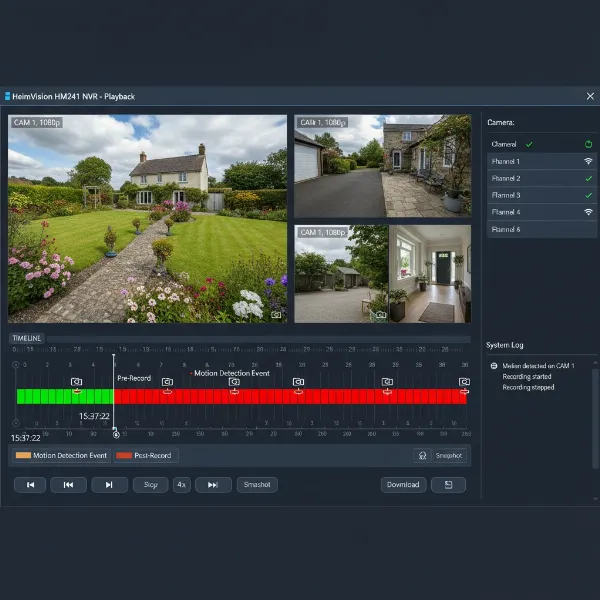 HeimVision NVR interface displaying motion detection events on a video timeline for playback.
User Experience: NVR, PC Software & Mobile App
The overall user experience with the HeimVision HM241 system is shaped by its various access methods, each offering distinct advantages and limitations.
NVR Interface
Connecting the NVR directly to a TV or monitor via HDMI or VGA provides the most comprehensive control and the most polished interface. This method allows you to configure camera settings, view live feeds from all channels simultaneously, set up motion detection schedules, and review recorded footage with ease. It’s also the optimal way to quickly scrub through timelines at speeds up to 32x and manage individual video file backups to a USB drive.
PC Software (EseeCloud)
The EseeCloud PC software offers an alternative for monitoring from your computer. It facilitates live viewing of camera feeds and playback of recorded footage. A key benefit of the PC software is its ability to directly export video clips and screenshots to your computer’s hard drive, simplifying the process of saving important evidence. However, it does present some limitations: simultaneous playback of more than two 1080p streams can slow down, and crucially, it lacks a fast-forward or scrubbing feature, which can make reviewing long stretches of footage cumbersome.
Mobile App (HeimKits)
The “HeimKits” mobile app provides a modern, polished, and user-friendly interface for remote monitoring via your smartphone. It supports live viewing of cameras in various group layouts (1, 4, 6, or 8 channels), allows switching between SD and HD streams, and enables users to capture screenshots or video clips directly to their device. The app’s timeline is highly responsive, with motion detection events clearly marked for quick navigation.
A critical point for the mobile app is its push notification feature. To receive real-time push notifications on your phone, you must create a free HeimVision cloud account and enable the cloud P2P (peer-to-peer) service. Without this, even local network push notifications are not possible. Once configured, notifications are typically instantaneous and reliable, linking directly to a preview of the alert clip, with the option to view the full pre-recorded and post-recorded event.
Storage Options
As mentioned, the HeimVision HM241 NVR system requires a user-supplied 3.5-inch hard drive for video storage. While not included, this allows users to choose a capacity that best suits their needs. The NVR manages storage efficiently, supporting 24/7 continuous recording and automatically overwriting the oldest footage when the drive is full. This ensures that the system always has space for new recordings without manual intervention.
Pros and Cons of the HeimVision HM241
To provide a balanced perspective, here’s a breakdown of the key advantages and disadvantages of the HeimVision HM241 NVR Wireless Security System.
Pros:
- Easy Setup and Use: The cameras are pre-paired with the NVR, making initial installation straightforward and quick.
- Strong Wireless Performance: Impressive range and signal penetration through walls, offering flexible placement options for cameras.
- Good Video Quality: 1080p Full HD resolution provides clear daytime footage.
- Effective Night Vision: Powerful EXIR LEDs deliver clear, evenly illuminated night vision up to 50 feet.
- User-Friendly Mobile App: The HeimKits app is well-designed, intuitive, and offers reliable push notifications (with cloud service).
- Flexible Connectivity: Cameras can be used wirelessly or wired via Ethernet, providing versatility for different installation scenarios.
- Pre and Post-Recording: Motion detection includes capturing footage before and after an event, ensuring comprehensive coverage.
- Excellent Value for Money: Offers a robust feature set and solid performance at an affordable price point for a starter kit.
Cons:
- Hard Drive Not Included: Requires an additional purchase and installation of a 3.5-inch HDD for recording functionality.
- Cloud Dependency for Push Notifications: Real-time push alerts on the mobile app are only available when using the free HeimVision cloud P2P service; no local-only push notifications.
- Basic Motion Detection: Lacks advanced features such as AI-powered human/vehicle detection or customizable activity zones.
- No Power over Ethernet (PoE): Cameras require individual power adapters, which may limit placement options or necessitate running power cables.
- PC Software Limitations: The EseeCloud PC software has some drawbacks, including slower simultaneous playback of multiple HD streams and the absence of a fast-forward feature.
- No ONVIF Support: Limits compatibility with third-party NVRs or software that relies on the ONVIF standard.
Who is the HeimVision HM241 Best Suited For?
The HeimVision HM241 NVR Wireless Security System is particularly well-suited for specific user profiles and applications. It’s an excellent choice for homeowners looking to implement a reliable and affordable surveillance solution without the complexity of a fully wired system. Its ease of setup makes it ideal for DIY enthusiasts who prefer to install their Security Cameras themselves.
Small business owners can also benefit from the HM241, particularly for monitoring smaller premises like retail stores or offices, where budget-friendliness and straightforward operation are key. Given its robust wireless capabilities and good night vision, it’s perfect for those who need effective outdoor surveillance in areas where running extensive cabling is impractical. Ultimately, anyone seeking a dependable, easy-to-manage 1080p security system that offers good value for money will find the HeimVision HM241 a compelling option.
Expert Insight:
“The HeimVision HM241 stands out as an exceptional value for money in the wireless NVR kit market. Its ease of installation, robust wireless performance, and clear 1080p video, especially with its powerful night vision, make it a strong contender for homeowners and small businesses seeking reliable basic surveillance.”
Maximizing Your HeimVision HM241 System
To get the most out of your HeimVision HM241 NVR Wireless Security System, consider these practical tips and best practices.
First, strategic camera placement is paramount. Identify key entry points, vulnerable areas, and high-traffic zones on your property. For optimal wireless signal strength, try to minimize the number of thick walls or major obstructions between the cameras and the NVR. If a camera is at the edge of the wireless range, leverage the system’s repeater function through another in-range camera to extend coverage effectively. Always test the wireless connection strength before permanently mounting any camera.
When it comes to hard drive selection, choose a reputable brand and a capacity that aligns with your recording needs. While the NVR automatically manages storage, opting for a drive designed for surveillance (e.g., WD Red or Seagate SkyHawk) can provide greater reliability and longevity for 24/7 recording. A 1TB drive is a good starting point for about 20 days of continuous 1080p recording from four cameras, but larger capacities offer extended retention periods.
Security and privacy considerations are also vital. Since the mobile app’s push notifications rely on the HeimVision cloud P2P service, be aware that your NVR will connect to their servers. If you have significant privacy concerns, ensure your NVR is behind a robust firewall, and configure rules to only allow necessary outgoing connections. Regularly update the NVR firmware and use strong, unique passwords for both the NVR and your cloud account to protect against unauthorized access. While the system is easy to set up, taking these extra steps will enhance the security posture of your surveillance system.
Conclusion
The HeimVision HM241 NVR Wireless Security System offers a compelling package for anyone in search of an affordable, easy-to-install, and reliable surveillance solution. Its strengths lie in the straightforward setup thanks to pre-paired cameras, commendable 1080p video quality both day and night, and a robust wireless performance that can effectively cover most residential and small business properties. While the necessity of a separate hard drive purchase and the cloud dependency for push notifications are minor drawbacks, the overall value proposition remains exceptionally strong.
For homeowners and small businesses seeking peace of mind without a complex or costly installation, the HM241 proves to be a fantastic choice. It delivers essential monitoring capabilities with a user-friendly experience that truly empowers you to safeguard what matters most. Are you ready to take control of your property’s security with a system that balances performance and affordability?
Frequently Asked Questions
Does the HeimVision HM241 come with a hard drive?
No, the HeimVision HM241 NVR Security System does not typically include a hard drive. You will need to purchase and install a 3.5-inch SATA HDD separately to enable video recording and storage.
Can I view the cameras remotely without internet?
While you can view live feeds locally by connecting the NVR to a monitor, remote viewing via the mobile app requires the NVR to be connected to the internet. For real-time push notifications, a free HeimVision cloud P2P service account is also necessary.
Is the HeimVision HM241 weatherproof?
Yes, the cameras included with the HeimVision HM241 system are IP66 weather-rated, making them suitable for outdoor installation and capable of withstanding various weather conditions like rain and dust.
Can I add more cameras to the HeimVision HM241 system?
Yes, the HeimVision HM241 NVR is an 8-channel system, meaning you can add up to four additional compatible wireless IP cameras to expand your surveillance coverage beyond the initial four included cameras.