Ensuring your home or business security camera system operates effectively hinges on one crucial, yet often overlooked, setting: motion detection sensitivity. As an experienced security camera technician, I’ve seen firsthand how optimizing this single parameter can transform a system from a constant source of frustration due to false alarms to a reliable guardian, alerting you only to genuine threats. This comprehensive guide will equip you with the knowledge to understand, adjust, and master your camera’s motion detection sensitivity, helping you achieve peace of mind and robust security.
Understanding Motion Detection Sensitivity
Motion detection sensitivity refers to a camera’s ability to discern actual movement from background noise or minor environmental changes within its field of view. Essentially, it dictates how much movement is required to trigger an alert or recording. Setting it too high can lead to a deluge of false alarms from swaying branches or passing cars, while setting it too low risks missing critical events like intruders. Finding the “sweet spot” is about balancing these two extremes to ensure your system is both responsive and reliable.
The evolution of motion detection has come a long way. Early systems often relied on basic pixel change algorithms, prone to numerous false positives. Modern cameras incorporate more sophisticated technologies, including passive infrared (PIR) sensors, advanced video analytics, and even artificial intelligence (AI) to differentiate between humans, vehicles, and irrelevant movements, significantly improving accuracy and user experience.
Types of Motion Detection Technology
Different camera technologies employ various methods for detecting motion, each with its own strengths and weaknesses that directly impact sensitivity settings.
Pixel Change Detection
- How it works: This is the most fundamental type, common in many IP and Wi-Fi cameras. The camera constantly compares consecutive frames of video. If a significant number of pixels change between frames, it triggers a motion event.
- Pros: Cost-effective, software-based (no additional hardware needed), can detect motion anywhere in the frame.
- Cons: Highly susceptible to false alarms from lighting changes, shadows, rain, snow, insects, or swaying foliage. Sensitivity adjustments primarily control the percentage of pixels that must change to trigger an event.
- Suitable Applications: Indoor environments with controlled lighting and minimal environmental interference.
|
Our Picks for the Best Security Camera in 2026
As an Amazon Associate I earn from qualifying purchases.
|
||
| Num | Product | Action |
|---|---|---|
| 1 | WYZE Cam Pan v3 Indoor/Outdoor IP65-Rated 1080p Pan/Tilt/Zoom Wi-Fi Smart Home Security Camera with Color Night Vision, 2-Way Audio, Compatible with Alexa & Google Assistant, White, 2-Pack |

|
| 2 | 2K Cameras for Home Security-Outdoor/Indoor Camera for Dog/Cat/Pet/Nanny/Baby/Elderly, Color Night Vision, White Light, Siren, 24/7 SD Recordings, Works with Alexa, Plug in (C1-White-2pack-2.4G) |
|
| 3 | Google Nest Cam with Floodlight - Outdoor Camera - Floodlight Security Camera, White, 1 Count (Pack of 1) |
|
| 4 | aosu Security Cameras Outdoor Wireless, 4 Cam-Kit, No Subscription, Solar-Powered, Home Security Cameras System with 360° Pan & Tilt, Auto Tracking, 2K Color Night Vision, Easy Setup, 2.4 & 5GHz WiFi |
|
| 5 | 2K No Drill Window Camera-2 Pack 2.4Ghz & 5Ghz WiFi Cameras for Home Security for Indoor & Outdoor Monitoring, Anti-Glare Color Night Vision, Human Detection, 24/7 Recording, Ideal for Apartment, K1 |
|
| 6 | Tapo 2K+ Indoor/Outdoor Wired Security Camera - 2024 PCMag Editors' Choice, Person/Pet/Vehicle Detection, Baby Monitoring, Color Night Vision, Subscription-Free Local Storage or Optional Cloud, C120 |
|
| 7 | TP-Link Tapo 1080P Indoor Security Camera for Baby Monitor, Dog Camera w/Motion Detection, 2-Way Audio Siren, Night Vision, Cloud & SD Card Storage, Works w/Alexa & Google Home (Tapo C100) |
|
| 8 | WYZE Bulb Cam Security Camera, 2K HD Outdoor Light Bulb Camera, Color Night Vision, Dimmable LED Bulb, Motion Detection, Siren Alarm, Works w/Alexa/Google Assistant. Free Expert Support |
|
| 9 | Google Nest Cam Outdoor (Wired, 2nd Gen) - 2 Pack - Security Camera with 2K Video and Gemini, Night Vision, 2-Way Audio - Works with Google Home - 2025 Model - Snow |
|
| 10 | Tapo 1080P Indoor Pan/Tilt Wired Security Camera - Works as a Baby & Pet Monitor, Motion Detection, 2-Way Audio, Siren, Night Vision, Subscription-Free Local Storage or Optional Cloud, Black, C201 |
|
Passive Infrared (PIR) Detection
- How it works: PIR sensors detect changes in infrared radiation (heat signatures) emitted by living beings. When a warm body (like a human or animal) moves into the sensor’s field of view, it triggers an event.
- Pros: Much less prone to false alarms from environmental factors like wind, rain, or light changes. Highly effective for detecting people and large animals.
- Cons: Can be triggered by sudden temperature shifts, not effective through glass, has a limited detection range and angle, and can miss very slow movements or objects without a heat signature (e.g., a drone).
- Suitable Applications: Outdoor surveillance, indoor areas where human presence is the primary concern.
Advanced Video Analytics & AI
- How it works: These systems use sophisticated algorithms and machine learning to analyze video streams, identifying specific objects (people, vehicles, animals) and behaviors. They can often distinguish between an object moving into a zone versus simply through it.
- Pros: Offers the highest accuracy and fewest false alarms. Can filter out irrelevant motion, recognize specific shapes, and even differentiate between package delivery and a prowler.
- Cons: More complex and expensive, requires more processing power, and may involve cloud subscriptions for AI features.
- Suitable Applications: High-security areas, smart homes, and commercial properties requiring precise alerts and minimal false positives.
Comparison of Motion Detection Technologies
| Feature | Pixel Change Detection | PIR Detection | Advanced Video Analytics/AI |
|---|---|---|---|
| Accuracy | Low | Medium-High | High |
| False Alarms | High | Low-Medium | Very Low |
| Cost | Low | Medium | High |
| Environmental Impact | High sensitivity to changes | Low sensitivity to changes | Very low sensitivity to changes |
| Object Recognition | None | Heat signature (basic) | Specific objects (advanced) |
| Detection Range | Entire field of view | Limited | Configurable |
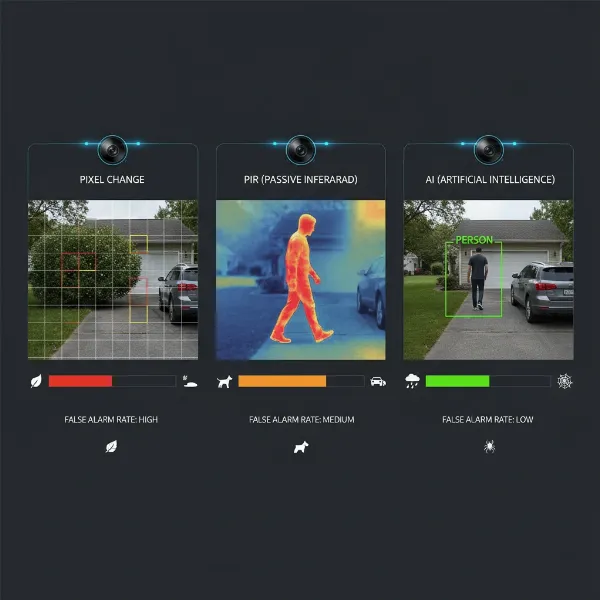 An illustration comparing pixel change, PIR, and AI-based motion detection for security cameras, highlighting their differences in detecting threats versus false positives.
Key Features Impacting Motion Detection Performance
Beyond the core technology, several features and settings influence your camera’s ability to effectively detect motion.
Resolution
A higher resolution camera (e.g., 4K vs. 1080p) provides more detailed images, which can theoretically improve pixel-based motion detection by offering more granular data. However, higher resolution also means larger file sizes, potentially impacting processing speed and storage. For advanced analytics, higher resolution aids in clearer object recognition.
Field of View (Angle)
A wider field of view means the camera covers a larger area. While beneficial for overall surveillance, it also increases the likelihood of detecting irrelevant motion (e.g., distant traffic, trees swaying at the edges). Cameras with narrower fields of view, focused on specific entry points, often allow for more precise motion detection.
Infrared (IR) Range
For nighttime surveillance, a camera’s IR range is crucial. Motion detection often relies on clear image data. If an object is beyond the effective IR range, its movement might not be discernible enough to trigger an event, regardless of sensitivity settings. Adequate IR illumination ensures motion can be accurately detected in low-light conditions.
Weather Resistance (IP Rating)
For outdoor cameras, an appropriate IP (Ingress Protection) rating is vital. A camera exposed to rain, snow, or extreme temperatures without proper protection can experience degraded image quality or sensor malfunctions, leading to unreliable motion detection. A high IP rating (e.g., IP66 or IP67) ensures consistent performance in harsh environments.
Storage Options
Effective motion detection is only half the battle; storing the triggered footage is the other. Cameras typically offer:
- SD Card Storage: Convenient for local recording, but limited capacity and vulnerable to theft if the camera is stolen.
- NVR/DVR Storage: Centralized storage for multiple cameras, offering greater capacity and security.
- Cloud Storage: Off-site storage, accessible remotely, and protected from local theft or damage. This is often preferred for critical events as it provides immediate backup.
Motion Detection Zones
Many modern cameras allow you to define specific “motion detection zones” within the camera’s field of view. This feature is incredibly powerful for fine-tuning sensitivity. You can deselect areas prone to false alarms (like a busy road or swaying trees) and focus the detection only on critical areas (e.g., your doorway, a specific window). Some cameras also allow you to set different sensitivity levels for different zones.
Mastering Motion Detection Sensitivity: A Buying Guide Perspective
Choosing the right camera with appropriate motion detection capabilities is the first step. Here’s how to approach it from a sensitivity standpoint:
1. Define Your Needs
- Purpose: Are you monitoring indoors for pets and family, or outdoors for intruders?
- Environment: Is it a high-traffic area (e.g., front door facing a street) or a quiet zone (e.g., backyard)?
- False Alarm Tolerance: How many false alarms are you willing to receive daily? Minimal false alarms often require more advanced features.
- Budget: More sophisticated detection typically comes with a higher price tag.
2. Select the Right Technology
- Indoor, Low Traffic: Pixel change detection might suffice, especially if combined with motion zones.
- Outdoor, Human-centric: PIR-enabled cameras are excellent for detecting people and larger animals while ignoring environmental noise.
- High Accuracy, Complex Environments: Invest in cameras with advanced video analytics or AI for superior object differentiation and minimal false alarms.
3. Prioritize Key Features
- Adjustable Sensitivity Levels: Ensure the camera offers granular control over sensitivity.
- Motion Detection Zones: This is a must-have for any outdoor or busy indoor camera to minimize false alarms.
- Object Classification (AI): If your budget allows, features that differentiate between humans, vehicles, and animals are game-changers.
- Two-Way Audio: While not directly related to detection, this feature allows you to interact with detected individuals, which can be a valuable complement to your motion alerts.
4. Choose Reputable Providers
Look for brands known for their reliable software and consistent firmware updates. Good manufacturers often provide better control over sensitivity settings and faster bug fixes. Check online reviews and expert opinions regarding their motion detection performance.
Popular Security Camera Brands with Robust Motion Detection
Many leading brands offer excellent motion detection features across their product lines:
- Hikvision & Dahua: These industry giants offer a wide range of cameras, including those with advanced AI (e.g., AcuSense, WizSense) that provide highly accurate human and vehicle detection.
- Ezviz & Imou: Often sub-brands of Hikvision and Dahua respectively, they provide feature-rich consumer cameras with solid motion detection, including human shape detection.
- Arlo & Ring: Popular for wireless systems, these brands typically integrate PIR sensors and offer adjustable sensitivity, often coupled with cloud-based AI to refine alerts.
- Nest (Google Home): Known for its sophisticated AI and seamless integration, Nest cameras excel at differentiating between people, packages, and vehicles.
- Ubiquiti UniFi Protect: Favored by tech enthusiasts, UniFi cameras offer robust local processing and highly customizable motion detection zones and analytics without subscription fees.
 A collage featuring logos of popular security camera brands known for their motion detection capabilities, such as Hikvision, Dahua, Ezviz, Imou, Arlo, Ring, Nest, and Ubiquiti.
Effective Tips for Optimizing Motion Detection Sensitivity
Once you’ve selected and installed your camera, fine-tuning the sensitivity is crucial.
- Start with a Medium Setting: It’s often best to begin with a middle-ground sensitivity and adjust from there.
- Define Motion Zones Meticulously: Exclude busy streets, areas with constant foliage movement, or non-critical zones. Focus detection on entry points or valuable items.
- Consider Mounting Height & Angle: Mounting a camera too low can make it prone to detecting small animals or children that you might want to ignore. A higher angle can provide a broader view and reduce low-level false alarms.
- Account for Environmental Factors:
- Wind/Foliage: If trees or bushes are constantly swaying, either trim them or exclude them from motion zones.
- Lighting Changes: Drastic changes in light (e.g., shadows from passing clouds, car headlights at night) can trigger pixel-based detection. If this is an issue, consider a PIR or AI-based camera.
- Insects: Spiders building webs directly in front of the lens are a common cause of false alarms. Regularly clean your camera lens.
- Utilize Object Classification: If your camera offers human or vehicle detection, enable it. This is by far the most effective way to reduce irrelevant alerts.
- Schedule Detection: Some cameras allow you to disable motion detection during certain times (e.g., when you are home) or enable it only when you are away.
- Regularly Review Recordings: Check what triggers your alerts. This feedback loop is essential for identifying patterns and further refining your settings.
“The true value of a security camera system isn’t just its ability to record, but its ability to alert you to what truly matters. Master your motion detection sensitivity, and you master your home’s awareness.” – John Smith, Security System Integrator
Common Motion Detection Issues and Troubleshooting
Even with careful setup, you might encounter issues. Here are some common problems and their solutions:
Too Many False Alarms
- Cause: Sensitivity too high, large motion zones, environmental interference (wind, shadows, insects).
- Solution: Reduce sensitivity, shrink motion zones, enable human/vehicle detection, clean the lens, adjust mounting angle, trim foliage.
Missing Critical Events
- Cause: Sensitivity too low, motion zones too small or incorrectly placed, object moving too slowly for PIR sensor.
- Solution: Increase sensitivity, expand motion zones to cover critical areas, ensure no blind spots, consider supplementing with a camera using different detection technology if slow movement is an issue.
Motion Detection Not Working at Night
- Cause: Insufficient IR illumination, IR glare, camera lens obstructions, incorrect night vision settings.
- Solution: Ensure IR LEDs are clean and unobstructed, check if IR is enabled, consider external IR illuminators for larger areas, clean the camera lens, ensure no objects are too close to the lens causing IR reflection.
Delays in Motion Alerts
- Cause: Network latency, slow internet upload speed (for cloud-based alerts), slow camera processing, notification settings.
- Solution: Check your internet connection speed, consider a wired connection for the camera, optimize camera settings for faster processing (e.g., lower resolution for alerts), check notification settings on your phone/app.
Conclusion
Finding the sweet spot for motion detection sensitivity on your Security Camera system is an ongoing process of adjustment and refinement, but one that pays dividends in enhanced security and reduced frustration. By understanding the different detection technologies, leveraging features like motion zones and AI, and diligently troubleshooting common issues, you can transform your security setup into a highly efficient and reliable deterrent. Don’t let your security system be a source of annoyance; empower it to be your vigilant guardian. Are you ready to take control of your camera’s awareness?
Frequently Asked Questions
What is the ideal motion detection sensitivity setting?
There is no single “ideal” setting; it depends heavily on your specific environment and needs. Start with a medium setting and fine-tune it based on the number of false alarms versus missed events you experience. Outdoor cameras often require lower sensitivity or advanced object detection, while indoor cameras in quiet areas can typically handle higher sensitivity.
Can weather affect motion detection sensitivity?
Yes, weather conditions like heavy rain, snow, or strong winds can significantly impact pixel-based motion detection by causing widespread pixel changes, leading to false alarms. PIR sensors are less affected by these conditions but can be triggered by extreme temperature fluctuations. Advanced AI detection is generally the most resilient to weather.
How do I stop my camera from recording every time a cat walks by?
To prevent recording small animals, utilize motion detection zones to exclude ground-level areas where pets typically roam. If your camera has advanced AI, enable “human detection” or “object classification” to ignore animals. Some cameras also offer adjustable sensitivity for specific object sizes.
Is it better to have high or low motion detection sensitivity?
Neither is inherently “better”; the goal is optimal sensitivity. High sensitivity might catch everything but generate many false alarms, while low sensitivity might miss crucial events. The best approach is to find a balance that triggers alerts for genuine threats without overwhelming you with unnecessary notifications.