Choosing the right security camera system can feel like navigating a complex maze, especially with the myriad of options available. As a cornerstone of modern home and business protection, security cameras offer invaluable peace of mind. However, the fundamental decision often boils down to two main categories: wired or wireless. This comprehensive guide will dissect the differences, advantages, and disadvantages of each, helping you determine the ideal security camera solution to safeguard what matters most to you.
Understanding Security Cameras
Security cameras, at their core, are surveillance devices designed to capture and record visual data of specific areas, serving as a deterrent against crime and a crucial tool for evidence collection. From rudimentary systems of decades past to today’s sophisticated digital networks, their evolution has been marked by continuous technological advancements. Modern security cameras integrate features like high-definition video, night vision, motion detection, and remote access, transforming them into intelligent sentinels for personal safety and asset protection.
Wired Security Cameras: The Robust Backbone
Wired security cameras form a traditional, highly reliable surveillance system that connects directly to a central recording unit using physical cables. These cables, typically coaxial or Ethernet (for IP cameras), transmit both power and video data, often to a Digital Video Recorder (DVR) for analog systems or a Network Video Recorder (NVR) for IP-based setups. A significant innovation in wired systems is Power over Ethernet (PoE), which allows a single Ethernet cable to provide both power and data, simplifying installation while maintaining robust connectivity.
What Are They?
|
Our Picks for the Best Security Camera in 2026
As an Amazon Associate I earn from qualifying purchases.
|
||
| Num | Product | Action |
|---|---|---|
| 1 | Tapo 1080P Indoor Pan/Tilt Wired Security Camera - Works as a Baby & Pet Monitor, Motion Detection, 2-Way Audio, Siren, Night Vision, Subscription-Free Local Storage or Optional Cloud, Black, C201 |

|
| 2 | 2K No Drill Window Camera-2 Pack 2.4Ghz & 5Ghz WiFi Cameras for Home Security for Indoor & Outdoor Monitoring, Anti-Glare Color Night Vision, Human Detection, 24/7 Recording, Ideal for Apartment, K1 |
|
| 3 | Tapo 2K+ Indoor/Outdoor Wired Security Camera - 2024 PCMag Editors' Choice, Person/Pet/Vehicle Detection, Baby Monitoring, Color Night Vision, Subscription-Free Local Storage or Optional Cloud, C120 |
|
| 4 | WYZE Bulb Cam Security Camera, 2K HD Outdoor Light Bulb Camera, Color Night Vision, Dimmable LED Bulb, Motion Detection, Siren Alarm, Works w/Alexa/Google Assistant. Free Expert Support |
|
| 5 | Google Nest Cam with Floodlight - Outdoor Camera - Floodlight Security Camera, White, 1 Count (Pack of 1) |
|
| 6 | 2K Cameras for Home Security-Outdoor/Indoor Camera for Dog/Cat/Pet/Nanny/Baby/Elderly, Color Night Vision, White Light, Siren, 24/7 SD Recordings, Works with Alexa, Plug in (C1-White-2pack-2.4G) |
|
| 7 | aosu Security Cameras Outdoor Wireless, 4 Cam-Kit, No Subscription, Solar-Powered, Home Security Cameras System with 360° Pan & Tilt, Auto Tracking, 2K Color Night Vision, Easy Setup, 2.4 & 5GHz WiFi |
|
| 8 | WYZE Cam Pan v3 Indoor/Outdoor IP65-Rated 1080p Pan/Tilt/Zoom Wi-Fi Smart Home Security Camera with Color Night Vision, 2-Way Audio, Compatible with Alexa & Google Assistant, White, 2-Pack |
|
| 9 | Google Nest Cam Outdoor (Wired, 2nd Gen) - 2 Pack - Security Camera with 2K Video and Gemini, Night Vision, 2-Way Audio - Works with Google Home - 2025 Model - Snow |
|
| 10 | TP-Link Tapo 1080P Indoor Security Camera for Baby Monitor, Dog Camera w/Motion Detection, 2-Way Audio Siren, Night Vision, Cloud & SD Card Storage, Works w/Alexa & Google Home (Tapo C100) |
|
Wired cameras establish a direct, physical link to their power source and recording device. This direct connection ensures a dedicated channel for video transmission, minimizing signal loss and interference.
Advantages of Wired Security Cameras
- Superior Reliability: Wired systems boast unparalleled stability, offering 24/7 continuous recording without being susceptible to Wi-Fi dropouts or network congestion. This makes them ideal for critical surveillance needs where uninterrupted monitoring is paramount.
- High Video Quality: With a direct data pipeline, wired cameras can transmit higher resolution video with minimal compression and virtually no lag, ensuring crisp, clear footage even at 4K.
- Enhanced Security: Physical cable connections are inherently more secure against cyber threats like eavesdropping and Wi-Fi jamming, as they cannot be intercepted wirelessly. This provides a robust defense against sophisticated intruders.
- Consistent Power Supply: Wired cameras receive constant power, eliminating concerns about battery life or recharging, ensuring continuous operation.
- Scalability for Large Areas: Wired systems are highly scalable, capable of supporting numerous cameras over extensive properties, making them suitable for large homes, commercial establishments, and industrial sites.
Disadvantages of Wired Security Cameras
- Complex Installation: The primary drawback is the intricate installation process, which often requires running extensive cabling through walls, ceilings, and attics. This can be time-consuming, labor-intensive, and typically necessitates professional installation, incurring higher upfront costs.
- Less Flexibility: Once installed, wired cameras have fixed placements. Relocating them involves significant effort and potential re-cabling, limiting flexibility.
- Higher Upfront Cost: The cost of cabling, professional installation, and sometimes specialized DVR/NVR units can make the initial investment for a wired system higher than wireless alternatives.
Wired security cameras are the preferred choice for those prioritizing maximum reliability, high-definition continuous recording, and robust security over ease of installation and placement flexibility. They are a permanent solution built for long-term, stable surveillance.
Wireless Security Cameras: Convenience Meets Connectivity
Wireless security cameras leverage your existing Wi-Fi network to transmit video data, offering greater flexibility in placement and a simpler installation process compared to their wired counterparts. While they transmit data wirelessly, most “wireless” cameras still require a wired connection for power, meaning they aren’t entirely free of cables unless they are also battery-powered.
What Are They?
These cameras connect to your home or business Wi-Fi network to send recorded footage to a cloud storage service, a local NVR, or a mobile device. They simplify installation by eliminating the need for video data cables running back to a central hub.
Advantages of Wireless Security Cameras
- Easier Installation: Wireless cameras significantly reduce installation complexity as they eliminate the need to run extensive data cables. This makes them a popular choice for DIY enthusiasts and those seeking a quicker setup.
- Flexible Placement: Their wireless data transmission allows for more versatile placement options, enabling you to position cameras in areas where running cables would be difficult or unsightly.
- Portability: Wireless cameras are easier to reposition or temporarily relocate, making them ideal for renters, temporary setups, or monitoring evolving situations.
- Remote Accessibility: Most wireless systems come with companion apps, allowing for convenient remote viewing and control from smartphones or tablets.
Disadvantages of Wireless Security Cameras
- Network Dependency: Wireless cameras are heavily reliant on the strength and stability of your Wi-Fi signal. Weak signals, network congestion, or interference from other devices can lead to dropped connections, lag, or poor video quality.
- Security Vulnerabilities: Wi-Fi networks can be susceptible to cyber threats like eavesdropping or hacking if not properly secured with strong encryption (e.g., WPA3). They are also vulnerable to Wi-Fi jamming devices, which can disable the camera’s transmission.
- Not Truly “Wire-Free” (Often): While they eliminate data cables, many wireless cameras still require a wired connection to an electrical outlet for power, limiting their placement to areas with accessible power.
- Limited Range and Scalability: The effective range of wireless cameras is tied to your Wi-Fi signal. For larger properties, repeaters or additional access points may be necessary, and scaling a large system can strain network bandwidth.
- Potential for Cloud Storage Costs: Many wireless cameras rely on cloud storage services, which often come with monthly or annual subscription fees.
Wireless security cameras are an excellent solution for smaller properties, apartments, or situations where ease of installation and flexible placement are top priorities, provided a stable Wi-Fi network is available.
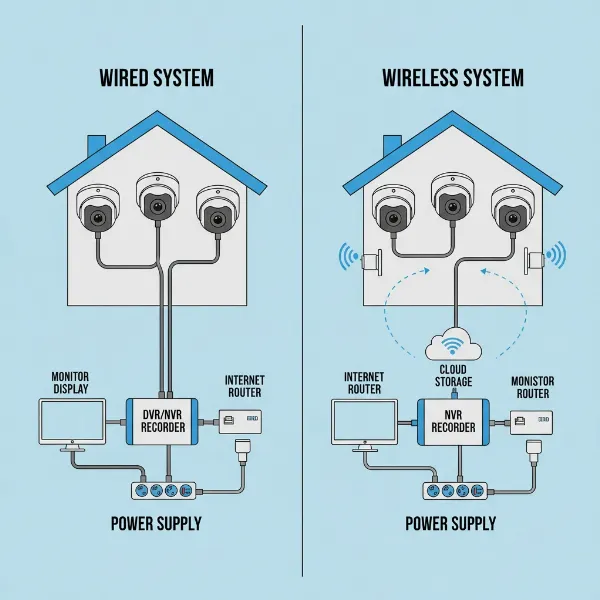 A diagram showing the setup of both wired and wireless security camera systems side by side, highlighting their connections.
“Wire-Free” Security Cameras: Ultimate Freedom
A distinct sub-category within wireless cameras, “wire-free” cameras are truly free of all cables, operating solely on battery power and communicating wirelessly via Wi-Fi. These devices offer the ultimate in installation simplicity and placement flexibility.
What Are They?
Wire-free cameras run on rechargeable batteries, eliminating the need for any physical connections for power or data. They connect to your Wi-Fi network for video transmission and can be mounted almost anywhere within signal range.
Advantages of Wire-Free Security Cameras
- Super Easy Installation: With no wires whatsoever, installation is incredibly simple—often just mounting the camera to a wall or placing it on a shelf.
- Ultimate Flexibility and Portability: These cameras can be placed virtually anywhere, indoors or outdoors, and easily moved as needs change.
- Unaffected by Power Outages: Since they run on batteries, wire-free cameras continue to operate even during power failures, provided their batteries are charged.
Disadvantages of Wire-Free Security Cameras
- Battery Life Management: The main drawback is the need for periodic battery recharging, which can lead to downtime for surveillance. Battery life varies significantly based on usage (motion detection frequency, live view access) and environmental factors.
- Motion-Activated Recording: To conserve battery, most wire-free cameras only record when motion is detected, rather than offering continuous 24/7 surveillance. This means you might miss critical moments outside of triggered events.
- Vulnerability to Theft: Their easy installation and lack of cables can also make them easy targets for theft, as a perpetrator could simply unmount and take the camera.
- Same Wi-Fi Vulnerabilities: Like other wireless cameras, they are susceptible to Wi-Fi interference, signal issues, and jamming.
Wire-free cameras are best suited for supplementary surveillance, monitoring specific areas on demand, or for locations where running any type of cable is absolutely impossible.
Comparing Wired vs. Wireless Security Cameras
To help you make an informed decision, here’s a direct comparison of the key features:
| Feature | Wired Cameras | Wireless Cameras (Wi-Fi) | Wire-Free Cameras (Battery) |
|---|---|---|---|
| Installation | Complex, professional often needed, extensive cabling | Easier, no data cables but often power cable needed | Simplest, no cables at all |
| Reliability | High, stable, constant connection | Moderate, dependent on Wi-Fi signal, interference risks | Moderate, dependent on Wi-Fi, battery life is a factor |
| Video Quality | High (less compression, no lag) | Medium to High (can be affected by bandwidth) | Medium (often optimized for battery saving) |
| Security | High (less interception, no jamming) | Moderate (Wi-Fi vulnerabilities, jamming risk) | Moderate (Wi-Fi vulnerabilities, jamming risk, theft risk) |
| Power Source | Wired (PoE or separate power/data) | Wired power source usually required | Battery-powered, requires recharging |
| Flexibility | Low (fixed placement) | High (flexible placement) | Very High (ultimate flexibility) |
| Cost (Upfront) | Higher (installation) | Medium | Lower |
| Long-Term Maint. | Low | Medium (connectivity issues, cloud fees) | High (battery recharging, monitoring battery levels) |
| Scalability | Excellent for large systems | Limited by Wi-Fi range and bandwidth | Limited, primarily for smaller setups |
Key Factors When Choosing Your Security Camera System
Selecting the right security camera system involves evaluating several crucial factors tailored to your specific situation:
Property Size and Layout
For extensive properties or multi-story buildings, wired systems often provide the necessary coverage and reliability. Smaller homes, apartments, or outdoor areas where cabling is impractical might benefit more from wireless or wire-free solutions.
Installation Effort & Cost
Consider if you’re comfortable with a DIY installation. Wireless and wire-free cameras are generally easier to install yourself. If you opt for a wired system, factor in the cost of professional installation, which can significantly impact your budget.
Desired Reliability & Security Level
If continuous, uninterrupted surveillance with maximum protection against tampering and cyber threats is essential (e.g., for high-value assets or critical entry points), a wired system is superior. For general monitoring and convenience, wireless cameras offer sufficient reliability.
Video Quality Needs
For crystal-clear, forensic-grade footage, wired cameras, especially IP cameras with NVRs, deliver the best results. If good-enough quality for identifying events and general monitoring suffices, many wireless cameras offer adequate resolution.
Power Access
Before choosing, identify available power outlets. Wireless cameras typically need an outlet, whereas wire-free cameras operate entirely on batteries. Wired systems require a pathway to a central power source and recorder.
Network Infrastructure
A robust and secure Wi-Fi network is paramount for wireless cameras. Assess your Wi-Fi signal strength in the planned camera locations and consider potential interference from other wireless devices.
Future Expansion
Think about your future needs. If you anticipate adding many cameras over time, a wired system might be more scalable in the long run without overburdening your Wi-Fi network.
Budget
Beyond the initial purchase, consider ongoing costs. Wired systems may have higher upfront costs but lower long-term maintenance. Wireless systems might have lower initial costs but potential subscription fees for cloud storage and the hassle of battery management for wire-free options.
Reputable Security Camera Brands
When investing in a security camera system, choosing products from established and reliable brands is crucial. While specific models may vary, companies like Hikvision, Dahua, Ezviz, Imou, and Xiaomi are widely recognized for offering a range of security solutions, from entry-level consumer models to professional-grade surveillance systems. These brands often provide a variety of wired, wireless, and wire-free options, catering to diverse security needs and budgets.
Tips for Effective Security Camera Usage
Maximizing the effectiveness of your security cameras goes beyond just installation.
- Strategic Placement: Position cameras to cover key entry points, vulnerable areas, and blind spots. Ensure they are out of easy reach for tampering.
- Secure Passwords: Always change default passwords to strong, unique combinations to prevent unauthorized access.
- Regular Maintenance: Periodically clean camera lenses, check cable connections (for wired systems), and ensure software/firmware is updated to maintain optimal performance and security.
- Understand Privacy Laws: Be aware of local regulations regarding surveillance, especially when cameras might capture public spaces or neighboring properties.
- Utilize Motion Detection: Configure motion detection zones and sensitivity settings to minimize false alarms and optimize recording efficiency.
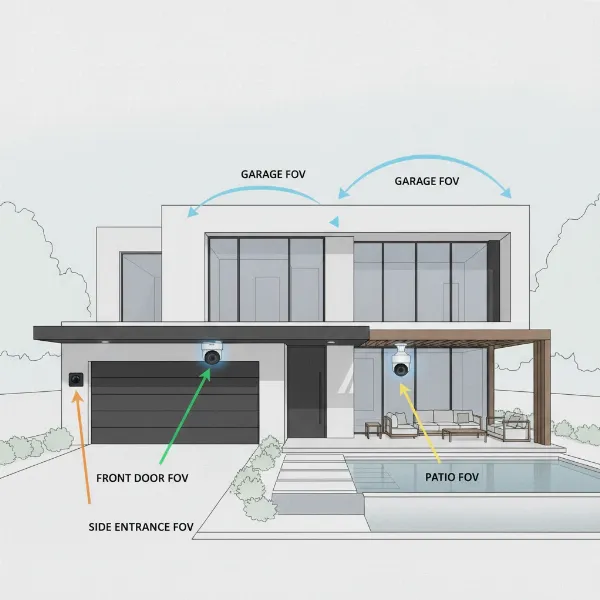 A home with multiple security cameras strategically placed at entry points and vulnerable areas, illustrating effective surveillance coverage.
Common Issues and Troubleshooting
Even with the best systems, problems can arise. Here are some common issues and their potential fixes:
- Camera Not Connecting to Network: For wireless, check Wi-Fi signal strength, router settings, and camera proximity to the router. For wired, inspect cable connections and NVR/DVR status.
- Blurry or Grainy Image: Ensure the lens is clean. Check resolution settings. For wireless, a weak Wi-Fi signal can degrade quality. For wired, check cable integrity or DVR/NVR settings.
- Camera Hacked: Immediately change all passwords, enable two-factor authentication, and check for unauthorized access logs. Ensure your network firewall is robust.
- Data Loss: Implement backup strategies, whether it’s local hard drives or redundant cloud storage. Regularly verify that recordings are being saved properly.
- Battery Draining Fast (Wire-Free): Reduce motion detection sensitivity, limit live view access, and ensure the camera isn’t in a high-traffic area that triggers constant recording.
“The choice between wired and wireless security cameras is a pivotal decision that directly impacts the reliability and efficacy of your surveillance system. While wired offers uncompromised stability, wireless provides unmatched flexibility. Understanding your specific needs and priorities is the first step towards a truly secure environment.” – Alex Chen, Security Systems Integrator
Conclusion
The decision between wired and wireless security cameras ultimately hinges on your unique security needs, property characteristics, budget, and willingness for installation complexity. Wired systems provide superior reliability, security, and video quality, making them ideal for comprehensive, permanent surveillance. Wireless solutions, including wire-free options, offer unparalleled flexibility and easier installation, suiting smaller spaces or temporary monitoring requirements. There is no one-size-fits-all answer; instead, the “right” choice is the one that best aligns with your priorities for protection and peace of mind.
What aspects of security are most critical for your peace of mind, and how might that influence your camera choice?
Frequently Asked Questions
Are wired security cameras truly more secure than wireless?
Yes, generally, wired cameras are considered more secure. Their physical data connection is less susceptible to wireless interception and cannot be disabled by common Wi-Fi jamming devices, unlike wireless networks which require robust encryption and are still vulnerable to certain attacks.
Can wireless cameras be hacked?
Yes, like any internet-connected device, wireless cameras can be vulnerable to hacking if not properly secured. Using strong, unique passwords, enabling two-factor authentication, keeping firmware updated, and using a secure Wi-Fi network (WPA3) are crucial steps to minimize risks.
How often do wire-free cameras need recharging?
The recharging frequency for wire-free cameras varies widely based on battery capacity, usage patterns (how often motion is detected and recorded, how frequently live view is accessed), and environmental conditions. Some may last months, others just weeks, requiring regular monitoring.
What is Power over Ethernet (PoE)?
Power over Ethernet (PoE) is a technology that allows network cables (Ethernet cables) to carry electrical power to powered devices, like IP Security Cameras. This means only a single cable is needed for both data connection and power supply, simplifying wiring and installation.