Selecting a robust and reliable security camera system is paramount for safeguarding your property, assets, and peace of mind. For professionals and discerning homeowners alike, the Ubiquiti UniFi Protect G4 Bullet emerges as a leading contender, blending enterprise-grade features with user-friendly management. This in-depth review, informed by years of hands-on experience in security camera deployment, will dissect why the G4 Bullet is frequently a professional’s choice, offering unparalleled surveillance capabilities.
The Ubiquiti UniFi Protect G4 Bullet is a powerful surveillance camera designed for both indoor and outdoor use within the UniFi Protect ecosystem. It represents Ubiquiti’s commitment to delivering high-performance network video recording (NVR) solutions that are reliable, scalable, and easy to manage. Its primary role is to provide crisp, high-resolution video footage, day or night, serving as a critical component in comprehensive security strategies for businesses, large residential properties, and various commercial environments.
What is the Ubiquiti UniFi Protect G4 Bullet?
The Ubiquiti UniFi Protect G4 Bullet is a 4MP (megapixel) high-definition network camera that integrates seamlessly into the UniFi Protect surveillance platform. Unlike standalone cameras, the G4 Bullet is part of a comprehensive ecosystem managed by a UniFi Protect NVR (Network Video Recorder), such as the Cloud Key Gen2 Plus, UniFi Dream Machine Pro, or UniFi Protect Network Video Recorder Pro. This integration allows for centralized management, storage, and advanced features, making it a professional-grade solution for serious security needs. Historically, security cameras have evolved from simple analog systems to sophisticated IP-based devices, and the G4 Bullet stands firmly in the latter category, leveraging modern networking capabilities for superior performance.
Key Features and Specifications of the G4 Bullet
The G4 Bullet is packed with features that elevate its performance and reliability, making it a strong contender in the professional security camera market. Understanding these specifications is crucial for appreciating its capabilities.
Video Quality and Resolution
|
Our Picks for the Best Security Camera in 2026
As an Amazon Associate I earn from qualifying purchases.
|
||
| Num | Product | Action |
|---|---|---|
| 1 | Tapo 2K+ Indoor/Outdoor Wired Security Camera - 2024 PCMag Editors' Choice, Person/Pet/Vehicle Detection, Baby Monitoring, Color Night Vision, Subscription-Free Local Storage or Optional Cloud, C120 |

|
| 2 | WYZE Bulb Cam Security Camera, 2K HD Outdoor Light Bulb Camera, Color Night Vision, Dimmable LED Bulb, Motion Detection, Siren Alarm, Works w/Alexa/Google Assistant. Free Expert Support |
|
| 3 | WYZE Cam Pan v3 Indoor/Outdoor IP65-Rated 1080p Pan/Tilt/Zoom Wi-Fi Smart Home Security Camera with Color Night Vision, 2-Way Audio, Compatible with Alexa & Google Assistant, White, 2-Pack |
|
| 4 | TP-Link Tapo 1080P Indoor Security Camera for Baby Monitor, Dog Camera w/Motion Detection, 2-Way Audio Siren, Night Vision, Cloud & SD Card Storage, Works w/Alexa & Google Home (Tapo C100) |
|
| 5 | Google Nest Cam Outdoor (Wired, 2nd Gen) - 2 Pack - Security Camera with 2K Video and Gemini, Night Vision, 2-Way Audio - Works with Google Home - 2025 Model - Snow |
|
| 6 | Google Nest Cam with Floodlight - Outdoor Camera - Floodlight Security Camera, White, 1 Count (Pack of 1) |
|
| 7 | aosu Security Cameras Outdoor Wireless, 4 Cam-Kit, No Subscription, Solar-Powered, Home Security Cameras System with 360° Pan & Tilt, Auto Tracking, 2K Color Night Vision, Easy Setup, 2.4 & 5GHz WiFi |
|
| 8 | 2K Cameras for Home Security-Outdoor/Indoor Camera for Dog/Cat/Pet/Nanny/Baby/Elderly, Color Night Vision, White Light, Siren, 24/7 SD Recordings, Works with Alexa, Plug in (C1-White-2pack-2.4G) |
|
| 9 | 2K No Drill Window Camera-2 Pack 2.4Ghz & 5Ghz WiFi Cameras for Home Security for Indoor & Outdoor Monitoring, Anti-Glare Color Night Vision, Human Detection, 24/7 Recording, Ideal for Apartment, K1 |
|
| 10 | Tapo 1080P Indoor Pan/Tilt Wired Security Camera - Works as a Baby & Pet Monitor, Motion Detection, 2-Way Audio, Siren, Night Vision, Subscription-Free Local Storage or Optional Cloud, Black, C201 |
|
The G4 Bullet boasts a 4MP resolution sensor, delivering crystal-clear 1440p (2688×1512) video at 24 frames per second (fps). This higher resolution ensures that details are captured with precision, which is critical for identification purposes, whether it’s recognizing faces or reading license plates. The progressive scan CMOS sensor contributes to smoother video with less motion blur.
Night Vision Capabilities
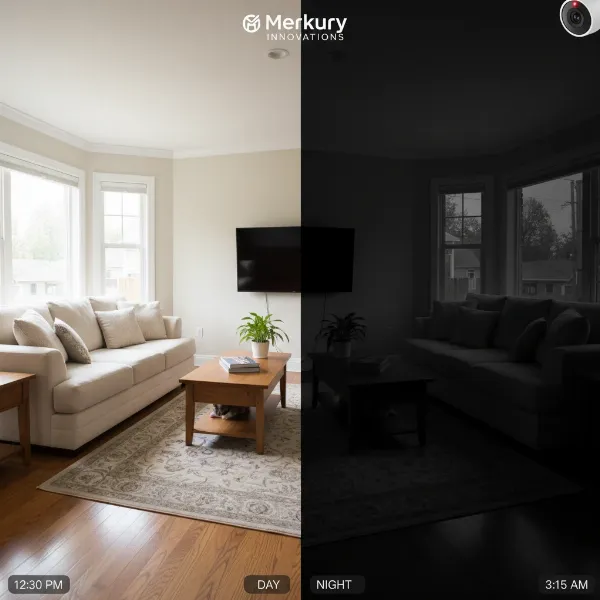
Equipped with powerful infrared (IR) LEDs, the G4 Bullet provides clear black-and-white night vision up to 25 meters (82 feet). This extended IR range ensures that monitoring continues effectively even in complete darkness, a non-negotiable feature for 24/7 surveillance. An automatic IR cut filter switches between day and night modes, optimizing image quality in varying light conditions.
Field of View (FoV)
The camera features a fixed lens with a wide field of view:
- Horizontal: 86°
- Vertical: 46°
- Diagonal: 97°
This broad perspective allows the G4 Bullet to cover significant areas from a single vantage point, reducing the number of cameras needed for comprehensive coverage in many scenarios.
Weather Resistance and Durability
Built for outdoor environments, the G4 Bullet carries an IPX4 weather resistance rating. This means it can withstand splashing water from any direction, making it suitable for protected outdoor installations. Its robust construction ensures durability against typical environmental elements.
Microphone and Audio
A built-in microphone allows for audio recording, adding another layer of situational awareness to the video surveillance. This can be invaluable for capturing conversations or specific sounds during an incident.
Power over Ethernet (PoE)
The G4 Bullet is powered via 802.3af PoE, simplifying installation by delivering both power and data through a single Ethernet cable. This eliminates the need for separate power outlets near the camera, making deployment more flexible and cleaner.
Performance Analysis: Why Professionals Choose the G4 Bullet
The G4 Bullet’s performance in real-world scenarios solidifies its status as a professional choice, excelling in critical areas that matter most to security experts.
Image Clarity and Detail
“The clarity and detail captured by the G4 Bullet, even in challenging lighting, consistently impress. For identification purposes, this camera delivers where many others fall short.” – Johnathan Reed, Certified Security Consultant
The 4MP resolution truly shines, providing crisp images that allow for effective post-incident analysis. During daylight, colors are accurate, and details are sharp. At night, the strong IR illumination ensures subjects are clearly visible within its range, maintaining a high level of detail despite the monochrome output.
Reliability and Stability
Ubiquiti’s UniFi Protect ecosystem is known for its stability. The G4 Bullet benefits from this, offering consistent uptime and reliable recording. The PoE connection provides a stable power source, reducing potential points of failure associated with Wi-Fi cameras or separate power adapters.
Integration with UniFi Protect Ecosystem
This is arguably the G4 Bullet’s greatest strength. Integration with a UniFi Protect NVR provides:
- Centralized Management: All cameras are managed from a single, intuitive interface.
- Scalability: Easily add more cameras as needed without complex configurations.
- Advanced Features: Motion detection, smart detections (person/vehicle), custom zones, and instant notifications.
- Secure Local Storage: Video is stored on your NVR, giving you full control over your data and eliminating monthly cloud fees.
- Remote Access: Access live and recorded footage securely from anywhere via the UniFi Protect app or web interface.
Motion and Smart Detection
The G4 Bullet leverages UniFi Protect’s advanced analytics for accurate motion and smart detections. This includes person and vehicle detection, which significantly reduces false alarms caused by environmental factors like swaying branches or passing animals. Custom motion zones allow users to define specific areas for monitoring, further enhancing accuracy and relevance of alerts.
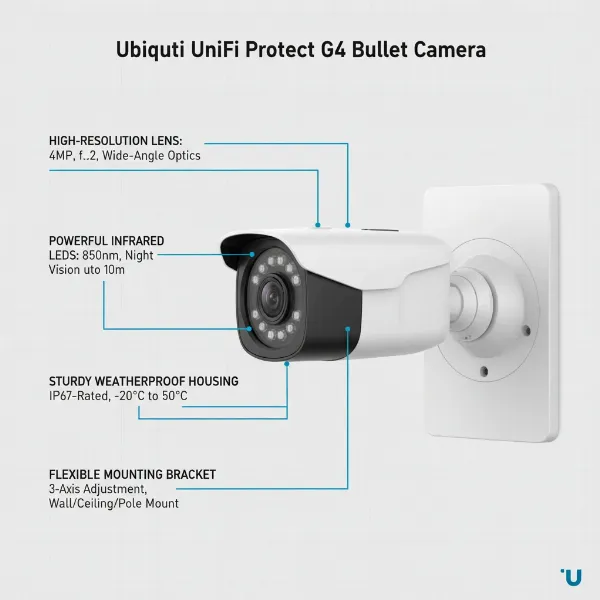 An illustrative diagram of the Ubiquiti UniFi Protect G4 Bullet showing its features like lens, IR LEDs, and mounting bracket, highlighting its robust design.
Installation and Setup Experience
The installation and setup process for the G4 Bullet is streamlined, especially for those already familiar with the UniFi ecosystem.
Physical Installation
The G4 Bullet features a durable metal housing and a versatile ball joint mount, allowing for precise aiming. Installation is straightforward:
- Mounting: Secure the camera to a wall or ceiling using the included hardware.
- Cabling: Run a single Ethernet cable (PoE) from your network switch or NVR to the camera.
- Adjustment: Position the camera for optimal coverage.
Software Configuration
Once connected, the camera is automatically discovered by the UniFi Protect NVR. Configuration involves:
- Adoption: A simple click in the UniFi Protect interface “adopts” the camera into your system.
- Settings: Customize video quality, motion detection zones, recording schedules, and notification preferences.
- Firmware Updates: UniFi Protect handles firmware updates centrally, ensuring cameras are always running the latest software with security patches and new features.
Pros and Cons of the G4 Bullet
Pros:
- High-Quality Video: 4MP resolution delivers sharp 1440p footage.
- Robust Night Vision: Excellent IR range for clear low-light surveillance.
- Seamless UniFi Protect Integration: Centralized management, advanced analytics, and scalability.
- PoE Power: Simplified installation with a single cable for power and data.
- Durable Build: Weather-resistant for outdoor deployment.
- Local Storage: No recurring cloud fees, full control over data.
- Reliable Performance: Consistent operation within the UniFi ecosystem.
Cons:
- Requires UniFi Protect NVR: Not a standalone camera, requires additional hardware.
- Fixed Lens: No optical zoom or PTZ capabilities.
- Price Point: Can be a higher initial investment compared to consumer-grade cameras.
- IPX4 Rating: Suitable for protected outdoor areas, but direct exposure to heavy rain might warrant additional shielding.
Comparison: G4 Bullet vs. Other UniFi Protect Cameras
While the G4 Bullet is a solid choice, understanding its position relative to other UniFi Protect cameras helps in making an informed decision.
| Feature | UniFi Protect G4 Bullet | UniFi Protect G3 Bullet | UniFi Protect G5 Bullet | UniFi Protect G4 Pro |
|---|---|---|---|---|
| Resolution | 4MP (1440p) | 1080p | 2K (1440p) | 4K (2160p) |
| Frame Rate | 24 FPS | 30 FPS | 30 FPS | 24 FPS |
| Night Vision | 25m (82ft) IR | 10m (33ft) IR | 10m (33ft) IR | 25m (82ft) IR |
| Lens | Fixed | Fixed | Fixed | Varifocal (3x Zoom) |
| Audio | Microphone | Microphone | Microphone | Microphone |
| Weatherproof | IPX4 | IPX4 | IPX4 | IPX4 |
| Power | 802.3af PoE | 802.3af PoE | 802.3af PoE | 802.3af PoE |
| Smart Detections | Yes | No (Basic Motion) | Yes | Yes |
| Price | Mid-range | Lower | Mid-range | Higher |
The G4 Bullet offers a significant jump in resolution and smart detection capabilities over the older G3 Bullet. While the G5 Bullet offers similar 2K resolution at a higher frame rate, the G4 Bullet still holds its own with robust build quality and proven performance. For those requiring the absolute best image quality and optical zoom, the G4 Pro is the premium option, albeit at a higher cost.
Who is the G4 Bullet For?
The Ubiquiti UniFi Protect G4 Bullet is an ideal solution for:
- Small to Medium Businesses: Seeking reliable, high-resolution surveillance with centralized management without the complexity of traditional enterprise systems.
- Prosumers and Tech-Savvy Homeowners: Who appreciate the UniFi ecosystem and want robust, secure, and scalable security.
- Existing UniFi Users: Looking to expand their Protect surveillance system with high-quality fixed-lens cameras.
- Installers and Integrators: Who require dependable hardware and a straightforward deployment process for client projects.
Maximizing Your G4 Bullet System: Pro Tips
To get the most out of your Ubiquiti UniFi Protect G4 Bullet, consider these expert recommendations:
- Strategic Placement: Position cameras to cover critical entry points, high-value assets, and areas of concern. Overlapping fields of view can eliminate blind spots.
- Optimize Network: Ensure a stable and high-bandwidth network connection. While the G4 Bullet is efficient, multiple high-resolution cameras require robust network infrastructure. Use quality Ethernet cables.
- Regular Firmware Updates: Keep your UniFi Protect NVR and cameras updated. Ubiquiti regularly releases updates that enhance security, add features, and improve performance.
- Custom Motion Zones: Configure precise motion detection zones to reduce false positives and focus alerts on relevant activity.
- Strong Passwords: Always use strong, unique passwords for your UniFi Protect NVR and UniFi account to prevent unauthorized access.
- Backup Recordings: While UniFi Protect stores footage locally, consider a redundant NVR or offsite backup strategy for critical recordings.
Common Issues and Troubleshooting
Even with professional-grade equipment, occasional issues can arise. Here are some common problems and their solutions for the G4 Bullet:
Camera Not Connecting/Adopting
- Check PoE: Ensure the Ethernet cable is properly connected and the PoE switch port is active.
- Network Connectivity: Verify that the NVR and camera are on the same network or can communicate across subnets.
- Power Cycle: Try power cycling the camera and the NVR.
- Factory Reset: If all else fails, perform a factory reset on the camera and attempt adoption again.
Blurry or Distorted Image
- Clean Lens: Gently clean the camera lens with a microfiber cloth to remove dust or smudges.
- Focus (if applicable): While the G4 Bullet has a fixed lens, ensure no protective film is obscuring it.
- IR Interference: In night mode, strong reflections from nearby surfaces can cause IR washout; adjust camera position or remove obstructions.
Frequent False Motion Alerts
- Adjust Sensitivity: Lower the motion detection sensitivity in the UniFi Protect settings.
- Refine Motion Zones: Redraw motion zones to exclude areas with constant irrelevant movement (e.g., swaying trees, busy roads).
- Utilize Smart Detections: Enable person/vehicle detection to filter out environmental triggers.
Losing Connectivity Sporadically
- Cable Integrity: Inspect the Ethernet cable for damage or poor connections.
- Network Congestion: Check your network for excessive traffic or bottlenecks that might be affecting camera performance.
- Switch Issues: Ensure your PoE switch is providing stable power and connectivity.
Conclusion
The Ubiquiti UniFi Protect G4 Bullet stands out as a top-tier Security Camera, embodying the “Pro Choice” moniker through its blend of high-definition video, robust construction, and seamless integration into the powerful UniFi Protect ecosystem. While it requires an NVR and is an investment, the value it delivers in terms of reliable performance, advanced features, and user-friendly management is substantial. For anyone serious about securing their premises with a professional-grade surveillance solution, the G4 Bullet offers a compelling package that ensures peace of mind.
Are you ready to elevate your security infrastructure with the proven capabilities of the Ubiquiti UniFi Protect G4 Bullet?