In a world where peace of mind is priceless, reliable home security stands as a cornerstone of modern living. You want to ensure your property and loved ones are safe, and a good security camera can be your vigilant eye. This review dives deep into the Defender Guard 2K Wi-Fi Security Camera, an accessible and robust option designed to offer high-quality surveillance without the burden of ongoing subscription fees. We’ll explore its features, assess its performance, guide you through installation, and weigh its pros and cons to help you decide if this camera is the right fit for your security needs.
What is the Defender Guard 2K Wi-Fi Security Camera?
The Defender Guard 2K Wi-Fi Security Camera is a do-it-yourself (DIY) outdoor surveillance solution crafted for homeowners seeking clear video monitoring and local data storage. It distinguishes itself by providing sharp 2K resolution footage, a significant upgrade from standard HD, all while operating without the need for a monthly cloud subscription. Defender, the brand behind this camera, has built a reputation for bringing professional-grade security equipment to the consumer market, enabling individuals to install and manage their systems independently and affordably.
Unpacking the Features: What Does it Offer?
Understanding the capabilities of a security camera is crucial to making an informed decision. The Defender Guard 2K Wi-Fi Security Camera packs several features aimed at providing comprehensive home surveillance.
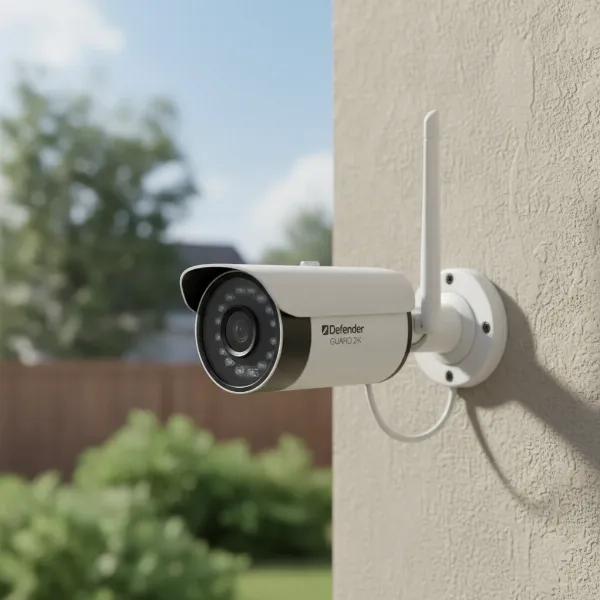 defender guard 2k wifi security camera outdoor view with antenna
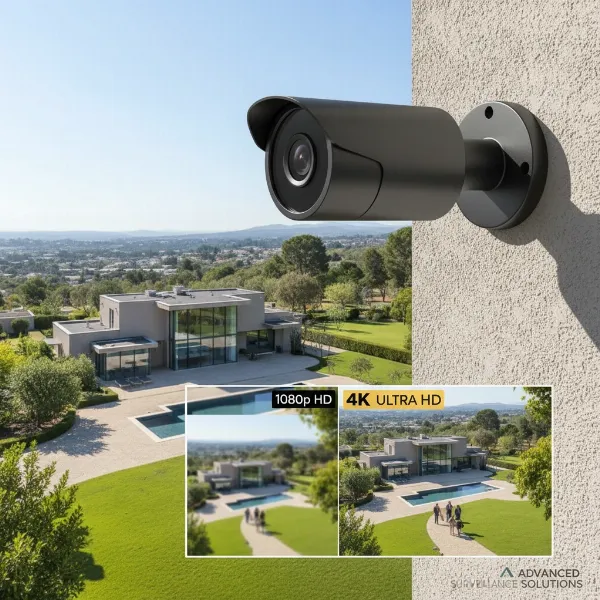
Firstly, its 2K resolution (2560 x 1440p or 4MP) delivers notably clear and sharp images, allowing for better identification of details compared to many 1080p cameras on the market. This clarity is maintained even when using digital zoom, making it easier to discern faces or license plates.
For connectivity, the camera utilizes 2.4 GHz Wi-Fi, ensuring a stable connection over longer distances, which is often beneficial for outdoor installations. If wireless signal strength is a concern, the option for an Ethernet connection is also available, providing a wired alternative for enhanced reliability during initial setup or continuous operation.
When the sun sets, the Defender Guard 2K transitions to infrared night vision, illuminating up to 100 feet in the dark to capture clear black-and-white footage. For those seeking more advanced night-time clarity, the Defender Guard Pro 2K model enhances this with color night vision, often assisted by integrated spotlights.
One of the most appealing aspects of the Defender Guard 2K is its local storage capability. It records all video footage directly to a microSD card, with a 16GB card typically included and support for expansion up to 128GB. This eliminates the need for recurring cloud subscription fees, putting you in full control of your surveillance data.
Motion detection is a core security feature, offering customizable sensitivity levels and activity zones. This allows you to fine-tune what triggers alerts, reducing false alarms from environmental factors. When motion is detected, the camera sends alerts with thumbnail images directly to your paired mobile device, enabling you to view the live feed instantly.
The camera also includes audio recording, capturing sounds within its vicinity. While the standard Defender Guard 2K doesn’t offer two-way talk, its Pro counterpart steps up with this feature, along with a siren and smart human detection for more advanced monitoring.
Built for the elements, the Defender Guard 2K boasts an IP67 weather-resistant rating, meaning it is dust-tight and capable of withstanding immersion in up to one meter of water. The Pro version carries an IP66 rating, offering protection against dust and strong jets of water. Both ratings ensure robust performance in various outdoor conditions.
Controlling and monitoring your camera is streamlined through the user-friendly Defender Guard app. The app provides essential camera controls, live streaming, resolution management, audio and video stream options, and the ability to record video or take screenshots. You can also easily access and share stored video clips.
The design of the standard Defender Guard 2K is a utilitarian, bullet-style camera with a noticeable antenna, clearly signaling its presence as a deterrent. It offers a 123-degree wide-angle field of view, providing a broad capture area, while the Pro model features a narrower 94-degree diagonal view with pan, tilt, and zoom (PTZ) capabilities.
Defender Guard 2K: Standard vs. Pro
Defender offers a couple of versions under the “Guard 2K” umbrella, each catering to slightly different security needs. The standard Defender Guard 2K focuses on core surveillance, while the Pro version introduces enhanced interactive features.
| Feature | Defender Guard 2K Wi-Fi | Defender Guard Pro 2K Wi-Fi |
|---|---|---|
| Video Resolution | 2K (2560 x 1440p) | 2K (2560 x 1440p) |
| Audio Recording | Yes | Yes |
| Two-Way Talk | No | Yes |
| Motion Detection | Basic (Customizable zones/sensitivity) | Smart Human Detection |
| Spotlight | No | Yes |
| Siren | No | Yes |
| Night Vision | Black and white (up to 100 ft) | Color night vision |
| Local Storage | MicroSD up to 128GB (16GB included) | MicroSD up to 128GB (16GB included) |
| Weather Rating | IP67 | IP66 |
| Axis Control | Fixed (180-degree rotation on mount) | Pan, Tilt, Zoom (PTZ) |
| Typical Price | From $40-$100 | From $126-$140 |
The standard Guard 2K is an excellent entry point for reliable surveillance, while the Pro version caters to those desiring more interactive and intelligent detection features for a slightly higher investment.
Installation: Setting Up Your Defender Guard 2K
Setting up your Defender Guard 2K Wi-Fi Security Camera is designed to be a straightforward process, even for DIY beginners.
Pre-Installation Checks: Before physically mounting the camera, it’s wise to test the Wi-Fi signal strength at your desired location using the Defender Guard app. This helps ensure a stable connection once installed, especially for outdoor placements. Remember, the camera primarily uses a 2.4 GHz Wi-Fi network.
Physical Setup: The first step involves installing the camera’s antenna and connecting it to an AC power source. Since it’s a plug-in camera, you might need to drill a hole through an external wall if an outdoor electrical outlet isn’t readily available to route the power cable indoors.
App Setup: Next, download the free Defender Guard (or SmartSignal) app from your smartphone’s app store. After creating an account, you’ll use the app to scan the QR code located on the camera itself. The app will then guide you through connecting to your 2.4 GHz Wi-Fi network and creating a secure password for your camera. If you encounter Wi-Fi issues during setup, some models allow for an initial wired connection via an Ethernet cable to your router.
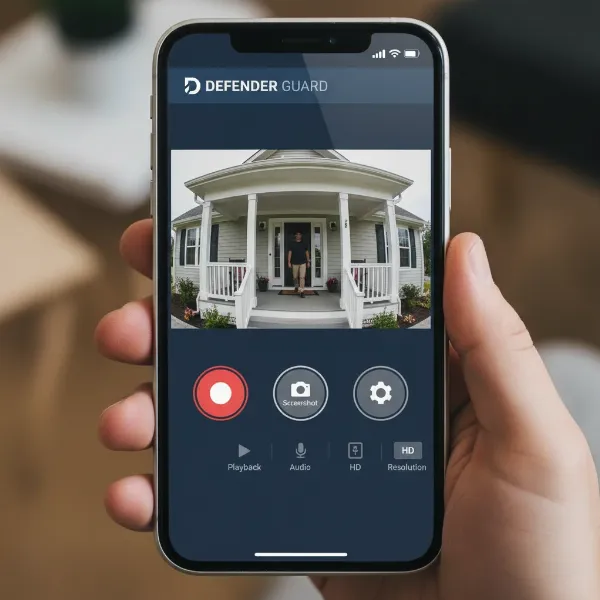 mobile screen displaying defender guard app live video feed and controls
Post-Setup: Once connected and verified, you can proceed with securely mounting the camera in your chosen spot, ensuring it covers the intended area effectively.
Performance Analysis: Strengths and Weaknesses
The Defender Guard 2K Wi-Fi Security Camera generally offers solid performance, but like any device, it comes with its own set of strengths and weaknesses.
Picture Quality: Users consistently praise the excellent clarity and sharpness of the 2K resolution video. This superior image quality is a significant advantage, making it easier to identify critical details in recordings.
Night Vision: The camera’s infrared night vision performs effectively, illuminating up to 100 feet, which is adequate for most residential outdoor spaces. The Pro model further enhances this with color night vision, providing more context in low-light conditions.
App Experience: The Defender Guard app is lauded for being user-friendly and easy to learn. Its basic controls are intuitively laid out, allowing for effortless live viewing, playback, and customization of settings like motion detection zones and sensitivity.
Local Storage: The inclusion of local microSD card storage, with no mandatory cloud subscription, is a major cost-saving benefit and appeals to users who prefer to keep their data private and avoid recurring fees. However, this also means that if the camera itself is stolen or damaged, the footage stored on it could be lost.
Wi-Fi Connectivity: While the 2.4 GHz Wi-Fi offers good range, some users of the Pro version have reported connectivity issues, especially with mesh Wi-Fi systems. Ensuring a strong, stable Wi-Fi signal at the camera’s location is crucial for optimal performance.
Motion Detection Accuracy: A common point of feedback is that the standard motion detection can be overly sensitive, leading to frequent false alerts triggered by things like insects, animals, or moving shadows. While sensitivity adjustments are available, this might require some fine-tuning. The Pro model’s “Smart Human Detection” feature aims to mitigate this by distinguishing human shapes.
Field of View: The standard camera’s 123-degree wide-angle lens offers a decent field of view. However, the Pro model’s 94-degree diagonal viewing angle is comparatively narrower, and with PTZ functionality, some users noted that the movable antennas could occasionally interfere with the image.
Advanced Features: The standard Defender Guard 2K is a no-frills security camera, intentionally lacking advanced features like facial detection or sophisticated motion tracking found in more expensive systems. The Pro version introduces some of these, but its PTZ response can sometimes be slow.
Defender Guard 2K: Is It the Right Security Camera for You? (Buying Guide)
Choosing the right security camera involves aligning its capabilities with your specific needs. The Defender Guard 2K Wi-Fi Security Camera excels in certain areas, making it ideal for particular users.
Identify Your Needs: Start by clearly defining what you need. Are you looking for a camera for indoor or outdoor surveillance? Is your primary concern deterring intruders, monitoring pets, or simply keeping an eye on your property? What’s your budget, and how important are advanced features like two-way talk or pan/tilt/zoom?
Budget-Conscious Users: If avoiding monthly subscription fees is a top priority, the Defender Guard 2K is an excellent choice. Its local storage model provides significant long-term savings compared to cloud-based systems.
DIY Enthusiasts: The camera’s straightforward installation process makes it suitable for individuals who prefer to set up their security system themselves without professional help.
Prioritizing Local Storage: For users who want complete ownership and control over their surveillance footage, the microSD card storage is a major draw. This means your data stays with you, not on external servers.
Consider Your Wi-Fi Setup: Since it relies on 2.4 GHz Wi-Fi, ensure you have a strong and stable signal at the camera’s intended location. While this frequency offers good range, it can be susceptible to interference, especially in busy networks or with mesh Wi-Fi systems for the Pro model.
Compare with the Pro Version: If features like two-way talk, smart human detection, a spotlight, siren, or the ability to pan, tilt, and zoom are critical for your security strategy, the Defender Guard Pro 2K Wi-Fi Security Camera might be worth the additional investment.
Where to Buy: The Defender Guard 2K can be found at major retailers like Home Depot and online marketplaces. Always check Defender’s official website for the latest deals or bundles.
Maximizing Your Defender Guard 2K Experience
To get the most out of your Defender Guard 2K Wi-Fi Security Camera, consider these practical tips:
- Optimal Placement: Strategically position your camera to cover key entry points or vulnerable areas while also ensuring a strong Wi-Fi signal. Test the live feed from your desired mounting spot before final installation.
- Fine-Tuning Motion Detection: Experiment with the detection sensitivity settings in the Defender Guard app. Adjusting these can significantly reduce false alarms caused by environmental factors, allowing you to focus on genuine threats.
- Regular Checks: Periodically review your recorded footage and check the camera’s live feed to ensure it’s operating correctly and providing the coverage you need. Stay updated with the app’s features and any firmware updates.
- Strong Security: Always use a strong, unique password for your camera and your Wi-Fi network to prevent unauthorized access.
- Upgrade Storage: If you anticipate recording a lot of footage, consider upgrading the included 16GB microSD card to the maximum supported 128GB to ensure ample storage capacity.
Common Issues and Simple Troubleshooting
Even the most reliable security cameras can encounter occasional hiccups. Here are some common problems with the Defender Guard 2K and how to address them:
- No Video or Connection Issues: If your camera isn’t displaying video or connecting, first check all power connections, ensuring cables are tight and the power adapter is plugged into a working outlet. Power cycling (unplugging for a minute and plugging back in) the camera and your Wi-Fi router can often resolve connectivity glitches. Confirm your camera is connected to a 2.4 GHz Wi-Fi network and check your phone’s app permissions for local network access.
- False Motion Alerts: This is a frequent concern. In the Defender Guard app, navigate to the detection settings and reduce the sensitivity. You can also define specific “activity zones” to tell the camera which areas to monitor for motion and which to ignore.
- Poor Night Vision: Ensure the camera lens is clean and free of obstructions. If using external floodlights, be aware that the camera might momentarily go dark as it switches between infrared and daylight modes.
- Forgotten Password or Persistent Connectivity Problems: If you forget your camera’s password or experience consistent connectivity issues that other troubleshooting steps can’t fix, you can perform a factory reset. This usually involves pressing and holding a reset button on the camera until an LED light flashes red or the camera beeps. This will revert camera settings to default but typically will not delete files on your SD card. After resetting, you’ll need to re-pair the camera with your app.
“A well-chosen security camera system acts as your constant vigilant eye, offering peace of mind and tangible protection for your home and loved ones. The right balance of features, reliability, and cost is key to effective home security.” – John Smith, Security Systems Expert
In conclusion, the Defender Guard 2K Wi-Fi Security Camera offers a compelling solution for robust home surveillance. Its commitment to clear 2K video quality, combined with the significant advantage of local storage and no monthly subscription fees, makes it an attractive option for budget-conscious and DIY-oriented users. While the standard model may lack some of the advanced AI features or two-way communication found in its Pro counterpart or pricier competitors, it delivers on its promise of reliable and accessible home monitoring.
By understanding its features, embracing straightforward installation, and employing effective usage tips, you can leverage the Defender Guard 2K to enhance the security of your property. It’s a solid choice for establishing a foundational layer of security, providing you with a clear view of what matters most. What aspects of a security camera matter most to your peace of mind when safeguarding your home?
Frequently Asked Questions
What resolution does the Defender Guard 2K Wi-Fi Security Camera offer?
The Defender Guard 2K Wi-Fi Security Camera records in 2K resolution (2560 x 1440p), also referred to as 4MP, providing significantly clearer and more detailed images than standard 1080p cameras for enhanced surveillance.
Does the Defender Guard 2K require a monthly subscription?
No, one of the key advantages of the Defender Guard 2K Wi-Fi Security Camera is that it does not require any monthly cloud subscription fees, as it stores all footage locally on an included microSD card.
Can the Defender Guard 2K Wi-Fi Security Camera be used outdoors?
Yes, the Defender Guard 2K Wi-Fi Security Camera is designed for outdoor use with an IP67 weather-resistant rating, meaning it’s protected against dust and can withstand short periods of water immersion.
What is the maximum storage capacity for the Defender Guard 2K?
The Defender Guard 2K Wi-Fi Security Camera comes with a 16GB microSD card but can be expanded to support up to 128GB of local storage, allowing for extended video recording without cloud fees.
What kind of Wi-Fi connection does the Defender Guard 2K use?
The Defender Guard 2K Wi-Fi Security Camera connects to your home network using a 2.4 GHz Wi-Fi frequency. For optimal performance, ensure a strong signal at the camera’s installation location.
Does the Defender Guard 2K have two-way audio?
The standard Defender Guard 2K Wi-Fi Security Camera supports audio recording but does not feature two-way talk. However, the Defender Guard Pro 2K Wi-Fi Security Camera does offer two-way audio communication, along with a siren and spotlight.
How do I troubleshoot false motion detection alerts?
To reduce false motion detection alerts, you can adjust the detection sensitivity and define specific activity zones within the Defender Guard app. This helps the camera focus on relevant movements and ignore minor environmental triggers like moving leaves or insects.