In today’s interconnected world, security cameras have become an indispensable tool for safeguarding our homes and loved ones. Many homeowners find it incredibly beneficial to share camera access with family members, allowing everyone to keep an eye on the property, monitor children or pets, or ensure a delivery isn’t missed. However, while sharing offers convenience, it also introduces critical security and privacy considerations. Granting access without proper precautions can inadvertently expose your home to vulnerabilities, compromise personal data, or even lead to legal complications. This comprehensive guide will walk you through the essential steps and best practices for securely sharing your security camera feeds, ensuring peace of mind for you and your family.
Understanding Security Camera Access Sharing
Sharing security camera access means granting designated individuals the ability to view live feeds, access recorded footage, and sometimes even control camera functions from their own devices. This capability moves beyond simply giving out your primary account password, which is a major security risk. Modern security camera systems are designed with multi-user access features, allowing you to invite family members or trusted individuals to join your home’s monitoring network.
The primary purpose of sharing access is to enhance collective security and convenience. Imagine a scenario where a child arrives home from school, and a parent can verify their safe entry from work. Or perhaps a neighbor needs temporary access to keep an eye on your property while you’re on vacation. Properly managed shared access empowers your trusted circle while maintaining your control as the primary owner. This ensures that everyone who needs to can contribute to your home’s safety without compromising the overall security infrastructure.
Step-by-Step Guide to Sharing Camera Access
Sharing your security camera feed with family members typically involves a few straightforward steps, though the exact interface may vary slightly between different brands and apps. The core principle remains the same: invite, configure, and manage.
Prerequisites for Sharing
|
Our Picks for the Best Security Camera in 2026
As an Amazon Associate I earn from qualifying purchases.
|
||
| Num | Product | Action |
|---|---|---|
| 1 | Google Nest Cam Outdoor (Wired, 2nd Gen) - 2 Pack - Security Camera with 2K Video and Gemini, Night Vision, 2-Way Audio - Works with Google Home - 2025 Model - Snow |

|
| 2 | Tapo 2K+ Indoor/Outdoor Wired Security Camera - 2024 PCMag Editors' Choice, Person/Pet/Vehicle Detection, Baby Monitoring, Color Night Vision, Subscription-Free Local Storage or Optional Cloud, C120 |
|
| 3 | Google Nest Cam with Floodlight - Outdoor Camera - Floodlight Security Camera, White, 1 Count (Pack of 1) |
|
| 4 | 2K Cameras for Home Security-Outdoor/Indoor Camera for Dog/Cat/Pet/Nanny/Baby/Elderly, Color Night Vision, White Light, Siren, 24/7 SD Recordings, Works with Alexa, Plug in (C1-White-2pack-2.4G) |
|
| 5 | Tapo 1080P Indoor Pan/Tilt Wired Security Camera - Works as a Baby & Pet Monitor, Motion Detection, 2-Way Audio, Siren, Night Vision, Subscription-Free Local Storage or Optional Cloud, Black, C201 |
|
| 6 | 2K No Drill Window Camera-2 Pack 2.4Ghz & 5Ghz WiFi Cameras for Home Security for Indoor & Outdoor Monitoring, Anti-Glare Color Night Vision, Human Detection, 24/7 Recording, Ideal for Apartment, K1 |
|
| 7 | WYZE Cam Pan v3 Indoor/Outdoor IP65-Rated 1080p Pan/Tilt/Zoom Wi-Fi Smart Home Security Camera with Color Night Vision, 2-Way Audio, Compatible with Alexa & Google Assistant, White, 2-Pack |
|
| 8 | aosu Security Cameras Outdoor Wireless, 4 Cam-Kit, No Subscription, Solar-Powered, Home Security Cameras System with 360° Pan & Tilt, Auto Tracking, 2K Color Night Vision, Easy Setup, 2.4 & 5GHz WiFi |
|
| 9 | WYZE Bulb Cam Security Camera, 2K HD Outdoor Light Bulb Camera, Color Night Vision, Dimmable LED Bulb, Motion Detection, Siren Alarm, Works w/Alexa/Google Assistant. Free Expert Support |
|
| 10 | TP-Link Tapo 1080P Indoor Security Camera for Baby Monitor, Dog Camera w/Motion Detection, 2-Way Audio Siren, Night Vision, Cloud & SD Card Storage, Works w/Alexa & Google Home (Tapo C100) |
|
Before you initiate the sharing process, ensure that the family member you wish to invite has downloaded the specific security camera application to their smartphone or tablet. They will also need to create their own individual user account within that app. This is crucial because it eliminates the need to share your personal login credentials, a fundamental aspect of secure access management. Each authorized user should have their unique credentials to log in, preventing unauthorized access to your main account.
Initiating the Share (Admin Role)
As the primary owner or “admin” of the security camera system, you hold the power to invite others. Navigate to your camera’s settings within the app, usually found under sections like “Device Sharing,” “Family Management,” or “User Settings.” Here, you’ll typically find an option to “Add User” or “Share Device.” You will then be prompted to enter the email address or user ID associated with the family member’s newly created account. Some systems might generate a QR code for the recipient to scan, simplifying the invitation process.
Setting User Permissions
This is arguably the most critical step in safe sharing. Most reputable camera systems offer granular control over what shared users can see and do. Avoid granting full administrative control unless absolutely necessary. Common permission levels include:
- View-only access: Allows live stream viewing and sometimes playback of recorded events.
- Playback control: Enables reviewing historical footage.
- PTZ (Pan, Tilt, Zoom) control: Gives the ability to adjust the camera’s orientation.
- Two-way audio: Permits communication through the camera.
- Download/Delete footage: Rarely recommended for shared users due to privacy and data integrity concerns.
Carefully consider each individual’s needs and trustworthiness when assigning permissions. A child might only need view-only access, while a spouse might require more extensive control over recordings.
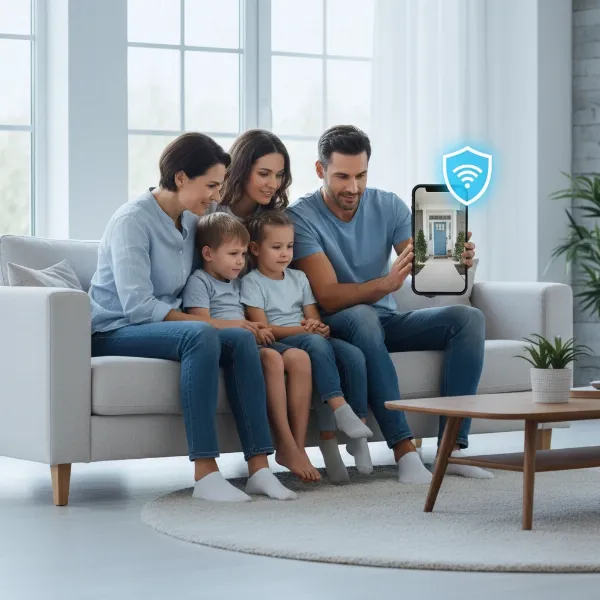 Family members securely accessing a home security camera feed on their smartphones.
Accepting the Invitation
Once you’ve sent the invitation, the family member will typically receive a notification within their camera app or via email. They must accept this invitation to gain access to the camera feed. This two-step verification ensures that access is granted intentionally and confirms the recipient’s identity.
Managing and Revoking Access
Security camera access isn’t a “set it and forget it” feature. Regularly review who has access to your cameras. Make it a routine to check every few months, or immediately after any change in household dynamics, such as a family member moving out. If a family member no longer requires access—perhaps they’ve moved out or their circumstances have changed—it’s vital to promptly revoke their permissions. This can usually be done from the same “Device Sharing” or “User Management” section in your app by selecting the user and choosing “Remove Access” or “Delete User.” This proactive management is key to maintaining control over your home’s security.
Crucial Security Best Practices for Shared Access
While the act of sharing itself is convenient, maintaining a robust security posture is paramount. Overlooking basic cybersecurity principles can undermine the very protection your cameras are meant to provide.
Strong Passwords and Two-Factor Authentication (2FA)
The foundation of any secure system is strong authentication. Ensure every user, including yourself, employs unique, complex passwords for their camera app accounts and your home Wi-Fi network. Passwords should be a mix of uppercase and lowercase letters, numbers, and symbols, and should not be reused across different services. Furthermore, activate Two-Factor Authentication (2FA) on your camera accounts whenever available. 2FA adds an extra layer of security by requiring a second form of verification, such as a code sent to your phone, in addition to your password, making it significantly harder for unauthorized individuals to gain entry even if they somehow obtain a password.
Regular Firmware and Software Updates
Security camera manufacturers frequently release firmware updates to patch vulnerabilities, improve performance, and add new features. Ignoring these updates leaves your system susceptible to known exploits. Make it a habit to check for and install the latest firmware for your cameras and the latest version of the associated mobile application. Enabling automatic updates where possible can help ensure you’re always running the most secure version.
Network Isolation (VLANs, Guest Networks)
For advanced users or those with a higher security requirement, consider isolating your security cameras on a separate network segment. This can be achieved using a Virtual Local Area Network (VLAN) if your router supports it, or by placing cameras on your router’s “guest network” if it offers client isolation. If a camera on an isolated network were to be compromised, the breach would be contained, preventing attackers from easily accessing other sensitive devices like your computers or financial data on your main home network.
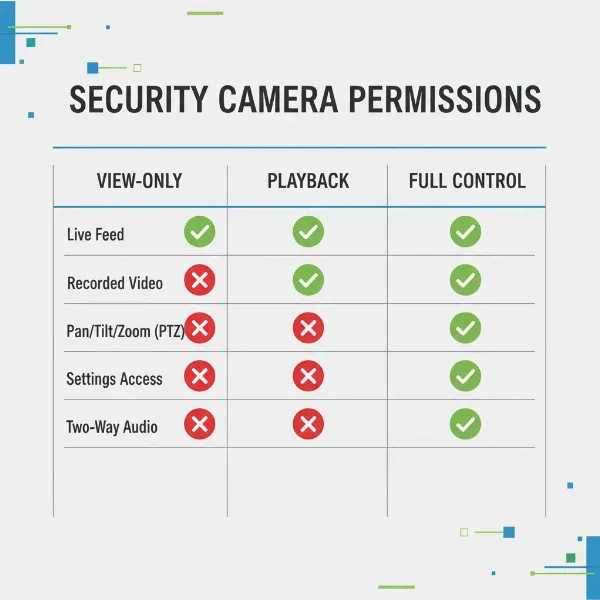 A chart illustrating different security camera access permissions for family members.
Physical Security of Cameras
Cybersecurity is only one piece of the puzzle; physical security is equally important. Install cameras in locations that are difficult to tamper with or disable. Ensure they are securely mounted, ideally out of easy reach of potential intruders. For outdoor cameras, choose models that are weather-resistant and robust. A physically secure camera is harder to manipulate, even for those with malicious intent.
Avoiding Direct Internet Exposure
Never directly expose your security cameras to the public internet through port forwarding on your router. While this method might seem like an easy way to enable remote viewing, it opens a direct pathway for attackers to probe and potentially compromise your devices. Modern camera systems and their associated cloud services are designed to facilitate secure remote access without requiring port forwarding. If your system relies on UPnP (Universal Plug and Play), consider disabling it on your router, as UPnP can sometimes automatically open ports, creating unintended vulnerabilities.
Privacy Considerations and Legal Implications
Sharing security camera footage isn’t just a technical matter; it has profound privacy implications for everyone involved, including family members, visitors, and even passersby. A responsible approach requires a clear understanding of ethical boundaries and legal frameworks.
Every individual has an expectation of privacy, especially within their own home. When deploying security cameras, avoid placing them in highly private areas such as bedrooms, bathrooms, or changing rooms, even if the intent is solely for family monitoring. Footage captured in such areas could lead to severe privacy violations. Furthermore, if your cameras capture areas beyond your property lines—such as a neighbor’s yard or public sidewalks—you might be subject to data protection laws in your jurisdiction. Many regions require clear signage indicating that surveillance is in progress.
Misusing or improperly sharing surveillance footage can lead to serious legal repercussions. Publicly posting clips of incidents, even seemingly innocuous ones, without anonymizing individuals can result in civil lawsuits for invasion of privacy. In more severe cases, footage could be shared maliciously or inadvertently fall into the wrong hands, leading to blackmail or other exploitation. Always prioritize the privacy of individuals and consult local laws regarding video and audio recording, as regulations vary significantly.
“While security cameras offer invaluable protection, the privacy of individuals, whether family or the general public, must always be at the forefront of your sharing strategy. A simple lapse in judgment can lead to complex legal and ethical challenges.” – Sarah Chen, Cybersecurity & Privacy Consultant
A diagram showing security cameras isolated on a separate network segment or VLAN for enhanced security.
Potential Risks of Improper Camera Access Sharing
Failing to implement secure sharing practices can expose you and your family to various risks, ranging from minor annoyances to significant security breaches. Understanding these dangers is the first step toward mitigating them.
Unauthorized Viewing and Data Breaches
The most immediate risk is unauthorized individuals gaining access to your camera feeds. If passwords are weak, or accounts are not properly secured, hackers could potentially view your home’s interior or exterior without your knowledge. This not only compromises your family’s privacy but could also provide criminals with valuable intelligence about your routines, property layout, and valuables, facilitating future criminal activity. A data breach could also expose personal information associated with your camera account.
Misuse of Footage
Even with trusted family members, the potential for misuse of footage exists. An unthinking individual might download or share a funny, but private, moment captured by the camera, leading to embarrassment or discomfort. In more severe cases, footage could be shared maliciously or inadvertently fall into the wrong hands, leading to blackmail or other exploitation.
Network Vulnerabilities
Security cameras, particularly IP cameras, are internet-connected devices. Like any networked device, they can have vulnerabilities. If a camera is compromised due to weak security or outdated firmware, it could potentially serve as a “jump point” for attackers to gain access to other devices on your home network. This could lead to a broader network intrusion, exposing your personal computers, smartphones, and other smart home devices to risk.
False Sense of Security
Relying on security cameras with poorly managed shared access can create a false sense of security. If the system is easily compromised, or if shared users are unaware of their responsibilities, the perceived protection can quickly become a liability. For instance, if access is not revoked when it should be, a former resident could still monitor your home, turning a security asset into a privacy nightmare. It’s essential that all users understand the seriousness of their access privileges.
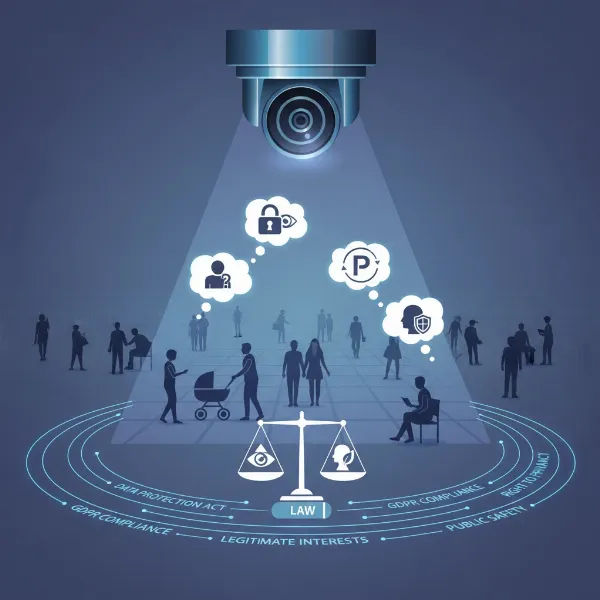 An illustration representing privacy laws and security camera footage, emphasizing ethical considerations.
Choosing the Right Camera System for Secure Sharing
Not all security camera systems are created equal when it comes to multi-user access and robust security features. Investing in a reliable brand with strong security protocols is crucial for safe sharing.
When selecting a camera, look for systems that explicitly offer granular user permission settings. This allows you to define exactly what each shared user can and cannot do, moving beyond a simple “all or nothing” access. Strong encryption for both data in transit (live streams) and data at rest (cloud recordings) is also vital. Always prioritize cameras that support Two-Factor Authentication (2FA) for all user accounts, as this is a fundamental layer of modern cybersecurity. Reputable brands like Ring, Arlo, Google Nest, and even some models from Hikvision or Dahua, typically provide these advanced security features, ensuring your data is protected. Additionally, consider how easy it is to manage users within their respective applications and whether they offer clear guidance on secure sharing practices.
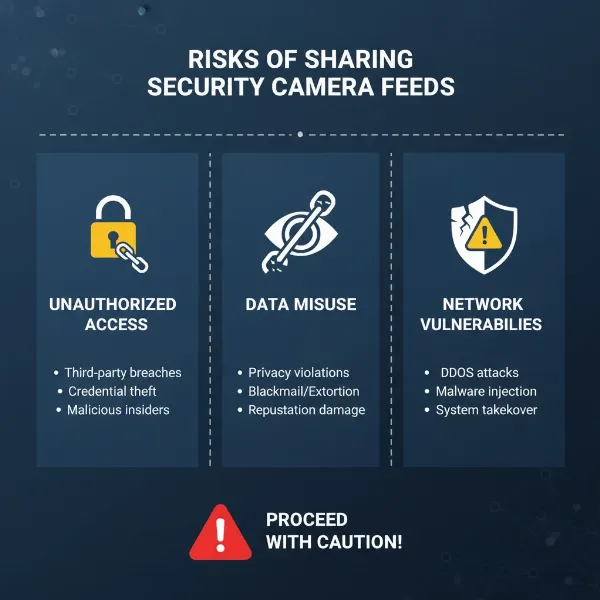 Infographic showing potential risks associated with insecure sharing of security camera access.
Expert Tips for Effective and Secure Sharing
Beyond the technical steps, effective communication and ongoing vigilance are key to successfully sharing your security camera access safely.
Regularly Audit Access
Periodically review the list of individuals who have access to your security cameras. Make it a routine to check every few months, or immediately after any change in household dynamics, such as a family member moving out. Remove access for anyone who no longer needs it. This simple audit can prevent lingering vulnerabilities.
Educate Family Members
Take the time to educate all shared users about the importance of strong passwords, 2FA, and responsible behavior when accessing the camera feeds. Explain the privacy implications and the potential risks of sharing footage outside the family. Empowering them with knowledge turns them into active participants in your home’s security, rather than potential weak links.
Communicate Clearly About Camera Placement
Be transparent with family members and frequent visitors about where cameras are located and what areas they monitor. This helps manage expectations of privacy and fosters trust. If you have cameras in sensitive areas, even with strict permissions, ensure everyone is aware and comfortable with their placement.
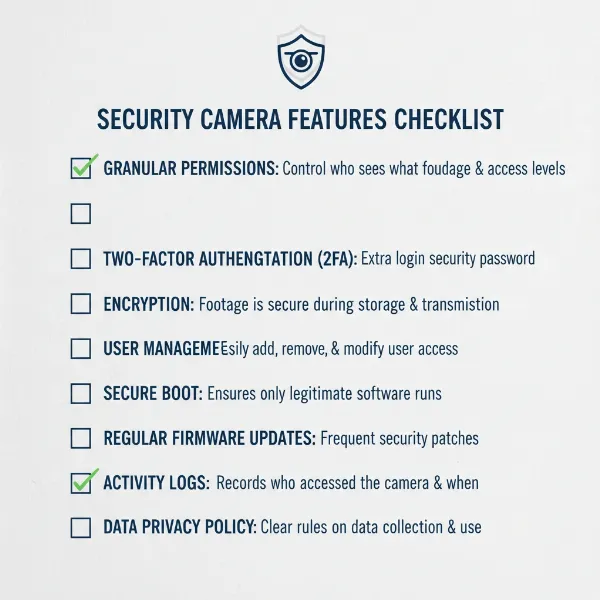 A checklist of important security features to look for in a security camera system for safe sharing.
Conclusion
Sharing Security Camera access with family members offers undeniable benefits, fostering a collective sense of security and providing valuable peace of mind. However, this convenience comes with a critical responsibility to prioritize safety and privacy above all else. By diligently following secure sharing protocols—from creating individual accounts and setting granular permissions