The excitement of planning a much-anticipated vacation can often be overshadowed by nagging worries about the security of your home. Will everything be safe while you’re away? Will you return to find your sanctuary just as you left it? Fortunately, with proactive planning and the right home monitoring strategies, you can trade that anxiety for genuine peace of mind, ensuring your property is secure and protected no matter how far you roam. This comprehensive guide will equip you with essential knowledge and actionable steps to effectively monitor your home during your travels, letting you fully enjoy your well-deserved break.
Understanding Security Cameras: Your Remote Eyes
Security cameras serve as your ever-vigilant eyes, providing real-time oversight and recorded evidence to protect your property and loved ones. From their early beginnings as rudimentary surveillance tools, security cameras have evolved into sophisticated digital systems, offering features that were once the realm of science fiction. Today, they are an indispensable part of any modern home security strategy, especially when you’re away.
Types of Security Cameras for Vacation Monitoring
Choosing the right camera system depends on your specific needs, budget, and desired level of monitoring. Each type offers distinct advantages for securing your home during extended absences.
- Analog Cameras: These traditional cameras transmit video signals over coaxial cables.
- Pros: Generally more cost-effective, known for stable, wired connections, and reliable for continuous recording.
- Cons: Lower resolution compared to modern digital options, and can require more complex wiring.
- Applications: Ideal for budget-conscious homeowners seeking basic, continuous surveillance in fixed locations.
- IP (Internet Protocol) Cameras: Digital cameras that send and receive footage over an IP network.
- Pros: Offer high-definition to 4K resolution, advanced smart features like intelligent motion detection, and remote access via smartphone apps.
- Cons: Can be more expensive and rely heavily on a stable internet connection for full functionality.
- Applications: Best for those desiring crystal-clear images, sophisticated analytics, and seamless remote monitoring capabilities.
- Wi-Fi Cameras: A subset of IP cameras that connect wirelessly to your home network.
- Pros: Easy to install and reposition due to wireless connectivity, offering flexible placement without extensive wiring.
- Cons: Can be susceptible to Wi-Fi signal interference and may have battery life considerations if not hardwired.
- Applications: Excellent for renters or homeowners who need flexible indoor or outdoor monitoring solutions with straightforward setup.
- By Form and Function:
- Bullet Cameras: These are highly visible, cylindrical cameras often mounted outdoors. Their prominent design acts as a strong deterrent, and they are typically fixed-view cameras.
- Dome Cameras: Designed to be discreet and vandal-resistant, dome cameras are often mounted on ceilings or eaves. They offer a wider field of view and are less conspicuous.
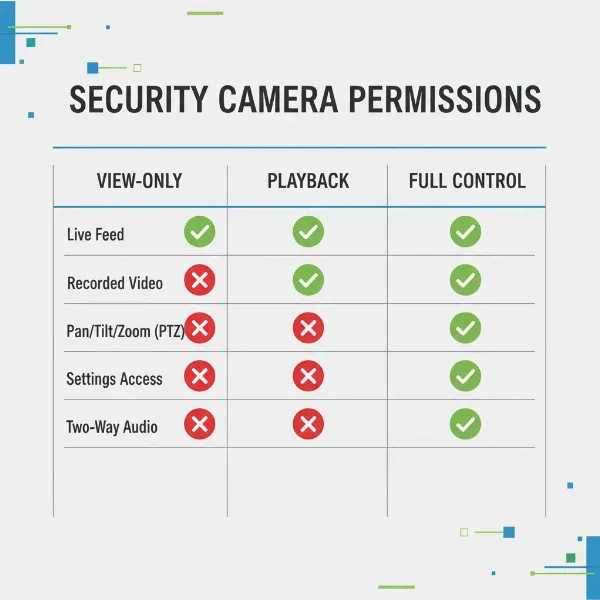
- PTZ (Pan, Tilt, Zoom) Cameras: Offering unparalleled flexibility, PTZ cameras can be controlled remotely to pan horizontally, tilt vertically, and zoom in on specific areas, providing extensive coverage from a single unit.
- Doorbell Cameras: Integrated into your doorbell, these cameras provide monitoring of your front entrance, featuring two-way audio to communicate with visitors and motion detection for package deliveries.
|
Our Picks for the Best Security Camera in 2026
As an Amazon Associate I earn from qualifying purchases.
|
||
| Num | Product | Action |
|---|---|---|
| 1 | 2K No Drill Window Camera-2 Pack 2.4Ghz & 5Ghz WiFi Cameras for Home Security for Indoor & Outdoor Monitoring, Anti-Glare Color Night Vision, Human Detection, 24/7 Recording, Ideal for Apartment, K1 |

|
| 2 | 2K Cameras for Home Security-Outdoor/Indoor Camera for Dog/Cat/Pet/Nanny/Baby/Elderly, Color Night Vision, White Light, Siren, 24/7 SD Recordings, Works with Alexa, Plug in (C1-White-2pack-2.4G) |
|
| 3 | Google Nest Cam with Floodlight - Outdoor Camera - Floodlight Security Camera, White, 1 Count (Pack of 1) |
|
| 4 | TP-Link Tapo 1080P Indoor Security Camera for Baby Monitor, Dog Camera w/Motion Detection, 2-Way Audio Siren, Night Vision, Cloud & SD Card Storage, Works w/Alexa & Google Home (Tapo C100) |
|
| 5 | Google Nest Cam Outdoor (Wired, 2nd Gen) - 2 Pack - Security Camera with 2K Video and Gemini, Night Vision, 2-Way Audio - Works with Google Home - 2025 Model - Snow |
|
| 6 | WYZE Bulb Cam Security Camera, 2K HD Outdoor Light Bulb Camera, Color Night Vision, Dimmable LED Bulb, Motion Detection, Siren Alarm, Works w/Alexa/Google Assistant. Free Expert Support |
|
| 7 | aosu Security Cameras Outdoor Wireless, 4 Cam-Kit, No Subscription, Solar-Powered, Home Security Cameras System with 360° Pan & Tilt, Auto Tracking, 2K Color Night Vision, Easy Setup, 2.4 & 5GHz WiFi |
|
| 8 | WYZE Cam Pan v3 Indoor/Outdoor IP65-Rated 1080p Pan/Tilt/Zoom Wi-Fi Smart Home Security Camera with Color Night Vision, 2-Way Audio, Compatible with Alexa & Google Assistant, White, 2-Pack |
|
| 9 | Tapo 2K+ Indoor/Outdoor Wired Security Camera - 2024 PCMag Editors' Choice, Person/Pet/Vehicle Detection, Baby Monitoring, Color Night Vision, Subscription-Free Local Storage or Optional Cloud, C120 |
|
| 10 | Tapo 1080P Indoor Pan/Tilt Wired Security Camera - Works as a Baby & Pet Monitor, Motion Detection, 2-Way Audio, Siren, Night Vision, Subscription-Free Local Storage or Optional Cloud, Black, C201 |
|
Comparing Security Camera Types for Vacation
Understanding the differences between camera types can help you make an informed decision for vacation home monitoring.
| Feature | Analog Camera | IP Camera | Wi-Fi Camera | Doorbell Camera |
|---|---|---|---|---|
| Image Quality | Basic to Good (SD/HD) | Excellent (HD to 4K) | Good to Excellent (HD) | Good to Excellent (HD) |
| Stability | High (wired connection) | High (network-dependent) | Moderate (Wi-Fi-dependent) | Moderate (Wi-Fi-dependent) |
| Cost | Low to Moderate | High | Medium | Medium to High |
| Key Features | Basic surveillance | Advanced analytics, remote access | Remote access, motion alerts | Two-way audio, package detection |
| Installation | Complex (wiring) | Moderate (network setup) | Easy (wireless) | Easy (replaces existing doorbell) |
Essential Features for Vacation Home Monitoring
When selecting security cameras and systems for vacation monitoring, several features are paramount to ensuring effective surveillance and peace of mind.
- Resolution: The clarity of your camera’s image is crucial for identifying details. Cameras offering 1080p (Full HD) are a good standard, while 4K resolution provides exceptional detail, making it easier to identify individuals or specific events.
- Field of View (Angle): A wide field of view allows a single camera to cover a larger area, reducing the number of cameras needed. Consider cameras with 100-180 degree angles for comprehensive coverage, especially for outdoor areas.
- Infrared Night Vision: For round-the-clock protection, night vision is non-negotiable. Infrared (IR) LEDs enable cameras to “see” in complete darkness, ensuring continuous monitoring when light conditions are poor.
- Weather Resistance: Outdoor cameras must withstand the elements. Look for an IP (Ingress Protection) rating, such as IP65 or IP66, indicating strong resistance to dust and water.
- Storage Options: How your footage is stored is vital. Options include local storage (SD cards, NVR/DVR for analog/IP systems) and cloud storage. Cloud storage offers off-site backup, protecting footage even if the camera is tampered with, though it often comes with a subscription fee.
- Motion Detection & Alerts: Modern cameras feature intelligent motion detection, which can distinguish between people, animals, and vehicles, significantly reducing false alarms. Customizable activity zones allow you to focus alerts on specific areas of interest. Alerts are typically sent directly to your smartphone via an app.
- Two-Way Audio: This feature allows you to not only hear what’s happening but also speak through the camera. It’s particularly useful for doorbell cameras to interact with visitors or for indoor cameras to communicate with pets or family members.
- Remote Access & Mobile Apps: The ability to view live feeds, review recordings, and control camera settings from anywhere via a smartphone app is a core component of vacation monitoring. A user-friendly app is essential for seamless interaction.
Your Comprehensive Vacation Home Security Checklist
A well-prepared home is a secure home. Before embarking on your journey, run through this comprehensive checklist to minimize risks and ensure maximum security.
- Before You Leave:
- Secure All Entry Points: Double-check every door, window, and sliding glass door, including those on upper floors, in the basement, and the garage. Consider adding deadbolts or smart locks for enhanced security.
- Check and Test Security Systems: Ensure all alarms, cameras, and sensors are fully functional. Test your system to confirm it sends alerts properly. Replace batteries in wireless sensors if needed.
- Hold Mail and Package Deliveries: Piled-up mail and packages signal an empty house. Schedule a mail hold with your postal service or arrange for a trusted neighbor to collect them.
- Enlist Trusted Neighbors: Inform a reliable neighbor or friend of your travel plans and provide them with an emergency contact number. Ask them to keep an eye on your property, perhaps park a car in your driveway occasionally, or retrieve bins.
- Avoid Social Media Announcements: Resist the urge to broadcast your vacation plans on social media until after you return. This information can inadvertently alert potential intruders to your absence.
- Unplug Unnecessary Appliances: Disconnecting non-essential electronics can prevent power surges, save energy, and reduce fire risks.
- Program Smart Lights and Thermostats: Use smart plugs or programmable light timers to simulate occupancy by turning lights on and off at varying intervals. Smart thermostats can also be adjusted remotely or programmed to maintain basic temperatures, preventing issues like frozen pipes.
- Arrange for Yard Maintenance: An unkempt lawn or unshoveled driveway can indicate an empty home. Arrange for lawn care or snow removal services to maintain a “lived-in” appearance.
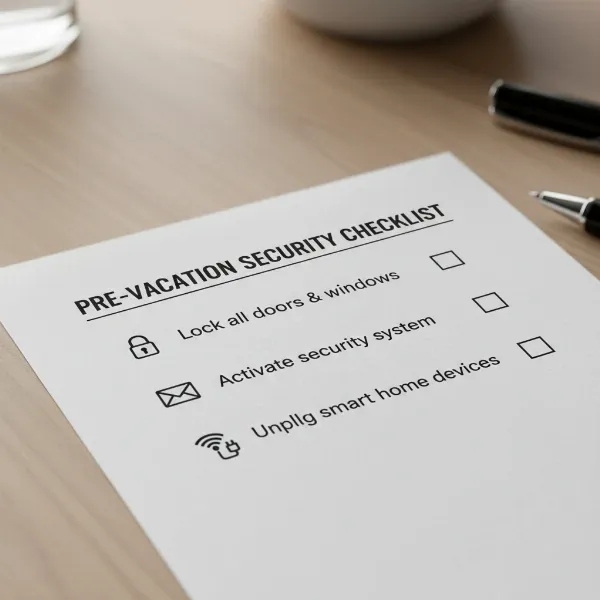 A detailed checklist for home security before vacation, including cameras and smart home devices
- While You’re Away:
- Regularly Check Camera Feeds and Alerts: Utilize your security system’s mobile app to view live camera feeds and respond to any motion alerts promptly.
- Communicate with Your Trusted Contact: Maintain open communication with your chosen neighbor or friend, especially regarding any suspicious activity or emergencies.
- Be Cautious with Public Wi-Fi: When accessing your security apps, always use secure Wi-Fi networks or a Virtual Private Network (VPN) to protect your login credentials from potential cyber threats.
- Consider Professional Monitoring: For enhanced security, especially during longer trips, professional monitoring services can provide 24/7 surveillance and dispatch emergency services in response to alarms.
Choosing the Right Security System for Your Vacation Home (Buying Guide)
Selecting the ideal security system involves evaluating your specific needs against the available options.
- Assess Your Needs:
- Purpose: Are you primarily looking for deterrence, evidence collection, or immediate emergency alerts?
- Area to Cover: Determine whether you need indoor, outdoor, or comprehensive coverage for all entry points.
- Budget: Consider the initial equipment cost, installation fees (if applicable), and ongoing monitoring subscriptions.
- Popular Brands & Systems: Many reputable brands offer systems with features suitable for vacation monitoring. Look for systems that integrate well with security cameras, smart locks, and environmental sensors, offering a holistic security solution. Key considerations include ease of use, mobile app functionality, and scalability.
- Professional vs. DIY Installation & Monitoring:
- DIY (Do-It-Yourself): Offers flexibility and cost savings, allowing you to install and often self-monitor the system. Brands like SimpliSafe are known for their user-friendly DIY options.
- Professionally Installed & Monitored: Provides expert installation and 24/7 monitoring by a security center, which can dispatch authorities directly. Companies like ADT and Vivint offer comprehensive professional services, ideal for those who prefer a hands-off approach and maximum security.
Expert Tips for Effective Home Monitoring
Leveraging security technology effectively requires more than just installation; it involves smart practices and vigilance.
- Strategic Camera Placement: Position outdoor cameras to cover primary entry points (front door, back door, windows), driveways, and any vulnerable side access. For indoor cameras, focus on common areas and valuables.
- Strong Passwords & Two-Factor Authentication: Use unique, complex passwords for all security devices and accounts. Enable two-factor authentication (2FA) wherever possible to add an extra layer of security against unauthorized access.
- Regular System Updates: Keep your camera firmware and security app software updated. Manufacturers frequently release updates that patch vulnerabilities and improve performance.
- Understanding Local Privacy Laws: Be aware of local laws regarding surveillance, especially if your cameras capture public areas or a neighbor’s property.
- Emergency Response Plan: Have a clear plan for what to do if an alarm is triggered or suspicious activity is detected. Know who to contact (neighbors, professional monitoring, local authorities) and in what order.
“A well-secured home isn’t just about deterring burglars; it’s about safeguarding your peace of mind. Investing in robust security measures before you leave allows you to fully immerse yourself in your travels, knowing your sanctuary is protected.” – John Marucci, Home Security Expert
Common Issues and Troubleshooting
Even the best systems can encounter problems. Knowing common issues and basic troubleshooting can save you stress.
- Connectivity Problems: Ensure your Wi-Fi router is working correctly and hasn’t been accidentally unplugged. Check internet service provider status if cameras are offline. Cellular backup can be vital for professional monitoring.
- Blurry or Noisy Images: Check camera lenses for dirt or condensation. Ensure good lighting conditions for optimal image quality, especially at night. For Wi-Fi cameras, try moving them closer to the router for a stronger signal.
- False Alarms: Adjust motion detection sensitivity settings to prevent triggers from pets, swaying trees, or passing cars. Define specific activity zones to exclude irrelevant areas.
- Data Storage Issues: Regularly check your storage capacity. If using cloud storage, ensure your subscription is active. For local storage, periodically back up important footage and ensure the SD card or hard drive is functioning correctly.
- Cybersecurity Concerns (Camera Hacking): Always use strong, unique passwords. Enable two-factor authentication. Keep firmware updated. Avoid connecting to unknown public Wi-Fi networks when checking your system remotely.
Conclusion
Securing your home while on vacation is a crucial aspect of responsible homeownership, allowing you to fully relax and enjoy your time away. By embracing proactive preparation, leveraging smart Security Camera technology, and fostering a supportive community network with trusted neighbors, you can create a formidable defense for your property. From understanding the nuances of different camera types and their essential features to meticulously completing your pre-departure checklist, every step contributes to a robust home monitoring strategy. Ultimately, investing in your home’s security is an investment in your peace of mind, ensuring your return to a safe and undisturbed sanctuary.
What steps will you take to secure your home before your next adventure?
Frequently Asked Questions
How often should I check my security cameras while on vacation?
While there’s no strict rule, checking your cameras once or twice a day for a quick glance is usually sufficient, unless you receive a specific alert. Excessive checking can drain battery life on wireless cameras and consume unnecessary data.
Are Wi-Fi cameras reliable for long periods of vacation?
Wi-Fi cameras can be reliable, but their performance depends heavily on a stable internet connection and consistent power supply. Ensure your home Wi-Fi is robust, and consider a backup power solution (like a UPS) if power outages are common in your area.
Can smart locks be hacked?
While no system is 100% impenetrable, reputable smart locks employ strong encryption and security protocols to resist hacking attempts. Using unique, complex passwords and enabling two-factor authentication significantly enhances their security.
Should I tell my neighbors I’m on vacation?
Yes, informing a trusted neighbor about your vacation plans is highly recommended. They can keep an eye on your property, collect mail, and act as a local contact in case of emergencies, adding a valuable layer of human vigilance to your security plan.
What if my internet goes out while I’m away?
Many modern security systems offer cellular backup, which allows them to continue sending alerts and, in some cases, record footage even if your internet connection fails. This feature is a critical consideration for uninterrupted monitoring.