In today’s world, security cameras have become an indispensable tool for safeguarding our homes and businesses. However, the sheer variety of options, especially concerning how they record footage, can be overwhelming. As an admin with over a decade of experience in security camera systems, I’ve seen countless setups, and one of the most crucial decisions you’ll make is choosing between continuous (24/7) recording and motion-activated recording. This choice significantly impacts your security effectiveness, storage needs, and overall budget. This comprehensive guide will walk you through the nuances of each method, helping you make an informed decision for ultimate peace of mind.
Understanding Security Camera Recording
At its core, a security camera’s role is to monitor and document activity within its field of view. From the basic CCTV systems of yesteryear to the smart IP cameras we use today, the fundamental goal remains constant: to provide a visual record. Modern advancements have introduced sophisticated recording capabilities, allowing us to tailor surveillance to specific security requirements. The method a camera uses to capture and store footage directly influences its efficiency, the completeness of its archive, and how you interact with your security system. Understanding these underlying mechanisms is the first step toward building a robust and reliable security solution.
Continuous Recording (24/7): The Unblinking Eye
Continuous Recording, often referred to as 24/7 recording or CVR (Continuous Video Recording), means your security camera records every second of every day without interruption. Think of it as an unwavering sentry, perpetually capturing footage, ensuring that absolutely nothing within its view goes undocumented. This method typically involves storing video on a Network Video Recorder (NVR), Digital Video Recorder (DVR), or to a cloud service. Many systems utilize “loop recording,” where the oldest footage is automatically overwritten once storage is full, maintaining a constant, seamless archive.
Advantages of Continuous Recording
The primary advantage of 24/7 recording is its unparalleled reliability and completeness. You get a full, unbroken timeline of events, leaving no gaps where critical incidents might occur. This is invaluable for:
- Comprehensive Evidence: In investigations or legal disputes, having the entire sequence of events—the lead-up, the incident itself, and the aftermath—can be crucial. This continuous context is often preferred by insurance companies for claims.
- No Missed Events: Unlike motion-activated systems that can sometimes fail to trigger, continuous recording guarantees that every moment is captured, regardless of whether a specific motion threshold was met.
- Forensic Review: If you need to pinpoint an exact time or understand subtle patterns of activity, scrolling through a complete timeline is more effective than sifting through fragmented clips.
|
Our Picks for the Best Security Camera in 2026
As an Amazon Associate I earn from qualifying purchases.
|
||
| Num | Product | Action |
|---|---|---|
| 1 | Tapo 1080P Indoor Pan/Tilt Wired Security Camera - Works as a Baby & Pet Monitor, Motion Detection, 2-Way Audio, Siren, Night Vision, Subscription-Free Local Storage or Optional Cloud, Black, C201 |

|
| 2 | WYZE Cam Pan v3 Indoor/Outdoor IP65-Rated 1080p Pan/Tilt/Zoom Wi-Fi Smart Home Security Camera with Color Night Vision, 2-Way Audio, Compatible with Alexa & Google Assistant, White, 2-Pack |
|
| 3 | Tapo 2K+ Indoor/Outdoor Wired Security Camera - 2024 PCMag Editors' Choice, Person/Pet/Vehicle Detection, Baby Monitoring, Color Night Vision, Subscription-Free Local Storage or Optional Cloud, C120 |
|
| 4 | Google Nest Cam Outdoor (Wired, 2nd Gen) - 2 Pack - Security Camera with 2K Video and Gemini, Night Vision, 2-Way Audio - Works with Google Home - 2025 Model - Snow |
|
| 5 | aosu Security Cameras Outdoor Wireless, 4 Cam-Kit, No Subscription, Solar-Powered, Home Security Cameras System with 360° Pan & Tilt, Auto Tracking, 2K Color Night Vision, Easy Setup, 2.4 & 5GHz WiFi |
|
| 6 | Google Nest Cam with Floodlight - Outdoor Camera - Floodlight Security Camera, White, 1 Count (Pack of 1) |
|
| 7 | TP-Link Tapo 1080P Indoor Security Camera for Baby Monitor, Dog Camera w/Motion Detection, 2-Way Audio Siren, Night Vision, Cloud & SD Card Storage, Works w/Alexa & Google Home (Tapo C100) |
|
| 8 | WYZE Bulb Cam Security Camera, 2K HD Outdoor Light Bulb Camera, Color Night Vision, Dimmable LED Bulb, Motion Detection, Siren Alarm, Works w/Alexa/Google Assistant. Free Expert Support |
|
| 9 | 2K No Drill Window Camera-2 Pack 2.4Ghz & 5Ghz WiFi Cameras for Home Security for Indoor & Outdoor Monitoring, Anti-Glare Color Night Vision, Human Detection, 24/7 Recording, Ideal for Apartment, K1 |
|
| 10 | 2K Cameras for Home Security-Outdoor/Indoor Camera for Dog/Cat/Pet/Nanny/Baby/Elderly, Color Night Vision, White Light, Siren, 24/7 SD Recordings, Works with Alexa, Plug in (C1-White-2pack-2.4G) |
|
Disadvantages of Continuous Recording
While highly reliable, continuous recording comes with its own set of challenges:
- Massive Storage Requirements: Recording 24/7, especially at high resolutions, consumes significantly more storage space—often 4-5 times more than motion-based recording. This means larger hard drives for NVR/DVRs or higher-tier, more expensive cloud storage plans.
- Higher Bandwidth Consumption: Constantly uploading video data, particularly to the cloud, demands a robust and stable internet connection. This can strain home networks and incur higher data costs for some users.
- Tedious Footage Review: Sifting through hours of uneventful footage to find a specific moment can be time-consuming and frustrating, even with timestamping and fast-forward options.
- Power Dependency: Most 24/7 recording cameras require a consistent, wired power source, making them less suitable for battery-powered or wirelessly connected cameras designed for efficiency.
- Privacy Concerns: Recording everything can raise privacy issues, especially in residential settings or shared spaces where continuous surveillance might feel intrusive.
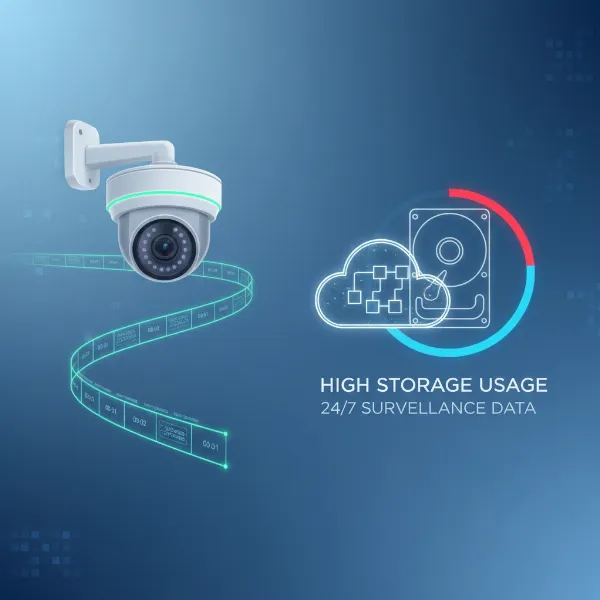 A graphic illustrating continuous 24/7 security camera recording with a timeline and large storage consumption.
Motion-Activated Recording: The Smart Sentinel
Motion-activated recording, also known as event-triggered recording, operates differently. Instead of recording constantly, these cameras only spring into action when they detect movement within their designated field of view. This intelligent approach aims to conserve storage and make footage review more efficient by focusing solely on potentially important events.
Cameras use various technologies to detect motion:
- Pixel Change (Video Motion Detection): The camera software analyzes changes in pixels between consecutive frames. If a significant percentage of pixels change, it triggers a recording.
- PIR Sensors (Passive Infrared): These sensors detect changes in infrared energy (heat) emitted by moving objects like people or animals. This method is generally more reliable in reducing false alarms from environmental factors.
- Smart Analytics (AI Object Detection): Advanced cameras utilize Artificial Intelligence to distinguish between different types of movement—identifying people, vehicles, packages, or pets. This greatly reduces false alarms caused by swaying trees or shadows.
- Pre-Roll Buffer: To ensure nothing is missed at the very start of an event, many motion-activated cameras include a “pre-roll” buffer. This feature stores a few seconds of video in memory, so when motion is detected, the saved clip includes footage from before the trigger.
Advantages of Motion-Activated Recording
Motion-activated recording offers several compelling benefits, making it a popular choice for many users:
- Significant Storage Savings: By only recording when motion occurs, these cameras use substantially less storage space, leading to longer retention periods on local devices or lower cloud storage costs.
- Efficient Footage Review: You spend less time searching, as your archive primarily contains clips of activity, making it much faster to find and review specific events.
- Lower Bandwidth Usage: Reduced recording means less data streaming, which is beneficial for networks with limited bandwidth or for battery-powered cameras that need to conserve energy.
- Battery Efficiency: For wireless, battery-powered cameras, motion activation is essential. They remain in a low-power state until motion is detected, extending battery life considerably.
- Instant Alerts: Many systems send immediate notifications to your smartphone when motion is detected, allowing for quick response to potential incidents.
Disadvantages of Motion-Activated Recording
Despite its efficiencies, motion-activated recording has notable drawbacks:
- Risk of Missed Events: If motion detection fails due to incorrect sensitivity settings, obstructions, environmental factors (heavy rain, fog, glare), or if the motion is too slow or distant, crucial footage can be missed.
- False Alarms: Without proper calibration and smart analytics, motion detection can be triggered by non-threats like swaying branches, shadows, passing cars, or animals, leading to numerous “false positives.”
- Limited Context: Even with pre-roll buffers, motion-activated clips might only capture a snippet of an event, potentially lacking the full lead-up or aftermath vital for complete understanding or forensic analysis.
- Tuning Complexity: Achieving optimal performance often requires careful configuration of activity zones, sensitivity levels, and object detection settings, which can be complex for new users.
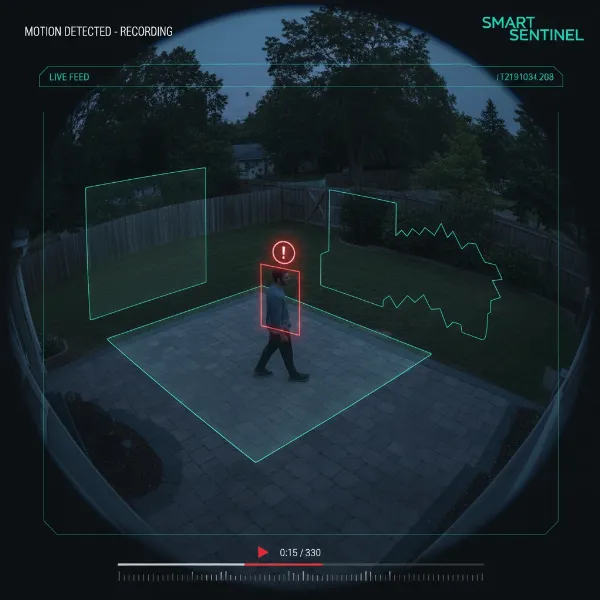 An image showing a security camera with motion detection zones highlighted, detecting a person in the frame.
“While motion-activated recording is an efficient and affordable solution that conserves resources by focusing on key events, it can occasionally miss critical footage or context if detection fails. Conversely, continuous recording offers full-time, reliable surveillance, leaving no moment unrecorded, but at the cost of higher storage and power consumption. The ideal choice depends on your specific security needs, environment, and budget.” – Security Camera Expert
Comparing Recording Methods
To help you visualize the differences, here’s a direct comparison of continuous and motion-activated recording:
| Feature | Continuous Recording (24/7) | Motion-Activated Recording |
|---|---|---|
| Storage Needs | Very High (4-5x more) | Low |
| Cost | Higher (storage, bandwidth) | Lower (storage, bandwidth) |
| Reliability | Very High (no missed events) | Moderate (risk of false alarms/misses) |
| Event Capture | Complete timeline, full context | Event-focused clips, may lack full context |
| Review Time | Time-consuming to find specific events | Quick to review specific events |
| Power Needs | Wired power typically required | Suitable for wired or battery-powered |
| Best Use Case | High-security areas, critical monitoring | Residential, low-traffic areas, battery cams |
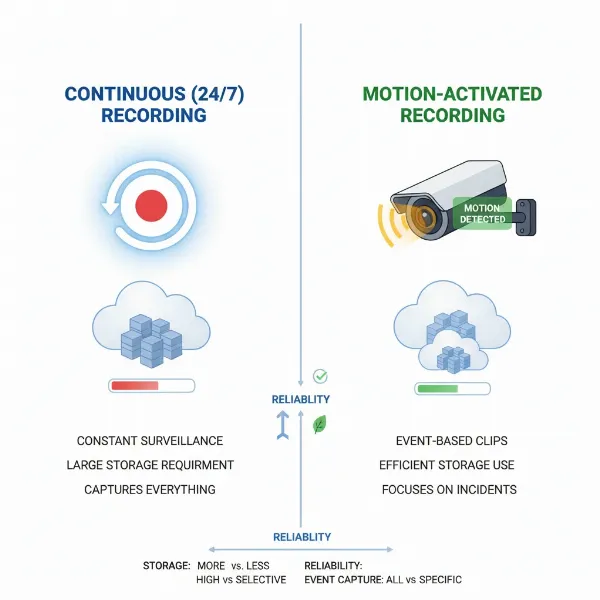 A side-by-side comparison illustrating continuous and motion-activated security camera recording methods.
Important Features Influencing Recording Choice
Beyond the core recording method, several other camera features play a crucial role in determining which system is right for you.
Storage Options
Your choice of recording often dictates your storage solution.
- Local Storage (SD Card/NVR/DVR): For continuous recording, NVRs (Network Video Recorders) or DVRs (Digital Video Recorders) with large hard drives are essential. Smaller SD cards are generally only sufficient for short-term motion-activated clips or very low-resolution continuous recording.
- Cloud Storage: Many modern cameras offer cloud storage subscriptions. Continuous cloud recording is usually the most expensive option due to high data transfer and storage costs, while motion-activated cloud storage is more affordable.
- Hybrid Systems: Some advanced systems combine local continuous recording with cloud storage for motion-activated clips, offering a balance of reliability and efficiency.
Resolution and Bitrate
Higher video resolution (e.g., 4K vs. 1080p) and bitrate (the amount of data per second) result in clearer images but drastically increase storage requirements. If you opt for continuous recording, higher resolutions will fill up your storage much faster, necessitating larger hard drives or shorter retention periods. For motion-activated recording, high resolution ensures clear details in event clips without overwhelming storage with empty footage.
Smart AI Detection
Modern cameras with AI-powered analytics can significantly enhance motion-activated recording. These systems can differentiate between people, vehicles, and animals, drastically reducing false alarms from irrelevant movements. For instance, a camera might only trigger a recording and alert you if it detects a person, ignoring passing cars or pets. This feature bridges some of the reliability gaps of traditional motion detection.
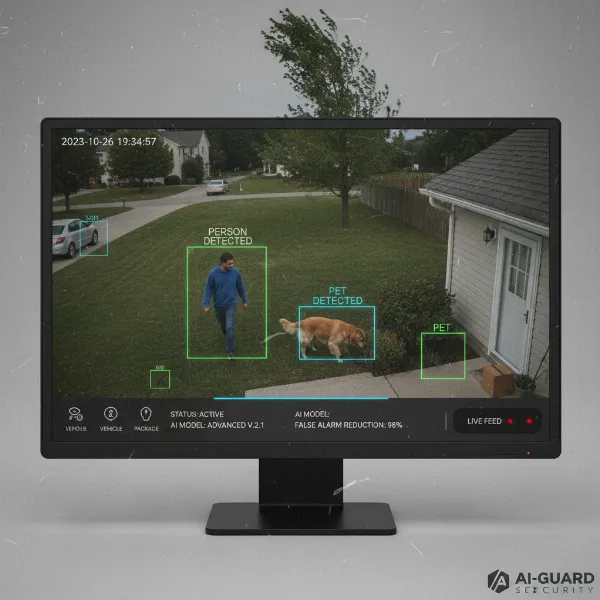 A security camera display showing smart AI detection distinguishing between a person and a pet.
Power Source
- Wired Cameras: Cameras connected to a continuous power source (PoE or power adapter) are best suited for 24/7 continuous recording, as they have a steady power supply for constant operation.
- Battery-Powered Cameras: These cameras almost exclusively use motion-activated recording to conserve battery life. Continuous recording would drain their batteries in a matter of hours.
Privacy Zones and Scheduling
Many cameras offer features to enhance both recording methods.
- Privacy Zones: Allow you to black out specific areas of the camera’s view that you don’t want to record, crucial for privacy, especially with continuous recording.
- Scheduled Recording: Offers flexibility, letting you set specific times for continuous recording (e.g., overnight) and switch to motion-activated recording during other periods (e.g., daytime when you’re home).
Choosing the Right Recording Method: A Buying Guide
Making the right choice depends heavily on your unique situation and security priorities. Here’s how to approach your decision:
1. Assess Your Security Needs
- Purpose: Are you monitoring a busy storefront, a quiet backyard, a critical entry point, or simply keeping an eye on your kids? For critical areas where every second counts (e.g., entrances, cash registers, highly valuable assets), 24/7 recording is generally recommended. For less critical areas or general deterrence, motion-activated might suffice.
- Traffic Level: High-traffic areas (e.g., a front door, a public hallway) will generate constant motion. Continuous recording might be simpler here, or a highly refined AI motion detection system. Low-traffic areas (e.g., a seldom-used side gate, a storage room) are perfect candidates for motion-activated recording to save storage.
- Risk Level: If you cannot afford to miss anything due to the high value of assets or the severity of potential threats, continuous recording provides the highest assurance.
2. Consider Your Environment
- Indoor vs. Outdoor: Outdoor cameras face more environmental triggers (weather, animals, shadows). High-quality AI motion detection is crucial here for motion-activated systems. Indoor cameras in controlled environments might have fewer false alarms.
- Power Availability: If you have easy access to wired power, 24/7 recording becomes a more viable option. For remote locations or areas without power outlets, battery-powered motion-activated cameras are the only practical solution.
3. Evaluate Storage & Network Capabilities
- Storage Capacity: Do you have an NVR/DVR with expandable storage, or are you relying on limited local SD cards? How many days/weeks of footage do you need to retain? Continuous recording demands significantly more storage.
- Internet Speed: For cloud storage, especially continuous cloud recording, a fast and reliable internet connection with high upload speeds is essential. If your internet is slow or capped, motion-activated cloud storage is a better choice.
4. Prioritize Reliability vs. Efficiency
- Maximum Reliability: If your priority is absolute certainty that every moment is captured, even the “boring” ones, continuous recording is your answer.
- Cost and Resource Efficiency: If you want to minimize storage costs, battery drain, and review time, and you’re comfortable with the potential for minor omissions (which advanced motion detection can mitigate), then motion-activated recording is more efficient.
Tips for Effective Security Camera Use
Regardless of your chosen recording method, these practices will maximize your security system’s effectiveness:
- Strategic Camera Placement: Position cameras to cover critical entry points, vulnerable areas, and blind spots. Ensure they are placed at an appropriate height to capture faces and deter tampering.
- Optimize Alert Settings: Fine-tune motion sensitivity, activity zones, and AI detection filters to minimize false alarms while ensuring genuine threats trigger alerts. Customize notifications to avoid alert fatigue.
- Use Strong, Unique Passwords: Protect your camera feeds and settings from unauthorized access. Regularly update firmware to patch security vulnerabilities.
- Share Access Wisely: If sharing camera access with family or trusted individuals, use secure methods and limit permissions as needed.
- Regular Maintenance: Periodically clean camera lenses, check cable connections, and review footage to ensure everything is working correctly. Update software and firmware for optimal performance and security.
- Understand and Comply with Privacy Laws: Be aware of local laws regarding video surveillance and privacy. Inform others if you are recording, especially in shared or public-facing areas. Designate privacy zones where appropriate.
Common Recording Issues and Troubleshooting
Even with the best equipment and settings, you might encounter issues. Here are some common recording-specific problems and their solutions:
- Footage Missing or Incomplete:
- Motion-Activated: Check motion sensitivity settings. Is it too low? Adjust activity zones to cover the entire desired area. Ensure the pre-roll buffer is enabled and set to an adequate duration if available. Consider upgrading to cameras with advanced AI detection.
- Continuous: Verify storage capacity. Is your hard drive full, causing older footage to be overwritten too quickly? Check power supply and network connection for interruptions.
- Too Many False Alarms (Motion-Activated):
- Reduce motion sensitivity. Refine activity zones to exclude irrelevant areas (e.g., busy streets, swaying trees). Utilize AI object detection (people, vehicle filters) if your camera supports it. Ensure the camera isn’t positioned where lighting changes (sun/shadows) frequently trigger it.
- Storage Fills Up Too Quickly:
- Continuous: Consider increasing storage capacity (larger HDD for NVR/DVR). Reduce video resolution or bitrate if acceptable. Adjust loop recording settings if applicable. Reduce the number of cameras recording continuously if possible, perhaps switching some to motion-activated.
- Motion-Activated: Address false alarms by tuning sensitivity and activity zones.
- Poor Video Quality During Recording:
- Check camera resolution settings. Ensure your network bandwidth is sufficient if recording to the cloud, as low bandwidth can lead to compression artifacts or dropped frames. Clean the camera lens.
Conclusion
Choosing between continuous (24/7) and motion-activated recording for your security cameras is a pivotal decision that directly impacts your property’s safety, your budget, and how you interact with your surveillance system. Continuous recording offers the most comprehensive, uninterrupted coverage, making it ideal for high-stakes environments where every second of footage is critical. However, it demands substantial storage, bandwidth, and often a wired power source. Motion-activated recording, conversely, excels in efficiency, saving storage and battery life while streamlining footage review, though it carries a higher risk of missing brief or subtle events without advanced AI.
Ultimately, the best choice aligns with your specific security needs, environment, available resources, and tolerance for potential missed footage. Many modern systems even offer hybrid options, combining the strengths of both methods to provide tailored, intelligent surveillance. By carefully weighing the pros and cons outlined above, you can confidently select the recording strategy that provides the optimal balance of security and convenience for you. What type of security challenge are you currently facing that this recording decision would help solve?
Frequently Asked Questions
Is 24/7 continuous recording always better for security cameras?
Not necessarily. While 24/7 recording provides a complete timeline of events with no gaps, it requires significantly more storage and bandwidth, and can be time-consuming to review. For many residential or low-traffic areas, motion-activated recording, especially with smart AI detection, offers sufficient security and is much more efficient.
Can motion-activated cameras miss important events?
Yes, motion-activated cameras can sometimes miss events if motion sensitivity is set too low, if activity occurs outside defined zones, or if environmental factors interfere with detection. However, advanced cameras with pre-roll buffers and AI-powered object detection significantly reduce the likelihood of missed critical footage by accurately identifying relevant activity.
How much storage do I need for 24/7 continuous recording?
The storage required for 24/7 recording depends on the number of cameras, resolution, bitrate, and desired retention period. For example, a single 1080p camera recording continuously might require 1-2 terabytes (TB) of storage per month for a reasonable retention period, while 4K cameras would need much more.
Do all security cameras offer both continuous and motion-activated recording?
No, not all Security Cameras offer both. Battery-powered cameras almost exclusively use motion-activated recording to conserve power. Wired cameras, especially those connected to NVRs or DVRs, are typically capable of 24/7 continuous recording, and many also offer motion-activated event tagging or scheduled recording.