Securing your home has become more accessible and advanced than ever, thanks to modern security cameras. While live feeds offer immediate peace of mind, the true power of these systems often lies in their ability to record and store footage, allowing you to review events whenever needed. This is where cloud storage for security cameras steps in, transforming how we interact with our home surveillance. But with leading brands like Ring, Arlo, and Nest dominating the market, understanding their diverse cloud storage plans and associated costs is crucial for making an informed decision that truly fits your security needs and budget.
What is Security Camera Cloud Storage?
Security camera cloud storage refers to the practice of saving video footage from your surveillance cameras to remote servers over the internet, rather than storing it locally on a physical device like an SD card or a network video recorder (NVR). Essentially, your camera records an event, and that video clip or continuous stream is then uploaded to a secure, off-site data center maintained by the camera’s manufacturer or a third-party provider. This method has evolved significantly from the bulky, on-premise DVRs of the past, offering greater accessibility, security, and convenience for modern users.
The Importance of Cloud Storage for Security Cameras
Cloud storage offers a multitude of benefits that make it a cornerstone of contemporary home security systems, providing peace of mind and enhanced functionality. However, it also comes with its own set of considerations.
Pros of Cloud Storage
|
Our Picks for the Best Security Camera in 2026
As an Amazon Associate I earn from qualifying purchases.
|
||
| Num | Product | Action |
|---|---|---|
| 1 | aosu Security Cameras Outdoor Wireless, 4 Cam-Kit, No Subscription, Solar-Powered, Home Security Cameras System with 360° Pan & Tilt, Auto Tracking, 2K Color Night Vision, Easy Setup, 2.4 & 5GHz WiFi |

|
| 2 | WYZE Cam Pan v3 Indoor/Outdoor IP65-Rated 1080p Pan/Tilt/Zoom Wi-Fi Smart Home Security Camera with Color Night Vision, 2-Way Audio, Compatible with Alexa & Google Assistant, White, 2-Pack |
|
| 3 | 2K Cameras for Home Security-Outdoor/Indoor Camera for Dog/Cat/Pet/Nanny/Baby/Elderly, Color Night Vision, White Light, Siren, 24/7 SD Recordings, Works with Alexa, Plug in (C1-White-2pack-2.4G) |
|
| 4 | Google Nest Cam Outdoor (Wired, 2nd Gen) - 2 Pack - Security Camera with 2K Video and Gemini, Night Vision, 2-Way Audio - Works with Google Home - 2025 Model - Snow |
|
| 5 | TP-Link Tapo 1080P Indoor Security Camera for Baby Monitor, Dog Camera w/Motion Detection, 2-Way Audio Siren, Night Vision, Cloud & SD Card Storage, Works w/Alexa & Google Home (Tapo C100) |
|
| 6 | Tapo 2K+ Indoor/Outdoor Wired Security Camera - 2024 PCMag Editors' Choice, Person/Pet/Vehicle Detection, Baby Monitoring, Color Night Vision, Subscription-Free Local Storage or Optional Cloud, C120 |
|
| 7 | 2K No Drill Window Camera-2 Pack 2.4Ghz & 5Ghz WiFi Cameras for Home Security for Indoor & Outdoor Monitoring, Anti-Glare Color Night Vision, Human Detection, 24/7 Recording, Ideal for Apartment, K1 |
|
| 8 | Tapo 1080P Indoor Pan/Tilt Wired Security Camera - Works as a Baby & Pet Monitor, Motion Detection, 2-Way Audio, Siren, Night Vision, Subscription-Free Local Storage or Optional Cloud, Black, C201 |
|
| 9 | WYZE Bulb Cam Security Camera, 2K HD Outdoor Light Bulb Camera, Color Night Vision, Dimmable LED Bulb, Motion Detection, Siren Alarm, Works w/Alexa/Google Assistant. Free Expert Support |
|
| 10 | Google Nest Cam with Floodlight - Outdoor Camera - Floodlight Security Camera, White, 1 Count (Pack of 1) |
|
Remote accessibility stands out as a primary advantage, allowing you to view your recorded footage from anywhere in the world using a smartphone, tablet, or computer, provided you have an internet connection. This ensures constant monitoring and immediate access to critical events, whether you’re at work, on vacation, or simply in another room. Another significant benefit is off-site backup. In the unfortunate event that your physical camera or local storage device is stolen or damaged, your video evidence remains safely stored in the cloud, protected from loss. Furthermore, cloud storage systems are highly scalable, meaning you can easily add more cameras or increase storage capacity through subscription upgrades without needing to purchase additional hardware. Many cloud plans also unlock advanced features like intelligent alerts, person detection, and customizable activity zones, which significantly enhance the camera’s effectiveness by reducing false alarms and providing more relevant notifications.
Cons of Cloud Storage
Despite its many advantages, cloud storage for security cameras does have some drawbacks. The most significant is the recurring cost; unlike a one-time purchase for local storage hardware, cloud services typically involve monthly or annual subscription fees, which can add up over time. Dependability on a stable and fast internet connection is another key concern. Without a robust internet connection, particularly strong upload speeds for high-resolution footage, you might experience laggy video, gaps in recording, or an inability to access your footage remotely. This dependency also means that during internet outages, your cameras may not be able to upload footage to the cloud, potentially leaving security gaps. Additionally, storing sensitive video data on third-party servers raises privacy and security concerns for some users, despite providers implementing robust encryption and security protocols.
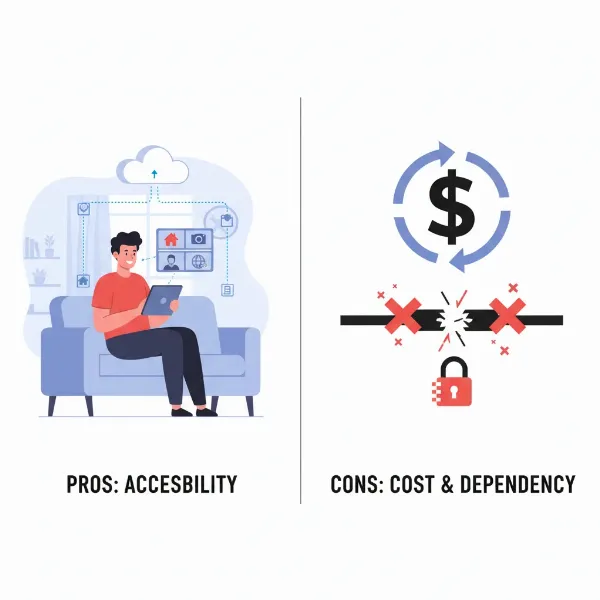 Advantages and disadvantages of cloud storage for security cameras contrasted
Factors Influencing Cloud Storage Costs
The cost of cloud storage for security cameras isn’t a one-size-fits-all figure; several key factors influence pricing across different providers and plans. Understanding these elements can help you identify a plan that aligns with your specific needs and budget.
Firstly, video resolution plays a significant role. Higher resolutions like 2K or 4K produce larger video files, which require more storage space and bandwidth. Consequently, plans supporting these higher resolutions often come at a premium compared to those for 1080p or 720p footage.
Secondly, the retention period dictates how long your recorded footage is stored in the cloud. Plans offering shorter retention, such as 7 or 14 days, are typically less expensive than those providing 30, 60, or even 180 days of video history. The longer you wish to retain your recordings, the higher the subscription cost will likely be.
The number of cameras covered by a plan is also a crucial factor. Some basic plans charge per camera, which can become costly if you have multiple devices. Many providers offer multi-camera or whole-home plans that cover an unlimited number of devices at a single location for a flat monthly fee, which can be more economical for extensive surveillance setups.
Finally, advanced features and integrations significantly impact pricing. Basic plans typically include essential features like event-based recording and push notifications. However, higher-tier plans often unlock intelligent alerts (e.g., person, package, vehicle, or familiar face detection), continuous video recording (CVR), e911 emergency call services, professional monitoring, and additional smart home integrations. These enhanced functionalities, while valuable, naturally contribute to a higher subscription price.
Cloud Storage Costs Comparison: Ring vs. Arlo vs. Nest
When evaluating security camera cloud storage, Ring, Arlo, and Nest are prominent players, each offering distinct plans and features. A detailed comparison helps in identifying the best fit for your home security needs.
Ring Protect Plans
Ring offers a straightforward three-tier subscription model known as Ring Protect, designed to cover varying needs from single devices to comprehensive home systems. The Ring Protect Basic plan, priced around $4.99 per month or $49.99 annually per device, provides essential features like up to 180 days of video event history, person and package alerts, and video preview alerts. For homes with multiple Ring devices, the Ring Protect Standard plan is a popular choice, costing approximately $9.99 per month or $99.99 annually. This plan covers all Ring devices at a single location and includes all Basic features, plus extended live view and alarm cellular backup (for Ring Alarm systems). The most comprehensive option is the Ring Protect Premium plan, available for $19.99 per month or $199.99 annually. It encompasses all features of the Standard plan, covers all devices at one location, and adds continuous live view, 24/7 recording (with compatible devices like the Ring Alarm Pro), and AI Smart Video Search for easier footage review. Ring generally offers the longest video retention period at 180 days across all its plans.
Arlo Secure Plans
Arlo’s cloud storage, under its Arlo Secure umbrella, emphasizes advanced detection and higher video quality. The Arlo Secure plan starts at $7.99 per month for a single camera or $12.99 per month for unlimited cameras (with annual billing often offering a slight discount). This plan includes 30 days of 4K cloud video recording, smart animated notifications, object detection (person, vehicle, animal, package), alarm detection, and smart activity zones. For users seeking enhanced emergency response, the Arlo Secure Plus plan is priced around $17.99 per month for unlimited cameras, adding 24/7 emergency response and critical alerts to the Secure plan features. The highest tier, Arlo Safe & Secure Pro, costs approximately $24.99 per month for unlimited cameras and includes all Secure Plus features, plus 24/7 professional monitoring, cellular and battery backup, and access to the Arlo Safe App. Arlo also uniquely offers local storage options via a compatible SmartHub, providing an alternative or supplementary backup for your footage.
Nest Aware Plans
Google Nest offers a simplified, whole-home approach with its Nest Aware subscription tiers. Following recent price adjustments in mid-August 2025, the basic Nest Aware plan now costs $10 per month or $100 annually. This plan covers all Nest cameras, doorbells, speakers, and displays in one home, providing 30 days of event video history and intelligent alerts such as familiar face detection, smoke/carbon monoxide alarm detection, and glass breaking sounds. It also includes e911 emergency calling. For more extensive video history and continuous recording, the Nest Aware Plus plan is available for $20 per month or $200 annually. It includes all Nest Aware features, extending event video history to 60 days and adding 10 days of 24/7 continuous video history for compatible wired cameras. Nest’s plans are particularly appealing for users already integrated into the Google Home ecosystem, offering seamless management of all smart devices.
Comparison Table: Ring vs. Arlo vs. Nest
| Feature | Ring Protect | Arlo Secure | Nest Aware |
|---|---|---|---|
| Basic Plan Price (Monthly) | $4.99 (per camera) | $7.99 (per camera) | $10 (all cameras) |
| Premium Plan Price (Monthly) | $19.99 (all cameras) | $24.99 (all cameras – Safe & Secure Pro) | $20 (all cameras – Nest Aware Plus) |
| Video History (Event) | 180 days | 30 days (for most plans) | 30-60 days (event) |
| Continuous Video Recording (CVR) | Included in Premium (with compatible devices) | Optional add-on or higher tier dependent | 10 days (Nest Aware Plus, compatible wired cameras) |
| Multi-Camera Coverage | Standard & Premium plans | Available for unlimited cameras | All plans cover all devices |
| Intelligent Alerts | Person, Package alerts | Person, Vehicle, Animal, Package, Alarm | Familiar Faces, Smoke/CO, Glass Breaking |
| Local Storage Option | Limited (Ring Edge with Alarm Pro) | Yes (via SmartHub) | No |
| Emergency Services | Professional Monitoring (higher tiers) | 24/7 Emergency Response, e911 (higher tiers) | e911 (all plans) |
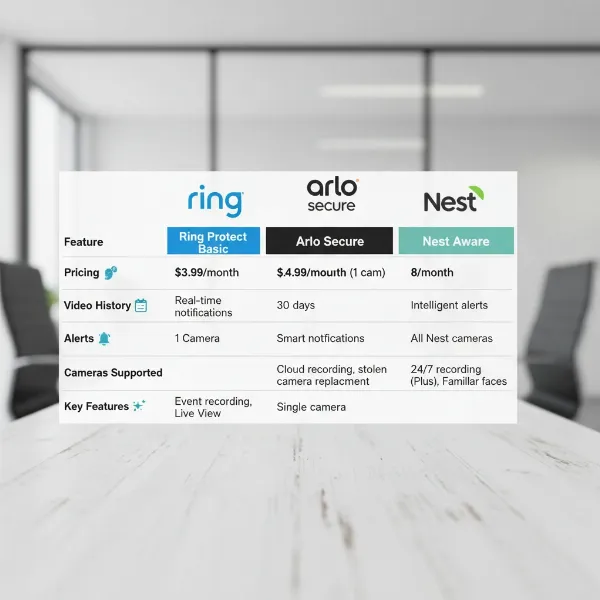 A detailed comparison table showing features and costs of Ring, Arlo, and Nest cloud storage plans
Key Features to Consider When Choosing
Beyond the direct costs, several crucial features define the value and effectiveness of a cloud storage plan for your security cameras. Understanding these will help you select a system that genuinely meets your security demands.
Video Resolution is paramount, directly impacting the clarity of your footage. While 1080p HD is standard, many newer cameras offer 2K or even 4K resolution, providing incredibly detailed images that can be crucial for identifying faces or license plates. Ensure your chosen cloud plan supports the resolution your cameras can deliver, as higher resolution often requires more storage and thus potentially higher plan tiers.
Continuous Video Recording (CVR) is a premium feature that ensures your camera records 24/7, not just when motion is detected. This provides a complete timeline of events, eliminating gaps that event-based recording might miss. If comprehensive surveillance is a priority, look for plans that include CVR, often found in higher-tier subscriptions.
Intelligent Alerts and AI capabilities significantly enhance a camera system’s usefulness. These advanced features can distinguish between people, vehicles, animals, or packages, reducing false alarms from trivial movements. Facial recognition, available with some systems like Nest, can even identify familiar faces versus strangers, sending more targeted alerts. Sound detection, such as glass breaking or smoke alarms, further expands monitoring capabilities.
Local Storage Options provide an important backup and an alternative to pure cloud dependence. Features like an SD card slot on the camera itself or compatibility with a local SmartHub/NVR allow you to store footage on-site. This can be invaluable during internet outages or if you prefer to keep sensitive data entirely within your control. Arlo, for instance, provides robust local storage solutions through its SmartHubs.
Finally, Emergency Services Integration, such as direct access to 911 (e911) or professional monitoring services, adds a critical layer of safety. These integrations mean that in an emergency, help can be dispatched quickly, even if you’re not able to contact them yourself. This feature is typically reserved for higher-tier or specific professional monitoring plans.
How to Choose the Right Cloud Storage Plan (Buying Guide)
Selecting the ideal cloud storage plan for your security cameras involves a careful assessment of your unique situation and priorities. Follow this guide to make a choice that brings both security and value.
First, assess your security needs. Consider the primary purpose of your cameras. Are you monitoring a small apartment for package deliveries, or do you need extensive coverage for a large property to deter sophisticated intrusions? Your needs will dictate the number of cameras, required resolution, and essential intelligent alert features. For instance, if package theft is a concern, ensure your plan includes package detection.
Next, determine your budget. Cloud storage is an ongoing expense, so establish a realistic monthly or annual budget. While cheaper plans might save money upfront, they often come with fewer features or shorter video retention. Balance cost with the features truly necessary for your peace of mind. Remember, annual subscriptions often offer savings compared to monthly payments.
Evaluate your existing camera ecosystem. If you already own Ring, Arlo, or Nest cameras, staying within that brand’s ecosystem simplifies management and ensures compatibility. Switching brands might mean purchasing new hardware, which could outweigh any potential savings on cloud storage. Your current smart home setup (e.g., Alexa with Ring, Google Home with Nest) might also influence your choice for seamless integration.
Consider data retention and CVR needs. How long do you need to store footage? For quick reviews, 30 days might suffice. For more comprehensive record-keeping or if you travel frequently, 60 or even 180 days of history could be crucial. If constant vigilance is key, continuous video recording (CVR) will be a non-negotiable feature, though it typically comes at a higher price and requires a compatible wired camera.
Lastly, check your internet reliability and speed. High-resolution cameras uploading continuously require significant bandwidth, especially upload speed. Ensure your home internet can handle the demands of your chosen camera system and cloud plan to avoid lag, dropped frames, or an inability to upload critical footage. An unreliable internet connection can render even the best cloud storage plan ineffective.
Optimizing Your Cloud Storage Usage
Maximizing the effectiveness and value of your security camera cloud storage involves smart configuration and diligent management. You can get the most out of your subscription and avoid unnecessary costs by taking a few proactive steps.
One effective strategy is to manage your video resolution settings. While 4K footage offers superior detail, it consumes significantly more storage space and bandwidth. If high resolution isn’t critical for certain cameras (e.g., an indoor camera monitoring a less sensitive area), consider reducing the resolution to 1080p or 720p. This can extend your video history within the same plan or potentially allow you to opt for a lower-tier plan.
Next, utilize activity zones and sensitivity settings. Most modern security cameras allow you to define specific areas within the camera’s field of view for motion detection. By setting activity zones to focus only on critical areas (e.g., your front door, not the sidewalk), you reduce the number of irrelevant recordings, saving cloud space and bandwidth. Adjusting motion sensitivity also helps minimize recordings triggered by pets, swaying branches, or passing cars, ensuring your cloud storage is filled with genuinely important events.
Regularly review and delete old or unnecessary footage. While cloud plans offer automated retention, actively managing your stored videos can prevent hitting storage limits prematurely or ensure that only the most relevant clips are kept for longer. This practice is particularly useful if your plan has a finite storage capacity rather than just a retention period.
Finally, secure your account with strong, unique passwords and two-factor authentication (2FA). Cloud storage contains sensitive personal data, so protecting your account login is paramount. A strong password combined with 2FA adds a critical layer of defense against unauthorized access, safeguarding your privacy and the integrity of your security footage.
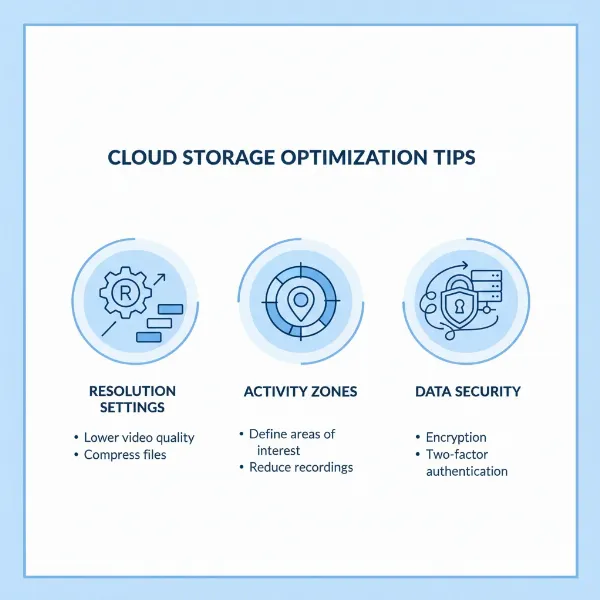 Tips for optimizing security camera cloud storage usage
Common Issues and Troubleshooting
Even with the most advanced security camera cloud storage systems, users might encounter issues. Knowing how to identify and troubleshoot these problems can save you time and maintain your home’s security integrity.
Internet connectivity problems are perhaps the most frequent challenge. Since cloud storage relies entirely on an internet connection, a weak Wi-Fi signal, slow upload speeds, or an internet outage can lead to missed recordings, poor video quality, or an inability to access live or stored footage.
- Troubleshooting: Check your Wi-Fi signal strength near the camera. Restart your router and modem. If problems persist, consider upgrading your internet plan, using a Wi-Fi extender, or, if available, connecting wired cameras via Ethernet for a more stable connection.
Storage limits and data retention can also be a concern. If your plan has a fixed storage capacity, your camera might stop recording once that limit is reached. Similarly, if your retention period expires, older footage will be automatically deleted.
- Troubleshooting: Monitor your storage usage through the app. Adjust camera resolution and activity zones to reduce unnecessary recordings. Upgrade your cloud storage plan if you consistently hit limits, or regularly download crucial footage for local backup before it expires from the cloud.
Privacy and security concerns are always present when using cloud services. While reputable brands employ strong encryption, no system is entirely impervious to sophisticated attacks or user error.
- Troubleshooting: Always use strong, unique passwords and enable two-factor authentication (2FA) for your security camera accounts. Be wary of phishing attempts and only access your footage through official apps or websites. Keep your camera firmware and app software updated to benefit from the latest security patches.
Compatibility issues can arise, especially if you mix and match devices from different brands or use older camera models with newer cloud services. Not all cameras support every feature of a cloud plan, such as 24/7 CVR or advanced AI alerts.
- Troubleshooting: Always verify device compatibility with the specific cloud plan features you desire before purchase. Consult the manufacturer’s documentation or support for details on which cameras support which functionalities.
“In the evolving landscape of home security, cloud storage has emerged as a non-negotiable component for many. The key is to look beyond just the monthly fee and understand the true value offered in terms of video retention, intelligent features, and overall reliability, ensuring your investment truly safeguards what matters most.” – Sarah Chen, Cybersecurity Analyst at SecureHome Solutions
Conclusion
Choosing the right cloud storage plan for your security cameras is a pivotal decision in establishing a reliable and effective home security system. As we’ve explored, Ring, Arlo, and Nest each present a compelling suite of services, distinguished by their pricing structures, video retention policies, and advanced features. Ring stands out with its generous 180-day video history, while Arlo offers robust local storage options alongside its feature-rich cloud plans, and Nest provides a seamless, whole-home experience with powerful AI alerts, albeit with slightly shorter video history options.
Ultimately, the best plan for you hinges on a careful evaluation of your specific security needs, budget constraints, and existing smart home ecosystem. Prioritize features like video resolution, continuous recording, and intelligent alerts based on what genuinely enhances your sense of security. Don’t forget to consider your internet’s reliability and to actively manage your settings to optimize cloud usage. By taking a thoughtful approach, you can select a cloud storage solution that not only protects your home and loved ones but also offers unparalleled peace of mind. What aspects of cloud security camera storage do you find most challenging to navigate?
Frequently Asked Questions
Is cloud storage necessary for security cameras?
While some security cameras offer local storage options via SD cards or NVRs, cloud storage is not strictly necessary for basic functionality like live viewing. However, it is essential for remote access to recorded footage, off-site backup against theft or damage, and often unlocks advanced AI features like person and package detection.
Can I use Ring, Arlo, or Nest cameras without a subscription?
Yes, you can generally use Ring, Arlo, and Nest cameras without a subscription for live viewing and receiving basic motion alerts. However, without a paid plan, you typically cannot access recorded video history, advanced intelligent alerts, or other premium features that significantly enhance the camera’s security capabilities.
Which brand offers the best video retention period?
Among Ring, Arlo, and Nest, Ring typically offers the longest video retention period with its Ring Protect plans, providing up to 180 days of video history across all its tiers. Arlo generally offers 30 days, while Nest Aware plans provide 30-60 days of event history and up to 10 days of 24/7 continuous recording with its premium plan.
How does continuous video recording (CVR) differ from event-based recording?
Event-based recording only captures video when motion or sound is detected, saving clips of specific incidents. Continuous Video Recording (CVR), on the other hand, records footage 24/7, providing a complete timeline without gaps. CVR is usually a premium feature found in higher-tier cloud plans and often requires a wired camera for consistent power.
Are there any free cloud storage options for security cameras?
While many brands offer a short free trial period, completely free, ongoing cloud storage for Security Cameras with meaningful features is rare among major brands like Ring, Arlo, and Nest. Some smaller brands or specific camera models might offer limited free cloud storage (e.g., 7 days of event history), but for comprehensive features and longer retention, a paid subscription is almost always required.