Securing your property with high-definition surveillance is no longer a luxury, but a necessity for many. As an admin with over a decade of hands-on experience in security cameras, I’ve seen firsthand how crucial crystal-clear footage is for identifying threats and ensuring peace of mind. The allure of 4K security cameras is undeniable, offering unparalleled detail that can mean the difference in critical situations. However, integrating these advanced systems into your home or business requires more than just plug-and-play; it demands a robust internet connection. Without sufficient speed, your state-of-the-art 4K cameras could be reduced to blurry, lagging streams, defeating their very purpose. This comprehensive guide will demystify the internet speed requirements for 4K security cameras, ensuring your surveillance system operates flawlessly and provides the security you expect.
Understanding 4K Security Cameras and Their Bandwidth Demands
A security camera is an electronic device used for monitoring and recording activities in a specific area, primarily for security purposes. From their humble beginnings as closed-circuit television (CCTV) systems in the mid-20th century to today’s sophisticated IP-based smart cameras, these devices have evolved dramatically. Modern 4K security cameras represent the pinnacle of this evolution, offering stunning 3840 x 2160 pixel resolution, which is four times the detail of Full HD (1080p). While this ultra-high definition capability provides superior image clarity, it inherently generates a significantly larger amount of data, placing substantial demands on your internet connection.
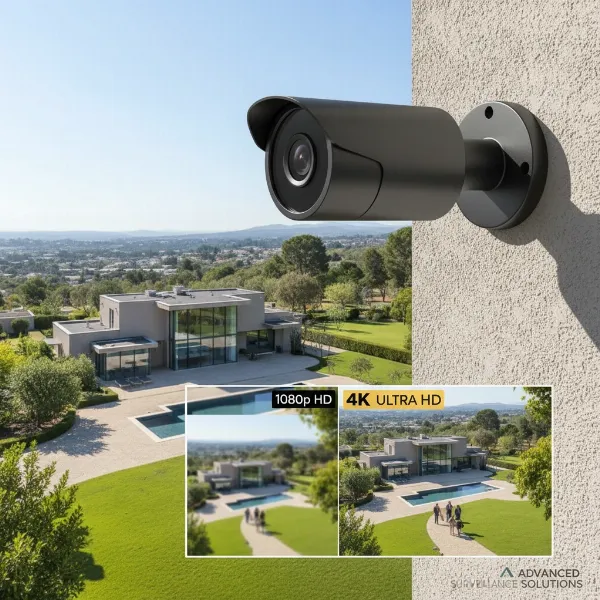 A modern 4K security camera with clear, high-resolution video footage.
What Makes 4K Cameras Bandwidth-Intensive?
The primary reason 4K cameras require more internet speed is the sheer volume of data they process. Each frame of a 4K video contains millions more pixels than lower-resolution footage. When these frames are strung together to create a smooth video stream, especially at higher frame rates, the data stream becomes massive.
- Resolution: As discussed, 4K resolution means more pixels per frame, translating to larger file sizes and higher bandwidth consumption for streaming and storage.
- Frame Rate (FPS): Video is a series of still images. A higher frame rate (e.g., 30 frames per second vs. 15 frames per second) creates a smoother, more fluid video but doubles the data transmitted per second.
- Color Depth and Image Quality: Richer colors and higher image quality settings also contribute to the overall data size.
|
Our Picks for the Best Security Camera in 2026
As an Amazon Associate I earn from qualifying purchases.
|
||
| Num | Product | Action |
|---|---|---|
| 1 | WYZE Cam Pan v3 Indoor/Outdoor IP65-Rated 1080p Pan/Tilt/Zoom Wi-Fi Smart Home Security Camera with Color Night Vision, 2-Way Audio, Compatible with Alexa & Google Assistant, White, 2-Pack |

|
| 2 | 2K No Drill Window Camera-2 Pack 2.4Ghz & 5Ghz WiFi Cameras for Home Security for Indoor & Outdoor Monitoring, Anti-Glare Color Night Vision, Human Detection, 24/7 Recording, Ideal for Apartment, K1 |
|
| 3 | 2K Cameras for Home Security-Outdoor/Indoor Camera for Dog/Cat/Pet/Nanny/Baby/Elderly, Color Night Vision, White Light, Siren, 24/7 SD Recordings, Works with Alexa, Plug in (C1-White-2pack-2.4G) |
|
| 4 | Tapo 2K+ Indoor/Outdoor Wired Security Camera - 2024 PCMag Editors' Choice, Person/Pet/Vehicle Detection, Baby Monitoring, Color Night Vision, Subscription-Free Local Storage or Optional Cloud, C120 |
|
| 5 | Google Nest Cam Outdoor (Wired, 2nd Gen) - 2 Pack - Security Camera with 2K Video and Gemini, Night Vision, 2-Way Audio - Works with Google Home - 2025 Model - Snow |
|
| 6 | Google Nest Cam with Floodlight - Outdoor Camera - Floodlight Security Camera, White, 1 Count (Pack of 1) |
|
| 7 | TP-Link Tapo 1080P Indoor Security Camera for Baby Monitor, Dog Camera w/Motion Detection, 2-Way Audio Siren, Night Vision, Cloud & SD Card Storage, Works w/Alexa & Google Home (Tapo C100) |
|
| 8 | WYZE Bulb Cam Security Camera, 2K HD Outdoor Light Bulb Camera, Color Night Vision, Dimmable LED Bulb, Motion Detection, Siren Alarm, Works w/Alexa/Google Assistant. Free Expert Support |
|
| 9 | Tapo 1080P Indoor Pan/Tilt Wired Security Camera - Works as a Baby & Pet Monitor, Motion Detection, 2-Way Audio, Siren, Night Vision, Subscription-Free Local Storage or Optional Cloud, Black, C201 |
|
| 10 | aosu Security Cameras Outdoor Wireless, 4 Cam-Kit, No Subscription, Solar-Powered, Home Security Cameras System with 360° Pan & Tilt, Auto Tracking, 2K Color Night Vision, Easy Setup, 2.4 & 5GHz WiFi |
|
Essential Internet Speed for 4K Security Cameras
When discussing internet speed for security cameras, the focus is predominantly on upload speed. While download speed is crucial for receiving data (like browsing the web or streaming movies), security cameras upload video data to cloud storage, remote viewing apps, or network video recorders (NVRs) accessed remotely.
For a single 4K security camera, general recommendations for a stable upload speed range from 5 Mbps to 10 Mbps. Some experts suggest around 8 Mbps per camera as a good baseline. High-end CCTV cameras might even demand up to 6 Mbps upload speed for a single 4K stream. This range accounts for variations in compression, frame rate, and activity levels.
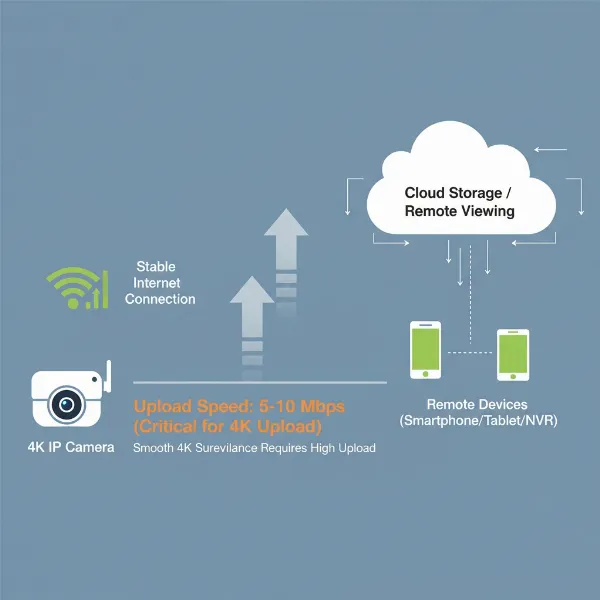 Network diagram illustrating critical upload speed for 4K security cameras.
Internet Speed Requirements by Camera Resolution
| Camera Resolution | Recommended Upload Speed Per Camera |
|---|---|
| Standard Definition (SD) | 0.5 – 2 Mbps |
| High Definition (HD/70p) | 1 – 2 Mbps |
| Full HD (1080p) | 2 – 5 Mbps |
| 2K (1440p) | 3 – 5 Mbps |
| Ultra HD/4K (2160p) | 5 – 10 Mbps |
These are general estimates, and actual needs can fluctuate based on specific camera features and your chosen settings. For example, if you have multiple cameras, you must consider their cumulative bandwidth requirements.
Key Features of Security Cameras That Impact Internet Speed
Several technological aspects of your security cameras directly influence how much internet bandwidth they will consume. Understanding these features is critical for optimizing your system.
Compression Standards: H.264 vs. H.265
Video compression is vital for reducing file sizes without significant loss in quality.
- H.264 (AVC – Advanced Video Coding): This has been a long-standing standard. While effective, it’s less efficient than newer codecs, meaning larger file sizes for the same quality compared to H.265.
- H.265 (HEVC – High-Efficiency Video Coding): This is the more modern standard, offering significantly better compression ratios (up to 50% more efficient than H.264) without compromising video quality. For 4K cameras, H.265 or its enhanced version, H.265+, is highly recommended as it drastically reduces the required internet bandwidth and storage space.
Continuous Recording vs. Motion-Activated Recording
The recording method chosen also plays a huge role in bandwidth usage.
- Continuous Recording (24/7): This method constantly uploads video data, demanding sustained high upload speeds. It’s the most bandwidth-intensive option but ensures no moment is missed.
- Motion-Activated Recording: Cameras only record and upload footage when motion is detected. This significantly reduces bandwidth usage, as data is only transmitted when an event occurs, minimizing the burden on your internet connection. Many modern cameras also use intelligent analytics to reduce false alarms.
Cloud Storage vs. Local Storage (NVR/DVR)
Where your footage is stored has direct implications for your internet speed needs.
- Cloud Storage: This method relies heavily on your internet’s upload speed as all recorded footage is sent to remote servers. It offers easy remote access and off-site backup, but can quickly consume your allocated bandwidth, especially with multiple 4K cameras continuously recording.
- Local Storage (NVR/DVR): Network Video Recorders (NVRs) or Digital Video Recorders (DVRs) store footage on-site, typically on a hard drive. This method significantly reduces the continuous upload bandwidth requirement, as most video data stays within your local network. Remote viewing from an NVR/DVR usually involves streaming a compressed version of the live feed, further lessening the internet burden.
Choosing the Right Internet Plan for Your 4K Security System (Buying Guide)
Selecting the appropriate internet plan is just as important as choosing your cameras. Here’s how to make an informed decision:
1. Determine Your Needs and Current Internet Speed
- Purpose of Use: Are you monitoring a single entryway, or a large property with multiple vantage points? Do you need continuous surveillance or just event-triggered alerts?
- Number of Cameras: The more 4K cameras you have, the higher your cumulative upload speed requirement will be.
- Recording Preference: Will you rely on cloud storage, or use a local NVR/DVR for primary storage?
- Other Internet Users: Account for other devices on your network (streaming, gaming, work-from-home) that also consume bandwidth. A dedicated connection for your cameras might be ideal for large setups.
- Check Your Current Speed: Use online speed tests to assess your current upload and download speeds. Be aware that advertised speeds are often “up to” values and real-world performance can vary.
2. Calculate Total Upload Speed Requirement
Multiply the per-camera upload speed (e.g., 8 Mbps) by the number of 4K cameras you intend to run. Then, add a buffer for other household internet usage. For example:
- Two 4K cameras @ 8 Mbps each = 16 Mbps upload.
- Four 4K cameras @ 8 Mbps each = 32 Mbps upload.
3. Prioritize Upload Speed with Your ISP
When speaking with internet service providers (ISPs), specifically inquire about upload speeds. Many consumer internet plans offer significantly higher download speeds than upload speeds. For 4K security cameras, a generous and stable upload speed is paramount.
4. Consider Wired vs. Wireless Connections
- Wired (Ethernet): Offers the most stable, reliable, and consistent connection. Recommended for critical 4K cameras where video quality and uninterrupted streaming are non-negotiable.
- Wireless (Wi-Fi): More convenient for installation but can be susceptible to interference, signal drops, and slower speeds, especially over distance or through walls. If using Wi-Fi, ensure strong signal strength and a robust Wi-Fi network (e.g., Wi-Fi 6 router).
5. Professional Installation and Setup
While DIY setups are possible, especially for simpler systems, complex 4K camera networks often benefit from professional installation. Experts can ensure optimal camera placement, secure network configuration, and efficient wiring to maximize performance and minimize bandwidth issues.
Reputable Security Camera Brands and Bandwidth Efficiency
While I cannot recommend specific models without knowing your exact needs, several well-known brands are recognized for their robust security camera systems and often incorporate features that enhance bandwidth efficiency. These include:
- Hikvision: Known for a wide range of IP cameras and NVRs, many supporting H.265+ compression.
- Dahua: Another industry leader offering comprehensive surveillance solutions with advanced compression technologies.
- Ezviz & Imou: These brands, often associated with Hikvision and Dahua respectively, provide user-friendly smart home cameras that frequently include H.265 for better efficiency.
- Lorex & Reolink: Offer various 4K camera systems, often highlighting their use of H.265 compression and local storage options to manage bandwidth.
When researching brands, specifically look for features like H.265/H.265+ compression, configurable frame rates, and options for local storage integration to help manage your internet speed demands effectively.
Effective Tips for Utilizing Your 4K Security Camera System
Even with adequate internet speed, optimizing your system can further enhance performance and security.
- Strategic Camera Placement: Position cameras to cover critical areas with minimal overlap, reducing the total number of cameras needed and thus bandwidth.
- Optimize Camera Settings:
- Frame Rate: Reduce the frame rate to 15-20 FPS if 30 FPS isn’t strictly necessary for your application. This can significantly cut bandwidth.
- Bitrate: Many cameras allow you to adjust the video bitrate. A lower bitrate reduces bandwidth but may slightly compromise image quality. Experiment to find the right balance.
- Motion Detection Zones: Configure specific zones for motion detection to minimize false alarms and only record/upload truly relevant events.
- Secure Your Network: Use strong, unique passwords for your Wi-Fi network and each camera. Enable WPA3 encryption if available. Regularly update camera firmware to patch security vulnerabilities.
- Monitor Your Network: Periodically check your internet speed and your camera system’s performance. Many NVRs and camera apps provide network status or bandwidth usage reports.
- Consider a Separate Network (VLAN): For larger or business setups, isolating your security camera system on its own Virtual Local Area Network (VLAN) can prevent it from hogging bandwidth from other devices and enhance security.
Common Issues and Troubleshooting Related to Internet Speed
Even with careful planning, you might encounter issues. Many common problems with 4K security cameras stem directly from inadequate internet speed.
- Lagging or Choppy Video: This is the most common symptom of insufficient upload speed. The camera cannot transmit data fast enough, causing delays and dropped frames.
- Poor Image Quality on Remote View: If your remote viewing quality is significantly lower than local playback, your internet connection might be downscaling the stream to cope with limited bandwidth.
- Dropped Connections or Offline Cameras: Cameras requiring continuous upload may disconnect if the internet connection is unstable or too slow to maintain the stream.
- Delayed Notifications: Motion alerts may arrive late if the camera struggles to upload the event footage promptly.
- Inability to Access Cloud Recordings: Slow upload speeds can make accessing or uploading footage to cloud storage unreliable or excessively slow.
Troubleshooting Steps:
- Run a Speed Test: Verify your current internet upload and download speeds.
- Check Camera Settings: Review frame rate, resolution, and compression settings. Can you switch to H.265? Can you lower the frame rate slightly?
- Reduce Camera Count (if possible): If you have too many cameras for your internet, consider prioritizing critical areas.
- Upgrade Internet Plan: If consistently experiencing issues, you likely need a higher upload speed from your ISP.
- Restart Equipment: Reboot your router, modem, and NVR/cameras.
- Check for Interference (Wi-Fi cameras): Move cameras closer to the router or consider switching to a wired connection.
“The true potential of 4K security cameras is only realized when paired with a robust and stable internet connection, especially adequate upload speed. Overlooking this critical aspect can turn your high-definition investment into a frustrating, underperforming system.” – Dr. Alex Chen, Cybersecurity & Surveillance Expert
Conclusion
The superior clarity of 4K security cameras offers an undeniable advantage in monitoring and safeguarding your property. However, to fully leverage this advanced technology, a solid understanding of your internet speed requirements is paramount. We’ve seen that adequate upload speed, typically ranging from 5 Mbps to 10 Mbps per 4K camera, is the cornerstone of a reliable 4K surveillance system, especially for remote viewing and cloud storage. Factors such as video compression (preferring H.265), frame rates, and your chosen storage method (local NVR/DVR vs. cloud) all play significant roles in your system’s bandwidth demands.
By carefully assessing your needs, choosing an internet plan with sufficient upload capacity, and optimizing your camera settings, you can ensure your 4K security cameras deliver seamless, high-quality footage. Don’t let a bottleneck in your internet connection compromise your security. Are you ready to optimize your network for crystal-clear 4K surveillance?
Frequently Asked Questions
How much upload speed do I need for one 4K security camera?
For a single 4K security camera, it’s generally recommended to have an upload speed of 5 to 10 Mbps. This range accounts for different camera settings like frame rate and compression, ensuring smooth, high-quality remote viewing and reliable cloud storage.
Does H.265 compression reduce internet speed requirements for 4K cameras?
Yes, H.265 (HEVC) compression significantly reduces bandwidth requirements for 4K cameras. It is up to 50% more efficient than the older H.264 standard, allowing you to stream and store 4K footage using less internet speed and storage space without a noticeable drop in video quality.
Is upload speed more important than download speed for security cameras?
For security cameras, upload speed is critically more important than download speed. Cameras need to upload video data to cloud servers or for remote viewing. While download speed is needed on the viewing device, the bottleneck is almost always the camera’s ability to send data out.
Can too many 4K cameras slow down my home internet?
Yes, running multiple 4K security cameras can definitely slow down your home internet, particularly affecting your upload speed. Each 4K camera demands a substantial portion of your bandwidth. If your total camera bandwidth exceeds your internet plan’s upload capacity, other online activities will suffer.
What happens if my internet speed is too slow for my 4K security cameras?
If your internet speed is too slow for your 4K Security Cameras, you will experience issues like lagging or choppy video, poor remote viewing quality, delayed motion notifications, and frequent disconnections. The cameras may struggle to upload footage, making your surveillance unreliable.
Should I use wired or wireless connection for 4K security cameras to save bandwidth?
While both wired and wireless connections use bandwidth, wired (Ethernet) connections typically offer more stable and consistent speeds, which is beneficial for high-bandwidth 4K streams. Wireless connections can be prone to interference and signal drops, potentially causing performance issues even with adequate total bandwidth.