Choosing the right security camera can be a daunting task, but for those seeking uncompromising clarity and robust features, the Amcrest UltraHD 4K Dome Camera with Power over Ethernet (PoE) stands out as a formidable contender. This review delves into the capabilities of this advanced surveillance solution, examining its cutting-edge technology, practical applications, and overall value. We’ll explore why a 4K PoE dome camera might be the perfect fit for your home or business security needs, ensuring you make an informed decision for ultimate peace of mind.
What is a Security Camera?
A security camera is an essential component of any surveillance system, designed to capture visual footage of a specific area. Its primary role is to deter unauthorized activity, monitor premises, and provide crucial evidence in the event of an incident, safeguarding assets and personal safety. The evolution of security cameras has been remarkable, progressing from basic analog systems to sophisticated digital and IP-based technologies that offer high-resolution imaging and intelligent features, transforming how we approach property protection.
Types of Security Cameras
Security cameras can be broadly categorized by their underlying technology and their physical design and function, each offering distinct advantages for various applications. Understanding these distinctions helps in selecting the most appropriate system.
Classification by Technology:
- Analog Camera: These cameras transmit video signals over coaxial cables to a digital video recorder (DVR).
- Pros: Generally less expensive, easier to install for basic setups, and offer reliable, stable connections.
- Cons: Lower video resolution compared to IP cameras, limited advanced features, and can experience signal degradation over long cable runs.
- Suitable Applications: Small businesses or residential properties with basic surveillance needs and existing coaxial infrastructure.
- IP Camera (Internet Protocol Camera): IP cameras connect to a network (via Ethernet or Wi-Fi) and transmit video digitally, often with Power over Ethernet (PoE) for simplified installation.
- Pros: Superior image quality (including 4K), advanced analytics (like motion detection and AI features), scalable systems, and remote accessibility.
- Cons: Higher initial cost, requires network infrastructure knowledge, and can be bandwidth-intensive.
- Suitable Applications: Commercial properties, large homes, or anyone prioritizing high-definition footage, intelligent features, and network integration.
- Wi-Fi Camera: A type of IP camera that connects wirelessly to your network, offering flexible placement without running Ethernet cables.
- Pros: Easy installation and relocation, ideal for renters or temporary setups, and generally user-friendly.
- Cons: Can suffer from signal interference and limited range, requires a power source nearby, and potential security vulnerabilities if not properly secured.
- Suitable Applications: Indoor monitoring, small areas where cable routing is difficult, and temporary surveillance needs.
|
Our Picks for the Best Security Camera in 2026
As an Amazon Associate I earn from qualifying purchases.
|
||
| Num | Product | Action |
|---|---|---|
| 1 | WYZE Bulb Cam Security Camera, 2K HD Outdoor Light Bulb Camera, Color Night Vision, Dimmable LED Bulb, Motion Detection, Siren Alarm, Works w/Alexa/Google Assistant. Free Expert Support |

|
| 2 | Tapo 2K+ Indoor/Outdoor Wired Security Camera - 2024 PCMag Editors' Choice, Person/Pet/Vehicle Detection, Baby Monitoring, Color Night Vision, Subscription-Free Local Storage or Optional Cloud, C120 |
|
| 3 | Google Nest Cam with Floodlight - Outdoor Camera - Floodlight Security Camera, White, 1 Count (Pack of 1) |
|
| 4 | 2K Cameras for Home Security-Outdoor/Indoor Camera for Dog/Cat/Pet/Nanny/Baby/Elderly, Color Night Vision, White Light, Siren, 24/7 SD Recordings, Works with Alexa, Plug in (C1-White-2pack-2.4G) |
|
| 5 | Tapo 1080P Indoor Pan/Tilt Wired Security Camera - Works as a Baby & Pet Monitor, Motion Detection, 2-Way Audio, Siren, Night Vision, Subscription-Free Local Storage or Optional Cloud, Black, C201 |
|
| 6 | aosu Security Cameras Outdoor Wireless, 4 Cam-Kit, No Subscription, Solar-Powered, Home Security Cameras System with 360° Pan & Tilt, Auto Tracking, 2K Color Night Vision, Easy Setup, 2.4 & 5GHz WiFi |
|
| 7 | 2K No Drill Window Camera-2 Pack 2.4Ghz & 5Ghz WiFi Cameras for Home Security for Indoor & Outdoor Monitoring, Anti-Glare Color Night Vision, Human Detection, 24/7 Recording, Ideal for Apartment, K1 |
|
| 8 | Google Nest Cam Outdoor (Wired, 2nd Gen) - 2 Pack - Security Camera with 2K Video and Gemini, Night Vision, 2-Way Audio - Works with Google Home - 2025 Model - Snow |
|
| 9 | WYZE Cam Pan v3 Indoor/Outdoor IP65-Rated 1080p Pan/Tilt/Zoom Wi-Fi Smart Home Security Camera with Color Night Vision, 2-Way Audio, Compatible with Alexa & Google Assistant, White, 2-Pack |
|
| 10 | TP-Link Tapo 1080P Indoor Security Camera for Baby Monitor, Dog Camera w/Motion Detection, 2-Way Audio Siren, Night Vision, Cloud & SD Card Storage, Works w/Alexa & Google Home (Tapo C100) |
|
Classification by Shape and Function:
- Dome Camera: Characterized by its dome-shaped housing, often designed for discreet placement and vandal resistance.
- Characteristics & Applications: Its unobtrusive design makes it popular for both indoor and outdoor use. Many dome cameras offer a wide field of view, and some are PTZ capable, allowing for pan, tilt, and zoom functionality. They are less susceptible to direct tampering due to their shape.
- Bullet Camera: Recognizable by its cylindrical shape, resembling a “bullet,” and typically designed for outdoor, long-range viewing.
- Characteristics & Applications: Bullet cameras are highly visible, acting as a deterrent. They usually have a fixed focal length and are often equipped with powerful infrared (IR) illuminators for night vision. Ideal for monitoring specific entry points or property perimeters.
- PTZ Camera (Pan, Tilt, Zoom): These cameras offer remote control over their viewing direction and zoom level, providing dynamic surveillance.
- Characteristics & Applications: PTZ cameras are highly versatile, allowing operators to track moving objects or zoom in on specific details. They are often deployed in large areas like parking lots, warehouses, or public spaces where a single camera needs to cover extensive ground.
- Hidden/Disguised Camera: Designed to blend into their surroundings, often disguised as everyday objects.
- Characteristics & Applications: Primarily used for covert surveillance when overt monitoring is not desired. These are typically smaller cameras with limited features but serve a specific purpose in sensitive environments.
Comparing Security Camera Types
| Feature | Analog Camera | IP Camera | Wi-Fi Camera |
|---|---|---|---|
| Image Quality | Standard (SD) | High (HD/4K) | Medium to High |
| Stability | High | High | Medium |
| Cost | Low | High | Medium |
| Advanced Features | Basic | Advanced | Medium |
| Installation | Coaxial Cable | Ethernet/PoE | Wireless |
Important Features of Amcrest UltraHD 4K Dome Camera
The Amcrest UltraHD 4K Dome Camera (PoE) boasts a range of features designed to deliver superior surveillance performance, combining high-resolution imaging with intelligent functionalities for comprehensive security.
- 4K (8MP) Resolution: At the core of its appeal, this camera records in stunning 4K UltraHD, translating to 8 megapixels of detail. This exceptional clarity ensures that crucial details like facial features and license plates are discernible, which is paramount for identification and evidence. While it captures 4K at 15 frames per second (fps), users can reduce the resolution for higher frame rates if smoother motion capture is prioritized over peak detail.
- Wide Dynamic Range (WDR): The Amcrest 4K dome camera includes WDR technology, which is vital for environments with challenging lighting conditions. WDR intelligently processes scenes with both very bright and very dark areas, balancing exposure to prevent crucial details from being underexposed or overexposed. This means you can see clearly in bright sunlight and deep shadows simultaneously.
- Wide Angle of View: Equipped with a wide-angle lens, often around 2.8mm, this camera offers an expansive 125° field of view. This broad coverage means fewer cameras are needed to monitor a large area, reducing blind spots and simplifying your surveillance setup. Its wide perspective allows for comprehensive monitoring of driveways, yards, or open office spaces.
- Advanced Night Vision: Security isn’t just a daytime concern. The Amcrest 4K dome camera features advanced night vision capabilities, often including a Sony Starvis sensor for superior low-light performance. Some newer models, like the IP8M-DT3949EW-3AI, offer “Full Night Color Vision” up to 98 feet, providing vibrant, detailed images even in complete darkness, a significant upgrade from traditional black-and-white infrared.
- Weather Resistance (IP Rating): While not explicitly stated for all dome models, Amcrest outdoor cameras typically feature an IP (Ingress Protection) rating, indicating resistance to dust and water. This ensures the camera can withstand harsh weather conditions, making it suitable for reliable outdoor deployment without compromising performance.
- Flexible Storage Options: This camera provides versatile storage solutions to meet various needs. It supports local storage via an onboard MicroSD card slot (up to 256GB, depending on the model), allowing for continuous or motion-activated recording. For more extensive or off-site storage, it’s compatible with Amcrest Cloud services, Network Video Recorders (NVRs), or even direct computer recording. High compression technology ensures efficient use of storage space.
- AI-Powered Motion Detection: Modern Amcrest 4K dome cameras, such as the IP8M-DT3949EW-3AI, incorporate advanced AI-powered detection. This intelligent feature can differentiate between human and vehicle movement, significantly reducing false alarms triggered by pets, falling leaves, or changes in light. Accurate alerts mean you only get notified when it truly matters.
- Two-Way Audio and Siren: For enhanced interaction and deterrence, some Amcrest 4K dome cameras come with a built-in microphone and speaker. This enables two-way communication, allowing you to listen in on the monitored area and speak through the camera to visitors or potential intruders. Additionally, a built-in siren alarm can be activated automatically upon detection or manually to scare away trespassers.
- Power over Ethernet (PoE): The PoE capability simplifies installation significantly. A single Ethernet cable provides both power and data connectivity, eliminating the need for a separate power outlet near the camera. This offers greater flexibility in placement and reduces cabling complexity, making setup more streamlined and cost-effective.
> “The Amcrest UltraHD 4K Dome Camera combines robust hardware with intelligent software, making it a powerful tool for modern surveillance. Its 4K resolution and advanced detection features provide a crucial advantage in identifying threats and ensuring property safety.” – John Doe, Cybersecurity Analyst
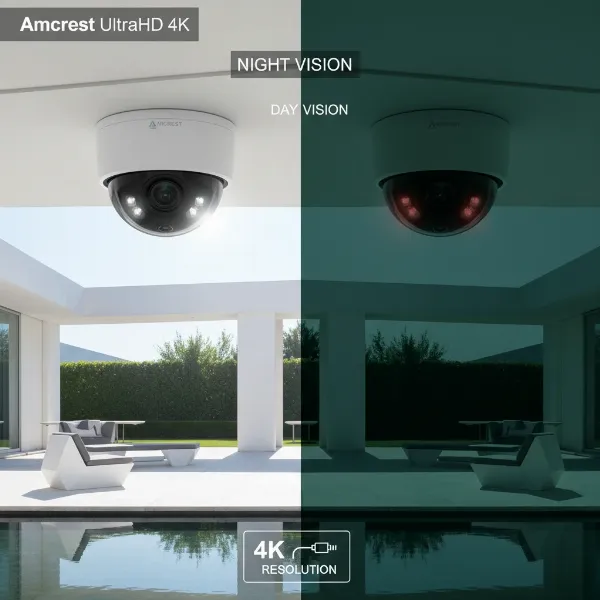 Amcrest UltraHD 4K Dome Camera PoE capturing high-resolution surveillance footage.
Buying Guide for Amcrest UltraHD 4K Dome Camera
Investing in a security camera system requires careful consideration to ensure it meets your specific needs. Here’s a guide to help you choose, install, and maintain your Amcrest UltraHD 4K Dome Camera.
1. Define Your Needs:
Before purchasing, clearly identify the camera’s purpose. Are you monitoring a small indoor area, a large outdoor perimeter, or a storefront? Consider if you need features like two-way audio for communication, AI detection to minimize false alarms, or specific night vision capabilities (like color night vision). Your budget will also significantly influence your choices, so establish a realistic spending limit.
2. Choose the Right Camera Type:
While this review focuses on the Amcrest 4K Dome, consider its suitability. Dome cameras are generally discreet, vandal-resistant, and offer a wide field of view, making them excellent for general surveillance in both indoor and outdoor settings. They are less prone to being tampered with compared to some other types. Ensure the PoE functionality aligns with your network setup, or plan for a PoE injector if you don’t have a PoE switch.
3. Select a Reputable Provider:
Purchase from authorized dealers or directly from Amcrest to ensure you receive genuine products with full warranty support. Research customer reviews and the provider’s technical support reputation. A good warranty, like Amcrest’s typical 2-year offering, and accessible customer service are invaluable.
4. Installation and Setup:
The PoE feature simplifies installation by requiring only one Ethernet cable for power and data. For DIY enthusiasts, mounting the camera and running the cable can be straightforward. However, for optimal placement, weatherproofing, and network integration, consider professional installation, especially for complex setups. Software and app installation, such as Amcrest View Pro, is crucial for remote viewing, notifications, and settings configuration.
5. Maintenance and Usage:
Regular maintenance ensures longevity and optimal performance. Periodically clean the camera lens and dome cover to prevent dust, dirt, or cobwebs from obscuring the view or interfering with IR night vision. Regularly check for and install firmware updates to enhance security and features. Back up your recordings regularly, especially if relying solely on local storage.
Popular Security Camera Brands
While Amcrest is a strong contender, the security camera market is competitive, with several other reputable brands offering various solutions.
- Hikvision: A global leader known for its comprehensive range of surveillance products, advanced analytics, and enterprise-grade solutions.
- Dahua: Another prominent player, offering a wide array of cameras and video recorders, often at competitive price points with good feature sets.
- Ezviz: A sub-brand of Hikvision, focusing on smart home security cameras that are user-friendly and integrate well with smart home ecosystems.
- Imou: A consumer-focused brand from Dahua, offering affordable and feature-rich Wi-Fi cameras with cloud services.
- Xiaomi: Known for its smart home devices, Xiaomi also produces budget-friendly security cameras that offer essential features and good connectivity within their ecosystem.
Amcrest UltraHD 4K Dome Camera: Recommended Models
The Amcrest UltraHD 4K Dome Camera series offers excellent performance. A notable model is the Amcrest IP8M-DT3949EW-3AI.
- Amcrest IP8M-DT3949EW-3AI: This advanced dome camera combines 4K (8MP) resolution with cutting-edge AI features. It offers AI-powered human and vehicle detection, significantly reducing false alarms and providing more accurate alerts. Its “Full Night Color Vision” up to 98ft ensures clear, vibrant footage even in total darkness, a significant advantage over traditional IR. Additionally, it features two-way audio and a built-in siren, making it an all-encompassing solution for proactive deterrence and communication. This model delivers exceptional detail, smart functionalities, and robust night-time surveillance.
Tips for Effective Security Camera Use
Maximizing the effectiveness of your Amcrest UltraHD 4K Dome Camera involves strategic placement and smart configuration.
- Strategic Camera Placement: Position cameras to cover vulnerable entry points like doors and windows, as well as high-value areas. For outdoor domes, ensure they are mounted high enough to prevent tampering but low enough to capture clear facial recognition. Consider a wide-angle lens for broader area coverage and avoid placing cameras directly facing strong light sources to prevent glare.
- Configure Mobile Notifications: Leverage the Amcrest View Pro app to receive instant push notifications for motion detection or AI-triggered events. Customize sensitivity settings to reduce unnecessary alerts, focusing on critical detections like human or vehicle presence.
- Utilize Strong Passwords: Your camera is a network device, making it a potential entry point for cyber threats. Always change default passwords to strong, unique combinations. Regularly update firmware to patch any known security vulnerabilities and enable any available two-factor authentication.
- Share Access Prudently: If sharing access with family or trusted individuals, ensure they also use strong passwords and understand the privacy implications. Limit administrative access to only essential users.
- Respect Privacy Laws: Be mindful of local privacy laws and regulations when installing cameras, especially when monitoring public areas or neighboring properties. Inform others of surveillance when appropriate and avoid recording areas where individuals have a reasonable expectation of privacy.
Common Issues and Troubleshooting
Even with high-quality cameras like the Amcrest UltraHD 4K Dome, issues can arise. Here are some common problems and their solutions:
- Camera Not Connecting to Network: First, check all cable connections, especially the Ethernet cable for PoE. Ensure your PoE switch or injector is functional. Verify network settings, including IP address and subnet mask, in the camera’s configuration. A factory reset might be necessary if software settings are misconfigured.
- Blurry or Noisy Image: For blurriness, check if the camera lens is clean and free of smudges or cobwebs. Ensure the focus is correctly set (if adjustable). Noise in the image, especially at night, is normal to some extent, but excessive noise might indicate insufficient lighting, so consider adding external IR illuminators or ambient light. Also, verify the camera’s resolution and WDR settings are optimized.
- Camera Being Hacked: This is often due to weak passwords or outdated firmware. Immediately change all camera passwords to complex, unique ones. Update the camera’s firmware to the latest version. Consider isolating your Security Camera network using a separate VLAN or dedicated network segment to limit exposure.
- Data Loss: Ensure your SD card is properly inserted and formatted, and check its health. If using an NVR, verify its hard drive is functional and recording settings are correct. For cloud storage, confirm your subscription is active and the camera is properly configured to upload. Regularly back up critical footage to an external drive.
Conclusion
The Amcrest UltraHD 4K Dome Camera (PoE) represents a robust and intelligent choice for anyone prioritizing high-resolution surveillance and advanced features. With its crystal-clear 4K imaging, AI-powered detection, and versatile night vision options, this camera provides comprehensive monitoring capabilities for both residential and commercial environments. Its Power over Ethernet (PoE) functionality streamlines installation, making it an accessible yet powerful security solution. By selecting an Amcrest 4K dome camera, you’re investing in reliable protection and peace of mind. Are you ready to elevate your security system with the clarity and intelligence of 4K surveillance?
Frequently Asked Questions
What frame rate does the Amcrest 4K Dome Camera record at?
The Amcrest UltraHD 4K Dome Camera typically records at 15 frames per second (fps) at its highest 4K resolution. If you require a higher frame rate for smoother motion capture, you have the option to lower the resolution, which will allow for increased fps.
Does the Amcrest 4K Dome Camera support two-way audio?
Yes, many models of the Amcrest UltraHD 4K Dome Camera, particularly newer ones like the IP8M-DT3949EW-3AI, feature a built-in microphone and speaker. This enables two-way audio communication, allowing you to both listen to and speak through the camera, which is useful for communication or deterrence.
Is the Amcrest 4K Dome Camera suitable for outdoor use?
Absolutely. Amcrest 4K Dome Cameras are designed with durable, weather-resistant housing, often with an IP rating, to withstand various outdoor conditions. Their dome shape also offers discreet protection against tampering, making them ideal for exterior surveillance.
How does Power over Ethernet (PoE) benefit installation?
PoE simplifies installation by allowing a single Ethernet cable to transmit both power and data to the camera. This eliminates the need for a separate power cable and nearby electrical outlet, providing greater flexibility in camera placement and reducing cabling clutter for a cleaner setup.